

What is Wakapi?
Wakapi is a self-hosted backend for coding-time statistics that accepts data from the open-source WakaTime client tools. Editor and IDE plugins built for WakaTime send small activity records called heartbeats; Wakapi stores them, aggregates them into durations and shows them in a web dashboard. The project describes itself as a minimalist, WakaTime-compatible backend and calls the compatibility partial: its own FAQ states that Wakapi covers a small subset of WakaTime, without team or organization support, personal goals, embeddable charts or WakaTime's wider integrations.
The software is written in Go by Ferdinand Mütsch, who started the repository in 2019 and maintains it under the GitHub account muety. The source code is released under the MIT license. The README currently notes that, because of limited maintainer time, pull requests are temporarily not accepted. A public instance runs at wakapi.dev; its imprint and privacy page names the operator and states that all data is processed and stored on computers located in Germany. The README thanks server.camp for donating the server infrastructure behind wakapi.dev.
Wakapi is distributed as release archives for Linux (amd64, arm64), macOS (amd64, arm64) and Windows (amd64), as the container image ghcr.io/muety/wakapi, through a quick-run script at https://wakapi.dev/get, and as source that builds with go install. A Docker Compose file in the repository pairs Wakapi with PostgreSQL 17 and reads secrets for the password salt, database password and SMTP password. Through the GORM ORM the server supports SQLite 3.31 or later (the default), MySQL 8.0 or later, MariaDB 11.4 or later and PostgreSQL; the README names MySQL as the most extensively tested option.
The latest release is 2.18.2, published October 14, 2026. It fixes the WakaTime relay deleting a user's API key after 100 failed requests, allows PUBLIC_URL to be an IP address again, repairs aggregation locking and improves the performance of all-time project filtering. It also adds an index on the heartbeats table during automatic migration; the release notes warn that building it can take hours on large tables and give a SQL statement to create it in advance. Release 2.18.0 restricted API keys to /api endpoints (a breaking change) and fixed duplicate counting of AI agent thinking time, and 2.17.0 introduced multiple API keys per user.
The README describes wakapi.dev as a free, hosted cloud service that only requires creating an account and configuring the client. The wakapi.dev privacy page states that the service offers an optional paid plan that unlocks additional functionality, with subscriptions and payments handled by Stripe; no price is listed on the public pages. At the time of writing, the wakapi.dev front page states that WakaTime imports are currently unavailable on that instance, referring to issue #94 about WakaTime OAuth 2 support. Similar projects on iThub include solidtime, a general time tracker for freelancers and teams.
Wakapi screenshots
Explore the interface. Open a screenshot to view it at full size.
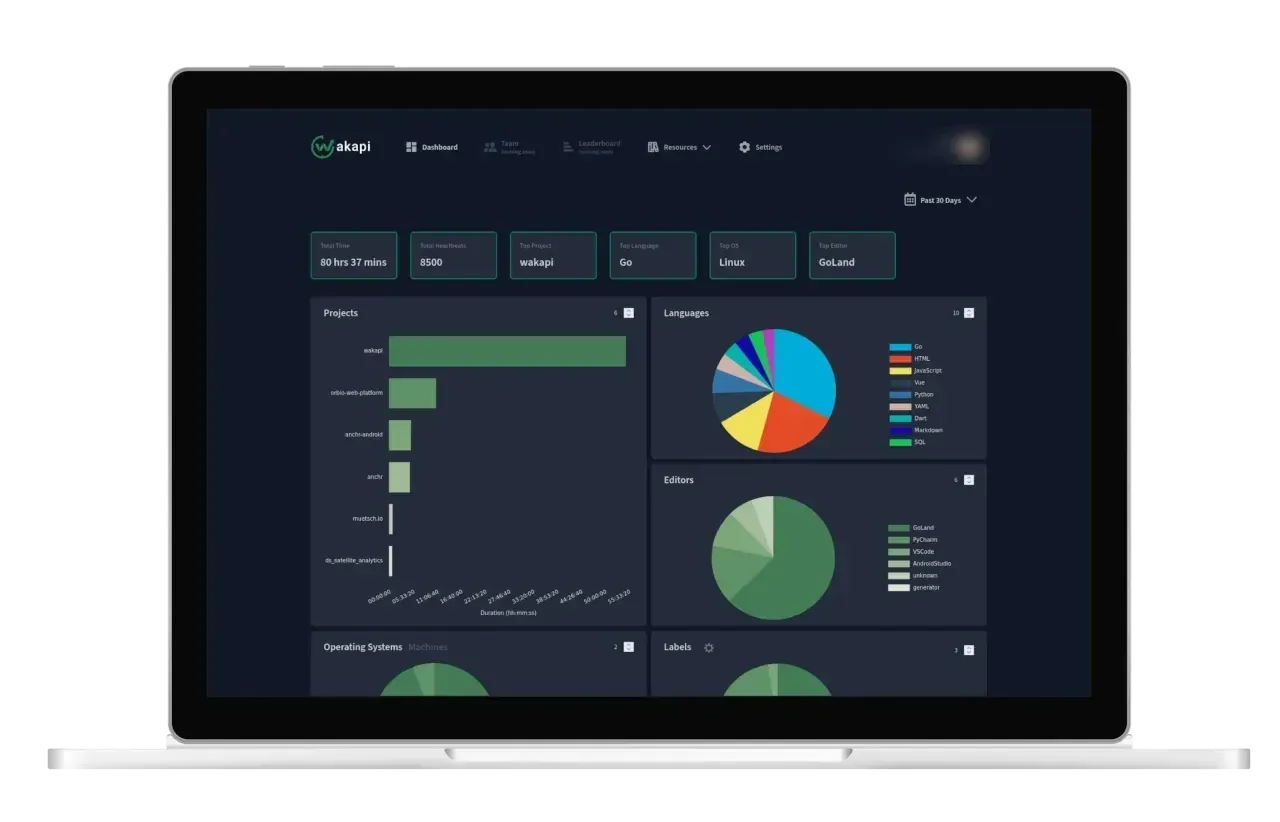
Official Wakapi screenshot of the statistics dashboard for the past 30 days; the account name in the header is blurred.
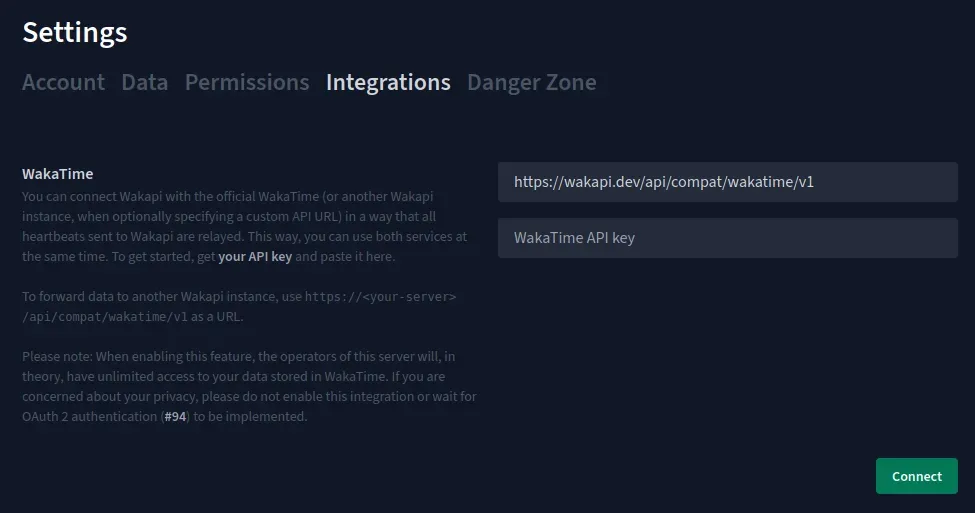
Wakapi Integrations settings for relaying heartbeats to WakaTime or another Wakapi instance, from the official wiki.
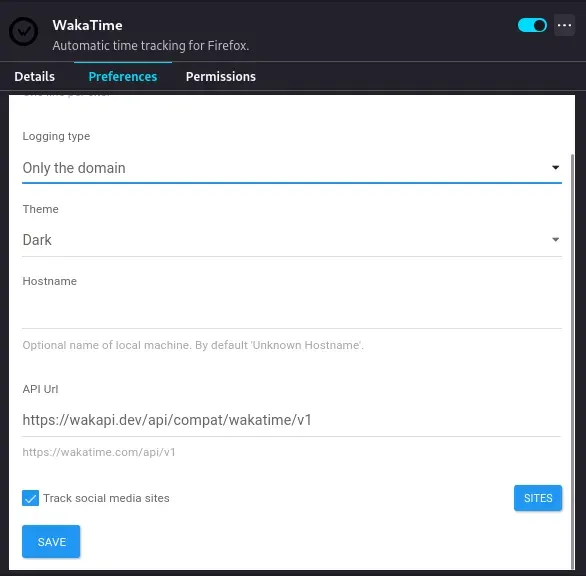
WakaTime browser extension configured to send data to wakapi.dev, from the Wakapi README.
Source: official Wakapi project page.
Key capabilities
- WakaTime client compatibility Wakapi relies on the open-source WakaTime plugins and wakatime-cli instead of shipping its own editor extensions. After installing a WakaTime plugin for an editor such as VS Code, a JetBrains IDE or Neovim, the user edits
~/.wakatime.cfg(on Windows%USERPROFILE%\.wakatime.cfg) and setsapi_urlto the Wakapi server, for examplehttps://wakapi.dev/api, plus the Wakapiapi_key. The plugin then sends heartbeats to Wakapi instead of WakaTime. - Parallel use with WakaTime The client can send data to both services at once: the WakaTime key stays in
[settings], while an[api_urls]section adds the Wakapi URL and key as an extra destination. The README warns against several.*entries because duplicate INI keys are ignored by wakatime-cli. Alternatively, Wakapi can relay every heartbeat it receives to WakaTime or to another Wakapi instance from Settings, Integrations. - Statistics dashboard The summary page shows total time and heartbeats and charts by project, language, editor, operating system, machine, project label, branch and category, along with an hourly breakdown and a timeline. Time ranges are chosen with a date picker, and each chart can be filtered to a single entity. Durations are inferred from gaps between heartbeats using a configurable timeout, following the same logic as WakaTime since a refactoring tracked in issue #675.
- Aliases, mappings and labels Users can define aliases that combine entities, for example merging a frontend and a backend repository into one project. Custom language mappings assign file extensions to languages, project labels group projects into sets such as private and work, and an option excludes activity from unknown projects. Changes that affect past data can be applied by regenerating the precomputed summaries from raw heartbeats.
- Badges Wakapi generates badges for README files and forums from the endpoint
/api/badge/<user>/<filter>, for example the coding time of today, the last 30 days or a single project, with label and color set through URL parameters. A second endpoint compatible with Shields.io allows further styling. Badges need public data access to be enabled under Settings, Permissions, and the Shields.io variant works only on publicly reachable instances, not on localhost. - Public leaderboard An instance can publish a leaderboard of its most active users. Users appear on it only after opting in under Settings, Permissions. The default scope is the last seven days, recalculated at 06:00 and 18:00 by default, and administrators can change the interval, disable the leaderboard or restrict it to logged-in users with the
leaderboard_*options. - Weekly e-mail reports When mail is enabled, Wakapi sends weekly e-mail summaries of coding activity. The schedule is a cron expression in
app.report_time_weekly, by default Friday at 18:00. Mail delivery uses SMTP, configured with host, port, credentials and TLS options; the same mail setup is used for password resets. - REST API and API keys Wakapi exposes a REST API documented with Swagger, including WakaTime-compatible routes under
/api/compat/wakatime/v1. API keys are passed as a Basic authorization header or as anapi_keyquery parameter and are only accepted on/apiroutes. Since 2.17.0 users can create additional keys with read-only or read-write access next to the primary key. - Prometheus metrics With
WAKAPI_EXPOSE_METRICS=truethe server publishes coding statistics in Prometheus format at/api/metrics. A scrape job authenticates with the base64-encoded API key as a bearer token, as shown in the README example. The README points to a community Grafana dashboard made for wakatime_exporter for visualizing the data in Grafana after scraping with Prometheus. - Data import Users can import historical heartbeats from WakaTime or from another Wakapi instance through the Integrations settings. The wiki migration guide uses this path to move data from wakapi.dev to a self-hosted server; only coding data is transferred, not aliases, mappings or other settings. Administrators control imports with options for batch size, cooldown, minimum interval between imports and a whitelist of allowed hosts.
- Heartbeat export There is no export button in the web interface. Raw heartbeats can be exported to CSV with the Python script
scripts/download_heartbeats.pyin the repository, which takes an API key, the server URL and an optional date range. Community projects listed in the README include an image generator, a Discord integration and an alternative export script. - GitHub profile integrations Wakapi works with GitHub Readme Stats, which renders WakaTime-style cards from the Wakapi stats endpoint, and with the WakaTime plugin of lowlighter metrics. Both require public data to be shared under Settings, Permissions; sharing at least 7 days enables a weekly card and at least 366 days a yearly card. The share settings define which entity types and how many days are visible without authentication.
- Browser and desktop add-ons The official WakaTime browser extension for Firefox and Chrome can report to Wakapi when its API URL is set to
https://wakapi.dev/api/compat/wakatime/v1or the equivalent path on a self-hosted instance. Visited websites then appear as files in the summary. On GNOME, the README shows a status bar indicator built with the Executor extension andwakatime-cli --today. - Authentication options Local accounts use a username and a password hashed with a configurable salt. Wakapi also supports OpenID Connect providers for single sign-on, described in the OIDC wiki page, WebAuthn passkeys (disabled by default), and trusted header authentication behind a reverse proxy, which the README marks as prone to misconfiguration. Local login can be switched off to enforce OIDC.
- Registration controls Administrators can disable sign-up, allow registration only through invite codes generated by existing users, require a CAPTCHA on the sign-up form and hide the landing page for personal instances. Sign-up, login and password reset endpoints have rate limits with defaults of 5 per hour, 10 per minute and 5 per hour respectively.
- Data retention and cleanup The option
app.data_retention_monthslimits how long heartbeats are kept and is unlimited by default. Accounts without data are deleted after 12 inactive months by default, and the database is vacuumed or optimized on a monthly schedule. Users can clear their data or delete their account from the Danger Zone settings. - Docker and Docker Compose The README documents a
docker runcommand forghcr.io/muety/wakapi:latestwith a named volume at/dataand aWAKAPI_PASSWORD_SALTvariable; SQLite is used by default inside the container. The repositorycompose.ymladds a PostgreSQL 17 service and Docker secrets for the salt, database password and SMTP password. For Kubernetes the README links a community-maintained Helm chart. - Binary, source and service setup Release archives contain a single binary that is started with a YAML file based on
config.default.yml, and every option can also be set throughWAKAPI_*environment variables. Building from source usesgo install github.com/muety/wakapi@latest. The repository includes a systemd unit, and the wiki has reverse proxy examples for Caddy and nginx plus a Raspberry Pi 4 setup guide.
Where Wakapi fits
Personal coding-time tracking on wakapi.dev
A developer creates an account on wakapi.dev, copies the API key from the web interface and follows the setup page: install a WakaTime plugin, then set api_url = https://wakapi.dev/api and the key in .wakatime.cfg. After restarting the editor, activity appears on the dashboard. The WakaTime client caches heartbeats locally while offline and sends them in batches later. According to the README, the client transmits file names, project names, editor names, the host name and timestamps; WakaTime's options to exclude or obfuscate paths apply to Wakapi as well.
Running a private instance
A self-hoster starts the container or binary, sets a password salt and chooses SQLite, MySQL, MariaDB or PostgreSQL. By default Wakapi listens on 127.0.0.1 and ::1 port 3000, and the README recommends exposing it through a reverse proxy such as Caddy or nginx for TLS, with security.insecure_cookies set to false in production. Public registration, the landing page and the leaderboard can be switched off for a single-user server. The default configuration file lists every option with comments.
Using WakaTime and Wakapi side by side
Users who keep a WakaTime subscription can mirror their data. The README prefers client-side configuration, where wakatime-cli sends each heartbeat to WakaTime and to every URL in [api_urls], configurable per project or system-wide. Server-side relaying from Wakapi to WakaTime is the alternative; the settings page notes that the server operator then has access to the user's WakaTime data through the stored API key.
Moving from wakapi.dev to self-hosting
The wiki describes the migration: set up an instance, copy the API key from wakapi.dev, enter https://wakapi.dev/api/compat/wakatime/v1 and that key under Settings, Integrations on the new server, connect and start the import. The guide says an import can take around 30 minutes depending on data volume and asks users to disconnect afterwards. Aliases, language mappings and other settings must be recreated by hand.
Showing coding activity on a profile or README
After enabling public data for a chosen time range under Settings, Permissions, a user can embed badges with today's or the last 30 days' coding time, per-project badges, GitHub Readme Stats cards or a lowlighter metrics section in a GitHub profile. The share settings decide which entities, such as projects, languages, editors, operating systems, machines or labels, are visible without authentication.
Feeding coding metrics into monitoring
An administrator enables WAKAPI_EXPOSE_METRICS, adds a Prometheus scrape job for /api/metrics with a bearer token derived from the API key, and builds Grafana panels from the result. Operational errors and request traces can additionally be sent to Sentry by setting a DSN and sample rates in the configuration.
Install
curl -L https://wakapi.dev/get | bashReviews of Wakapi
Be the first to share your experience with Wakapi.
Write a review
Loading review form…
Alternatives to Wakapi
 solidtimesolidtime is an AGPL-3.0 time tracker built on Laravel with timer, calendar and timesheet, billable rates, goals, reports, invoicing, desktop apps and Toggl, Clockify or Harvest import, as cloud or self-hosted.CCodeBurnCodeBurn reads session files from Claude Code, Codex, Cursor and other tools to show token use and cost by tool, model, project, branch and task.