

What is Harper?
Harper is a free, open-source English grammar and spell checker that runs on the device where the text is written. Elijah Potter created it after finding hosted checkers slow and invasive and local alternatives heavy on memory; he now develops it at Automattic together with outside maintainers and contributors, and the repository lives in the Automattic/harper monorepo. The project describes Harper as an error-tolerant parser for English that finds spelling, grammar, capitalization, punctuation and phrasing problems and proposes corrections. No account, GPU or network round trip is needed for checking.
The same Rust core, harper-core, is shipped in several forms. harper-ls is a Language Server Protocol server used by the Visual Studio Code, Neovim, Helix, Emacs, Zed and Sublime Text integrations. harper.js wraps a WebAssembly build of the core for browsers and Node.js and powers the Chrome, Edge and Firefox extensions and the Obsidian plugin. Harper Desktop, a Tauri application currently in beta for macOS 14 or later, checks text fields system-wide through the accessibility API. A small experimental harper-cli handles batch checks and Weir rule tests. The versioning policy keeps every component on one semantic version number.
The current release is v3.1.0, published November 6, 2026. It simplifies the Desktop menu bar status indicator, adds an in-app tip system to Desktop, keeps suggestion popups on the monitor being edited, fixes Google Docs handling for sentences spanning pages and for suggestions inside tables, improves WordPress Gutenberg support, adds a button to clear ignored suggestions in the browser extension and adds many new phrase rules. Version 3.0.0, released October 27, 2026, was a major bump because the core changed how dictionaries handle case sensitivity; it also added R comment support to the language server. Release assets include harper-ls and harper-cli archives for Linux, macOS and Windows, VS Code extension packages per platform, browser extension archives and a universal macOS DMG.
Harper is licensed under Apache-2.0. Only English is supported, with American, British, Canadian, Australian and Indian dialects selectable; the core is designed to accept other languages, but none ship today. Rules are written in Rust or Weir and the website advertises the checker as using no AI, so Harper does not rewrite tone or generate text. The project treats long lint times as bugs and publishes a comparison table that lists about 10 ms per suggestion for Harper against 650 ms for LanguageTool and 4000 ms for Grammarly, figures the project measured itself.
Some features sit outside the local core. The browser extension can send a problematic-lint report or a site review to writewithharper.com, but only when the user fills in and submits that form, and uninstalling opens a feedback page. The WordPress plugin still exists as harper.zip on the releases page, but the project now recommends the Chrome extension for WordPress and the plugin no longer receives regular updates. Only the latest version on the master branch is maintained, and the harper.js API is marked as early access.
Harper screenshots
Explore the interface. Open a screenshot to view it at full size.

Official screenshot of the Harper extension settings: toggleable rule groups such as Proper Nouns and Grammar and Agreement, English dialect choice, activation options, a user dictionary and Weirpack upload.
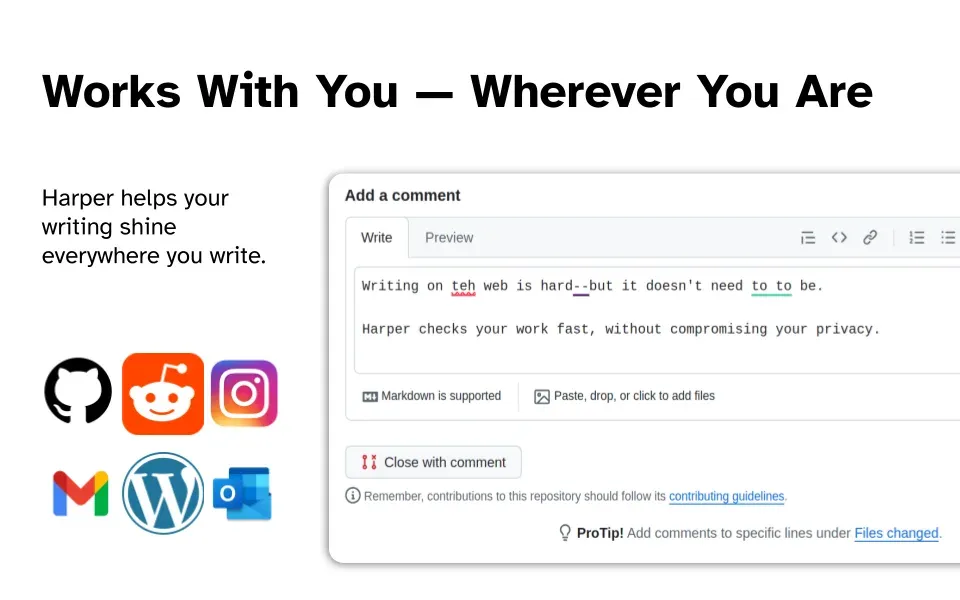
Official image of the browser extension in a GitHub comment field, flagging "teh", a repeated "to to" and a double hyphen.
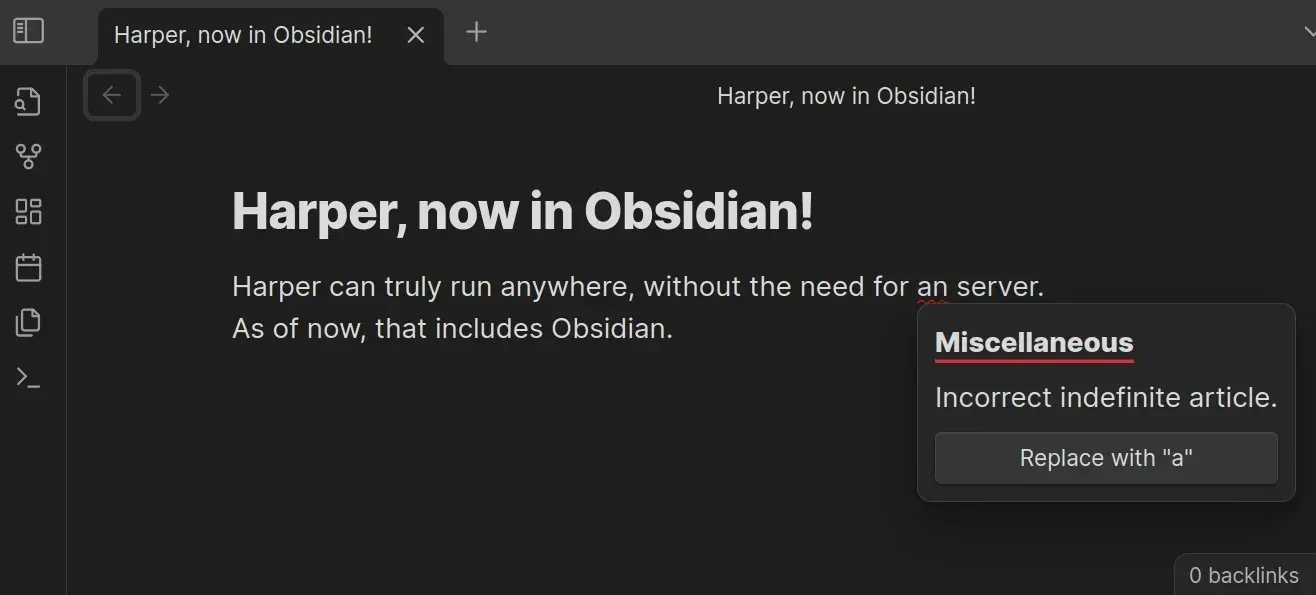
Official Obsidian plugin screenshot: Harper flags an incorrect indefinite article and offers a one-click replacement.
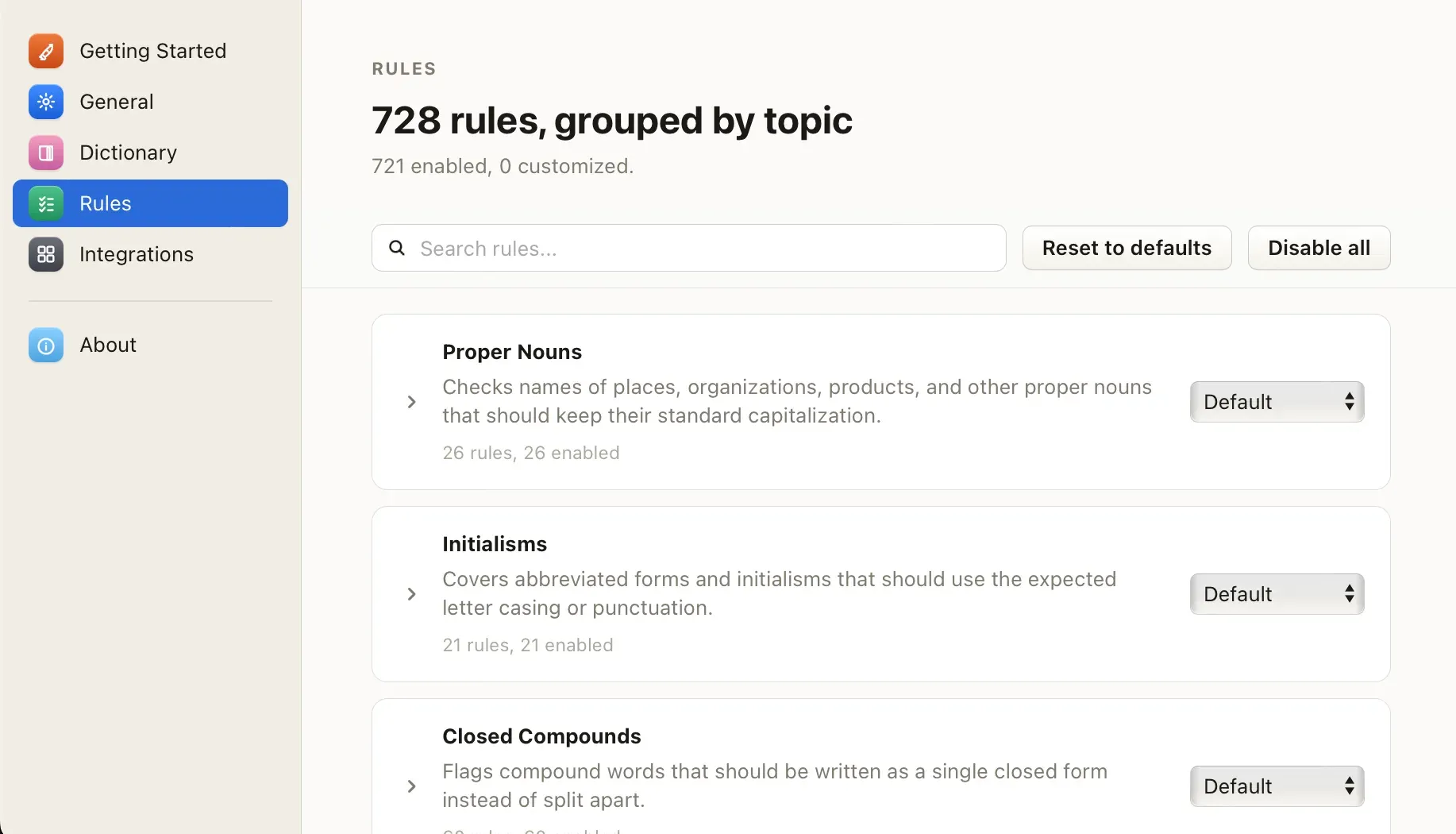
Official Harper Desktop settings screenshot from the product page: rules grouped by topic with search, reset and disable controls.
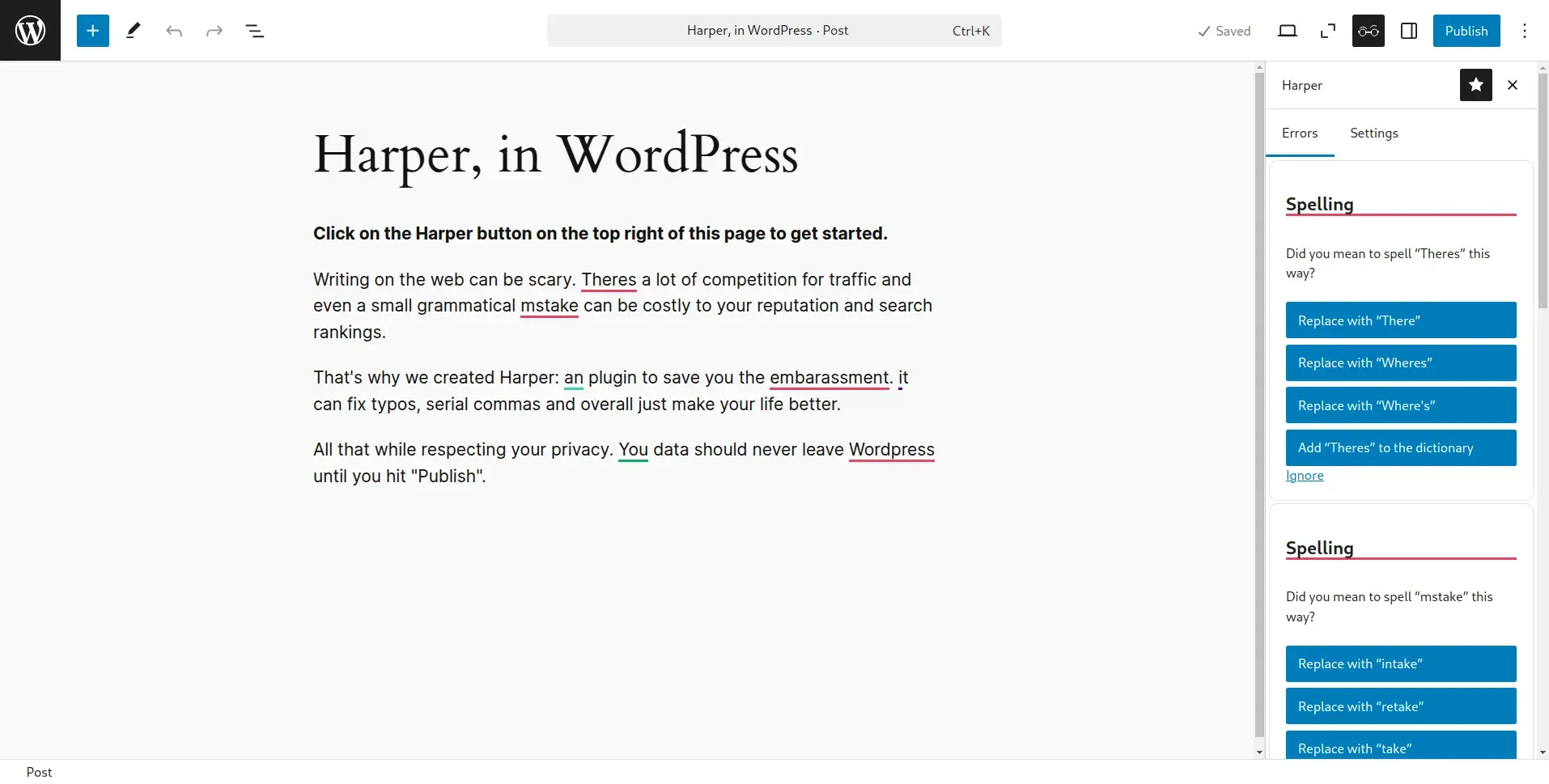
Official screenshot of the legacy WordPress plugin in the Gutenberg editor; the project now recommends the browser extension for WordPress.
Source: official Harper project page.
Key capabilities
- Install harper-ls with a package manager The language server is packaged for Homebrew on macOS and Linux (
brew install harper), Scoop on Windows, the Arch Linux extra repository, Nixpkgs, Termux and crates.io (cargo install harper-ls --locked, latest stable Rust only). Portable binaries for x86_64 and aarch64 Linux (glibc and musl), Intel and Apple Silicon macOS and x86_64 Windows are attached to each GitHub release. The language server guide lists every method. - Editor integrations through LSP The Visual Studio Code extension bundles
harper-lsand is published on the Visual Studio Marketplace and Open VSX, so VSCodium and other forks can use it; aharper.pathsetting points to a separate binary on immutable Linux systems. Neovim uses nvim-lspconfig or mason.nvim, Emacs uses Eglot, Sublime Text uses the LSP package, Helix uses its language configuration and Zed has an extension that downloadsharper-lsitself. Configuration is passed as a JSON object under aharper-lskey. - Comments and markup across 40+ file types
harper-lschecks Markdown, plain text, HTML, AsciiDoc, Typst, LaTeX, Org mode, email, Git commit messages and Jujutsu descriptions as prose. For programming languages such as Rust, Python, Go, TypeScript, Java, C, C++, PHP, PowerShell, Swift and R it checks comments only, leaving code untouched. Unsupported languages can be requested on a dedicated GitHub issue. - Browser extensions for Chrome, Edge and Firefox The extension runs
harper.jslocally inside the browser and highlights problems in web text fields, including GitHub comments, Gmail, WordPress and Google Docs. Users choose whether it activates on new sites by default, set a typing delay, export the list of enabled domains, require an activation key double-press and assign a hotkey that applies the last suggestion. Install it from the Chrome Web Store, Microsoft Edge Add-ons or Firefox Add-ons; Chrome Web Store reviews often delay updates by a few days. - Harper Desktop for macOS (beta) Harper Desktop runs a background highlighter process that reads and writes text through the macOS accessibility API and draws underlines and suggestion popups over other apps such as Mail, Slack, Notes, Pages and Discord. It requires macOS 14 Sonoma or later on Apple Silicon or Intel, can be enabled per app and keeps its configuration on disk. The release also carries a Windows x64 setup file, but the product page states that Windows and Linux are not yet offered, so treat Windows builds as unsupported previews.
- Obsidian plugin The Obsidian plugin is installed from Community Plugins and runs the grammar engine inside Obsidian, so vault contents are not sent to a checking service. It ignores fenced code blocks and inline code. The project notes that it expects an up-to-date Obsidian installer; older installers can cause loading problems.
- Rule sets grouped by topic Rules are grouped into topics such as proper nouns, initialisms, closed compounds, phrase corrections, punctuation and spacing, numbers and units, pronouns and possession, style and redundancy, and grammar and agreement. Each topic and each individual rule can be switched on or off, and the official extension settings screenshot shows the full catalog with counts per group. The public rules page on the website lists linter names with descriptions for use in configuration files.
- English dialects and non-English text The dialect setting accepts American (default), British, Canadian, Australian and Indian English and changes spelling and grammar expectations accordingly. An
isolateEnglishoption in the language server and an "Ignore Non-English Text" switch in the extension skip text detected as another language. The project labels this isolation as new and unstable. - Four layers of dictionaries
harper-lscombines a built-in static dictionary with a per-user dictionary, a per-workspace.harper-dictionary.txtand file-local dictionaries. The editable ones are plain line-separated word lists, and code actions add a flagged word to any of them. The browser extension and Desktop app have their own user dictionary fields for team terms and product names. - Code actions and ignore comments Quick fixes replace the flagged text, and separate actions ignore a lint for the session or add the word to a dictionary. A
ForceStableoption keeps always-available actions in a fixed position. Comment blocks containingharper:ignoreor CSpell-compatible markers such asspellchecker:ignoreare skipped, which lets Harper and CSpell coexist. - Custom rules with Weir and Weirpacks Weir is a small expression language for house-style rules: a pattern, a message, a description, a rule kind and replacement text, plus
testandallowsassertions thatharper-cli testcan run. Rules are distributed as.weirpackZIP archives with a requiredmanifest.jsonthat names author, version, description and license. The extension can upload Weirpacks,harper-cli lint --weirpackloads them in batch runs, and an in-browser Weir studio helps with drafting. - harper.js for web and Node.js applications harper.js is an ECMAScript module installed from npm or loaded from the unpkg CDN. In browsers it can use a worker-based linter; in Node.js it must use
LocalLinter. The package is marked early access, so its API can still change between releases. - harper-core Rust crate Rust programs can depend on
harper-corefrom crates.io and use its Document, Parser and Linter types directly. Parsers extract English from formats such as Markdown, and linters return lints with suggested replacements. The architecture guide on the website maps where to add a new linter. - Command-line checks with harper-cli
harper-cliis described by its own README as small and experimental, intended for checking many files at once, for example in continuous integration. It loads Weirpacks and runs Weir tests. On-disk caching, custom dictionaries and machine-readable output are listed as possible future features, so output formats should not be treated as stable. - Local writing statistics Integrations can log events such as flagged words, accepted suggestions and writing volume to a local
stats.txtfile of JSON lines; forharper-lsit sits in the Harper data directory. The project states that this data is not sent anywhere without explicit permission, and a dashboard on the website reads it in the browser. - Large-file and exclusion limits The language server skips files larger than
maxFileLength, 120000 bytes by default, and files matchingexcludePatternsglobs. Diagnostic severity defaults to hint and can be raised to information, warning or error. These settings help keep large generated files and vendored text out of the editor problem list. - WordPress (legacy plugin) A Gutenberg sidebar plugin was the original WordPress integration and remains downloadable as
harper.zip. The WordPress page now recommends the Chrome extension instead because plugin review cycles are slower, and the plugin is several months behind. A WordPress Playground demo still shows the classic workflow.
Where Harper fits
Checking documentation and READMEs in an editor
Install harper-ls through the platform package manager, then enable the editor integration for Markdown and plain text. Set the dialect your style guide uses and lower LongSentences or other rules that trigger too often for technical prose. Add product names to the workspace dictionary and commit .harper-dictionary.txt so the whole team shares it. Check that fenced code, link targets and front matter are not flagged; the Neovim guide shows a full default configuration that other editors mirror.
Proofreading code comments and commit messages
Because harper-ls reads only comments in programming languages, it can run alongside a code linter without touching identifiers. Enable the Git commit and Jujutsu description language IDs if your editor opens those buffers. Use harper:ignore blocks for generated text or quoted logs. Confirm that your editor sends a language ID Harper recognizes; the Emacs guide documents the case where Eglot derives an unsupported ID from the major mode.
Writing in the browser without a hosted checker
Install the Chrome, Edge or Firefox extension and decide whether Harper should activate on new sites by default. Test it in the web apps people actually use: GitHub comments, webmail, Google Docs and a WordPress block editor. Raise the typing delay if highlights feel distracting, and keep the list of enabled domains exported for reference. Note that the optional report forms send entered text to the maintainers, so internal guidance should say when they may be used.
Enforcing a house style with Weir
Write one Weir rule per banned term or preferred phrase, with a message and a replacement, and add test and allows lines that cover true and false positives. Run harper-cli test on each file, package the rules as a .weirpack with a manifest, then load the pack in the browser extension or with harper-cli lint --weirpack. Version the pack like any other configuration and review rule changes before distributing them.
Embedding grammar checking in an application
For a web or Electron application, install harper.js from npm and run the linter in a worker so typing stays responsive; in Node.js use LocalLinter. Pin the package version, because the API is still early access, and test with representative text sizes. Rust services can call harper-core directly. The harper.js documentation covers browser, CDN and Node.js setups.
System-wide checking on a Mac
Download the Desktop beta, grant the accessibility permission it requests and enable it only for the apps where you want checking. Verify that underlines appear in Mail, Slack or Notes and that suggestions are applied in the right field, including on multi-monitor setups that v3.1.0 addressed. Because the app reads text from other applications, review the permission with whoever manages the Mac before a wider rollout.
Install
brew install harperReviews of Harper
Be the first to share your experience with Harper.
Write a review
Loading review form…