

What is Kensaku?
Kensaku is a free, open-source desktop file search tool and launcher for Windows, macOS and Linux. The name is the Japanese word for search (検索). It builds a local index of the folders a user chooses and searches file names, the text inside documents and code, text read from images with OCR, and the meaning of content, all from one search field. The project is published on GitHub by the account yjid under the MIT license, and its README states that there is no account, no telemetry and no cloud search: the index stays in the operating system's config directory on the user's machine.
The desktop app is built with Tauri 2: a Rust library crate holds the indexer, the query pipeline and the extractors, and a React frontend renders the window. File metadata is kept in SQLite in WAL mode with a compact in-memory arena for name search, full text goes into a Tantivy index, and meaning search uses a static embedding table in the style of potion-base-8M (about 7.3 MiB in its i8 form) with no GPU and no ONNX graph at query time. ONNX Runtime 1.31 is bundled for OCR. A separate kensaku-cli binary shares the same index and provides command-line search, an MCP server over stdio and a loopback HTTP transport. On Linux and macOS a kensaku-daemon process can own a warm index for the CLI and MCP clients; on Windows everything runs in the app process. The architecture document describes the process model, storage layout and index tiers.
Releases are distributed as prebuilt bundles on the GitHub releases page: NSIS and MSI installers plus a portable zip for Windows x64 and Windows on ARM, a universal DMG for Apple silicon and Intel Macs, and an AppImage, a .deb and an .rpm for x86_64 Linux. Each release also ships standalone kensaku-cli binaries for the three systems and a SHA256SUMS file. The builds are not code-signed, so Windows SmartScreen and macOS Gatekeeper show a warning on first launch; the install guide lists the steps to continue and the prerequisites for building from source (Rust stable, Bun 1.1 or later or Node.js 20.19 or later, and the platform webview libraries). The project says Windows currently gets the most real-world testing, while the macOS and Linux builds are produced by CI, and the Linux build is tested on Ubuntu 22.04 under X11.
The current release is Kensaku v1.0.17, published on November 9, 2026. It is a security release that fixes five privately reported issues: agent scope checks and direct reads now fail closed, update downloads are staged in a private per-user directory with ownership, permission and file-type checks, the file watcher honors excluded extensions and sensitive names, and Office extraction has bounded XML, input and buffer budgets. The same release adds a Russian interface, email extractors for .eml and .msg, recent queries on the empty search screen, multi-select copy and move of results, and resumption of interrupted crawls. The first public release, v0.2.0, appeared on October 25, 2026, and v1.0.0 followed on October 27, 2026.
Several things are outside the shipped product according to the documentation. Kensaku does not bundle or call a language model: there is no chat panel and no /ask command, and agents bring their own model through MCP. Natural-language visual search and similar-image lookup are not part of search results; a Beta section can download a CLIP pack, but no production visual encoder is wired in. Native macOS and Windows OCR is not implemented, JPEG 2000, fax and JBIG2 scans are not decoded, thumbnails cover image files only, and searching and launching installed applications is a roadmap topic rather than a current feature.
Kensaku screenshots
Explore the interface. Open a screenshot to view it at full size.
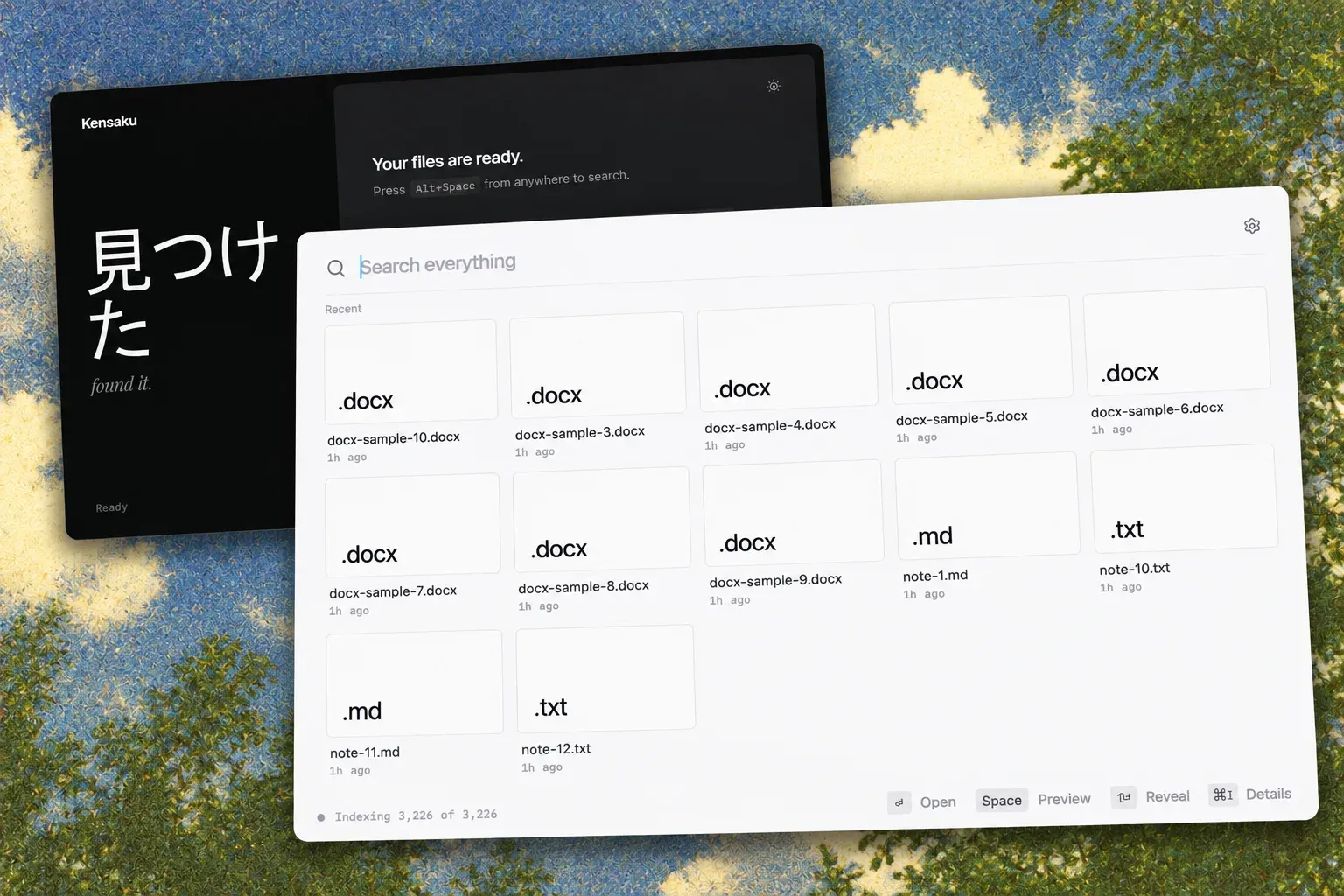
Official README hero image: the light search window lists recent .docx, .md and .txt files with Open, Preview, Reveal and Details shortcuts, in front of the dark first-run screen.
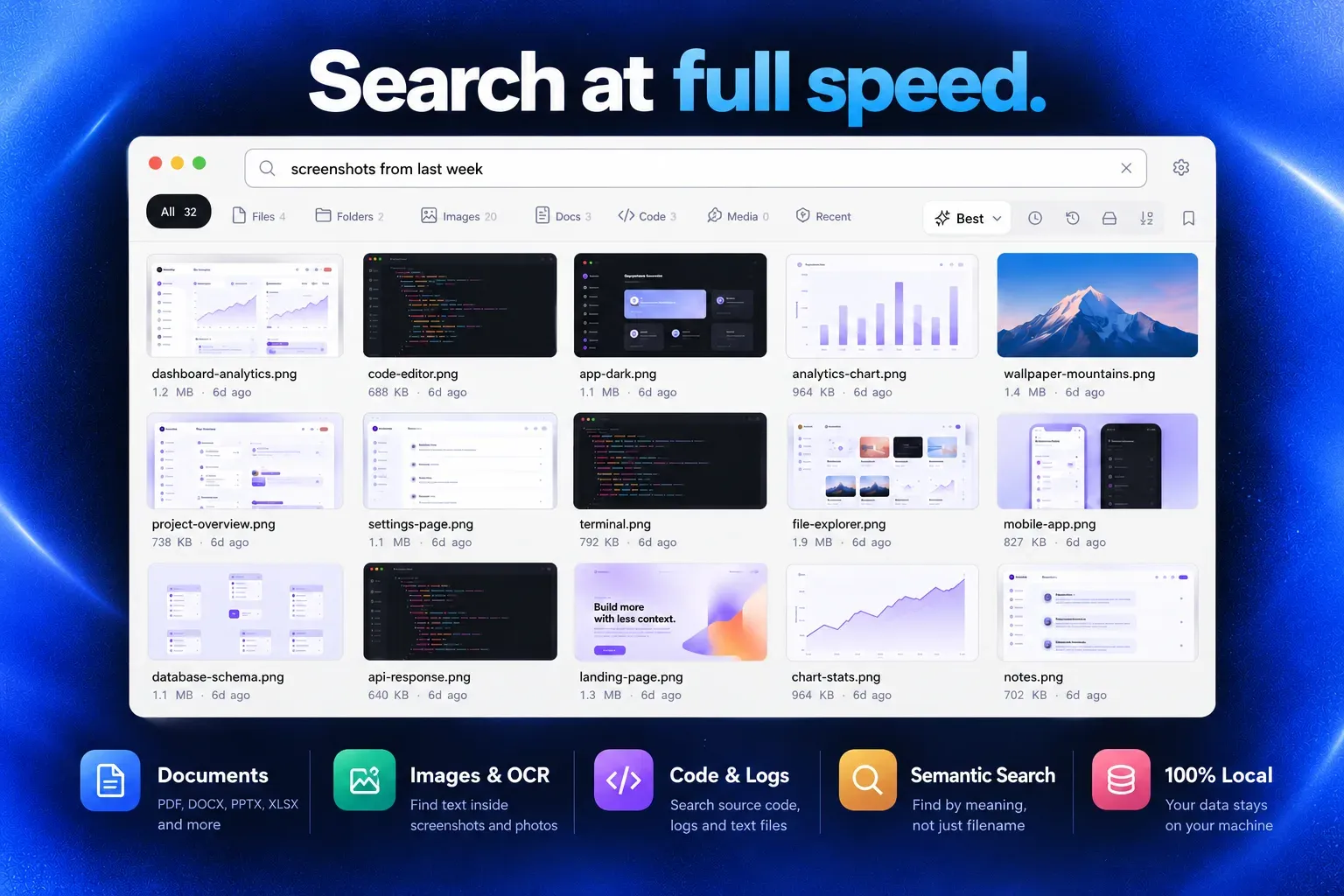
Official promotional figure: a plain-language query returns image results with sizes and dates, above summaries of document, OCR, code, semantic and local search.
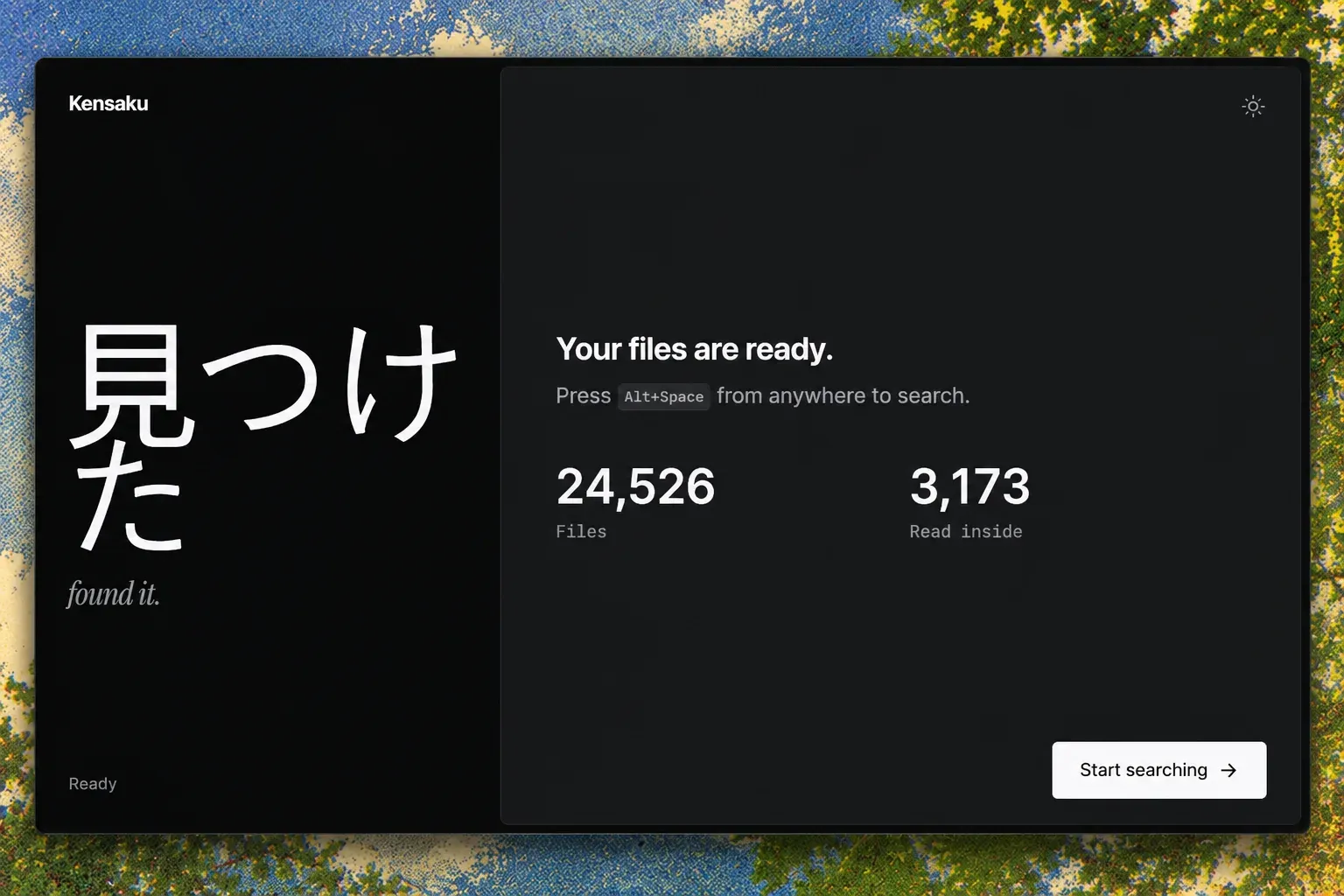
Official screenshot of the end of setup: the index counts files and files read inside, and Alt+Space opens search from anywhere.
Source: official Kensaku project page.
Key capabilities
- Filename search in milliseconds Name search runs against an in-memory metadata layer of about 128 bytes per entry, which the project measured at 12.2 MB for 100,201 files. The published reference numbers for a 100,000-file corpus are an 18 ms average on Windows 11 with default threads, 3.1 ms with four threads and 1.3 ms on a warm Linux reference machine. Results update as the user types, and the benchmarks page documents the harnesses, hardware and caveats.
- Full text inside documents The indexer extracts text from PDF, DOCX, PPTX, XLSX, EPUB, ODT, ODS, ODP, RTF, CSV and TSV files, email messages in .eml and .msg format, and plain text. Defaults allow extraction from files up to 100 MB, index up to 4 MB of text per file and create up to 48 semantic chunks per document, with quick, balanced and deep presets. Encrypted PDFs are flagged rather than indexed, and scanned PDFs go through OCR one page at a time.
- OCR for screenshots and images Text in images is read with PP-OCRv6 by default, running in-process on the bundled ONNX Runtime with a model pack of about 6.1 MB that downloads once. The optional Indra engine (about 27 MB, eight models) adds deskew, orientation detection and multi-script recognition for Latin, CJK, right-to-left and other scripts, and Tesseract is available as a fallback, including on Intel Macs where ONNX cannot run. Packs are verified against pinned SHA-256 checksums.
- Search by meaning A semantic tier embeds 240-token windows with static vectors and compares them with the query, so a description such as "the PDF about indexing" can match a file whose name says nothing about it. Semantic-only hits below a model-dependent cosine floor are dropped. An optional smart embedding model that uses ONNX Runtime can be enabled behind a build feature and falls back to the static table if it is missing.
- CJK and multilingual tokenization A custom tokenizer produces interleaved unigram and bigram tokens for Chinese Hanzi and Bopomofo, Japanese Kanji and Kana, and Korean Hangul, and splits mixed-script strings such as file names that combine Latin and CJK text. Latin, Cyrillic and Greek text uses an alphanumeric tokenizer with lowercasing. The languages page lists the Unicode ranges and code formats.
- Code and data formats More than 50 code and data formats are indexed, including Rust, Python, TypeScript, Go, C and C++, Java, shell scripts, SQL, JSON, YAML, TOML and Dockerfiles. A
lang:filter narrows results by language family, and snake_case and kebab-case identifiers are split into searchable parts. External extractors can be configured for formats Kensaku does not decode natively. - Query language and plain-language phrasing Filters such as
type:pdf,ext:rs,in:,path:,modified:<7d,size:>10mb,name:,content:,re:for regular expressions, exclusions with a minus sign, exact phrases and proximity search can be combined with plain words. A local, deterministic intent compiler turns phrases like "screenshots from last week" or "big videos in Projects" into the same filters and shows each inference as a removable chip. User-defined aliases, for example resume to cv, are set in Settings. - Launcher and desktop app modes In launcher mode, the setup default, Kensaku lives in the tray and a global shortcut (Alt+Space by default) toggles a floating search window that hides on Esc or when it loses focus. Desktop app mode shows a normal taskbar or dock window instead. Closing either window keeps the index warm, and on Linux desktops where global shortcuts are blocked, such as Wayland sessions, the command
kensaku --togglecan be bound to a key. - Keyboard-driven results Arrow keys move through list or grid results, Enter opens a file, Shift+Enter shows it in its folder, Space opens a Quick Look preview for PDFs, images and text, and Ctrl or Cmd+I shows details. Category chips (All, Files, Folders, Images, Docs, Code, Media, Recent) carry server-side counts, and results can be sorted by best match, newest, oldest, largest or name. Several results can be selected and copied or moved to a folder without overwriting existing names.
- Incremental indexing The file watcher picks up changes without rescanning the disk, and file identity is tracked by device and inode or the Windows file ID, so a rename updates one row without re-extracting content. Interrupted crawls resume, unplugged drives are preserved rather than pruned, and
.gitignoreand.cursorignorerules are honored by default. A crawl mode setting chooses between full, balanced (idle priority) and eco, which also paces work on battery. - MCP server for AI agents
kensaku-cli mcpexposes the index to MCP clients over stdio with tools for ranked or exhaustivesearch,read_snippet,regex_search,find_symbol(tree-sitter definitions for Rust, Python, JavaScript and TypeScript),health_checkandindex_state. Access is read-only by default; the only write tool,reindex, is hidden unless enabled in config. Settings, Agents can merge the configuration into Claude Desktop, Claude Code and Cursor, and the agents guide documents the schemas, pagination and limits. - Command line and loopback HTTP
kensaku-cli searchprints path, score and snippet per line or full JSON with--json, and supports--ext,--path,--sinceand--exhaustive.kensaku-cli servestarts an MCP Streamable HTTP endpoint on 127.0.0.1 (port 8765 by default) with read-only health and search routes, protected by a bearer token stored in the config directory. Exit codes distinguish runtime failures, usage errors and a missing index. - Agent scoping and safety limits The
agent_scoped_rootssetting restricts agent results and snippet reads to chosen folders, and paths are resolved before comparison so symlinks and parent-directory tricks do not escape. Snippets are capped at 100 characters in search results andread_snippetreturns at most a bounded window around the match. Credential files such as .pem, .key and .pfx are excluded from indexing, and file content is returned to agents as data. - Interface, themes and languages The window offers light and dark themes, list rows or card grid layouts, thumbnails for image files and hover details. The interface is available in English, Simplified Chinese and Russian, detected from the system or chosen in Settings. A Health section runs Doctor checks on the config, database, index, watcher, models, OCR and crash log, and shows latency percentiles and index composition.
- Windows installers and portable build Windows x64 and Windows on ARM each get an NSIS setup executable, an MSI package and a portable zip. The 1.0.16 Windows x64 downloads were a 14.3 MB setup and a 20.1 MB MSI, with an installed binary of about 36 MB. The portable build keeps its config, index and data in a
datafolder next to the executable and writes nothing to %APPDATA%. - macOS and Linux packages MacOS gets a universal DMG for Apple silicon and Intel; Gatekeeper blocks the first launch until the user chooses Open Anyway or clears the quarantine attribute. Linux gets an AppImage, a .deb installable with apt and an .rpm, all for x86_64. Uninstall on macOS and Linux is a two-step process, and
kensaku --remove-datadeletes the data folder. - In-app updates The app checks GitHub's public releases API about every 12 hours, shows release notes, asset size and download progress, and verifies the download size and the release
SHA256SUMSbefore running the installer. Since v1.0.17, downloads are staged in a private per-user directory with ownership and permission checks. Update checks can be turned off in Settings, About, and portable installs are told to replace the folder instead.
Where Kensaku fits
Finding a document by what it contains
The README describes the case of a PDF saved under an unhelpful name such as notes-final-2.pdf. Typing words remembered from the content returns matches from the full-text tier with the matching words highlighted, and the semantic tier can match a description of the topic. Filters like type:pdf or in:"~/Notes" narrow the set, and the FAQ lists the reasons a known word may not be found: an unwatched folder, an excluded extension, a file over the content cap or an encrypted PDF.
Searching text inside screenshots
With OCR enabled, images and scanned PDFs are read during indexing, so an error message captured in a screenshot can be found by typing the error text. Settings, Search, OCR shows which engine is active and whether it read a test image correctly. Phrases such as "screenshots from last week" compile to type:image modified:<7d, and bursts of near-identical screenshots collapse into one row.
Searching logs and source code
Developers can point Kensaku at project and log folders and search for a log line, a configuration key or an identifier. Regular expressions run with re:, lang:rust or ext:rs restrict results to one language, and -node_modules excludes a folder. Exclusion presets for developer, creative and all-round use are offered during setup, and .gitignore rules are honored.
Giving an AI coding agent access to local files
Claude Code, Claude Desktop, Cursor or another MCP client can run kensaku-cli mcp to search the same index the desktop app uses. The agent can page through ranked or exhaustive results, read a bounded snippet around a match and look up function or type definitions with find_symbol. The privacy page states that the MCP server cannot modify files and does not expose filesystem access beyond the index; HTTP clients can use kensaku-cli serve with the bearer token instead.
Scripting searches from the shell
kensaku-cli search "invoice" --ext pdf --since 30d returns tab-separated results for use in scripts, and --json returns the full response with scores, snippets, sizes and modification times. kensaku-cli state --json reports file counts, content documents, semantic units and the active model. The CLI exits with code 3 when no index exists, which happens until the desktop app has run once.
Searching CJK and mixed-language archives
Folders with Chinese, Japanese or Korean documents, or file names that mix CJK and Latin text, are tokenized with unigrams and bigrams so single characters and compound words are both searchable. The Indra OCR engine adds multi-script recognition for scanned material, and Tesseract can be configured with installed language data. Details are on the languages page and in the usage guide. Similar local search projects listed on iThub include DigUp and zvec-grep, and Sol is a macOS launcher with file search.
Reviews of Kensaku
Be the first to share your experience with Kensaku.
Write a review
Loading review form…
Alternatives to Kensaku
 DigUpDigUp is a free, open-source desktop app that indexes selected folders and searches documents, images, audio, video and code by meaning and exact words.
 zvec-grepzvec-grep searches code, documents, and structured data through a local CLI and AI agent integrations. It combines ripgrep, BM25, and vector search, returning ranked passages with source locations.
 SolSol is a free, MIT-licensed launcher and command palette for macOS 14 or later. One global shortcut opens app, file and bookmark search, window snapping, clipboard history, an emoji picker, calendar, translation, a calculator and your own shell or AppleScript commands.