

What is Nonograph?
Nonograph is a minimal anonymous publishing server. A visitor enters a title, an optional alias and a body written in a Markdown dialect, clicks Publish and receives a shareable link. There is no sign-up, profile or author dashboard. The name combines anonymous, monograph and telegraph, and the README describes the project as an open-source alternative to Telegraph (telegra.ph) with a focus on privacy. It is developed on GitHub by the maintainer du82, and the public instance at nonogra.ph is the homepage linked from the repository. The repository was created in September 2025.
Distribution follows the self-hosting model. The main route is the container image ghcr.io/du82/nonograph, tagged latest and by version, which bundles Tor and publishes the site as an onion service as well as on port 8009. The Docker guide covers Linux, macOS and Windows PowerShell, a Docker Compose file and Makefile wrap the same setup, an Unraid template is included, and a run script builds and starts it natively on Debian. Each GitHub release also carries server binaries for Linux x86_64, macOS x86_64 and Apple Silicon, and Windows x86_64.
The current release is v0.5.3 (November 4, 2026), which adds Turkish, French, Serbian and Chinese interface strings, bringing the homepage to nine languages selected from the browser's Accept-Language header. Version 0.5.2 added Russian, Hungarian, Spanish and Brazilian Portuguese and fixed bugs while hardening the server against automated penetration-testing bots. Version 0.5.1 improved the parser and text selection, and 0.5.0, labelled the stable API release, formally defined the HTTP API. Earlier 0.4.x releases added task lists, a table editor and security fixes; 0.3.0 introduced Onion-Location advertising.
The server is a single Rust binary on the Rocket 0.5 web framework. Ammonia sanitizes user content, syntect highlights code blocks, and a custom template engine renders pages. Posts are written to a content directory as Markdown files with YAML front matter and served from an in-memory cache, so no database is involved. Limits, cache size, CSRF protection, onion URL and code-block behavior are set in Config.toml. The code is released into the public domain under the Unlicense and is mirrored to Radicle, a Forgejo instance and the Software Heritage archive.
Out of scope: Nonograph does not host images or videos (media is embedded from external URLs), has no accounts, comments, search, newsletters or analytics, and documents no route for authors to edit or delete a page after publishing. Removing a page is an operator task on the server's file system. The README records a paid security assessment of the first release in October 2025, later paid security contributions and a bug bounty funded in Monero; the redacted assessment report is linked from the README.
Nonograph screenshots
Explore the interface. Open a screenshot to view it at full size.
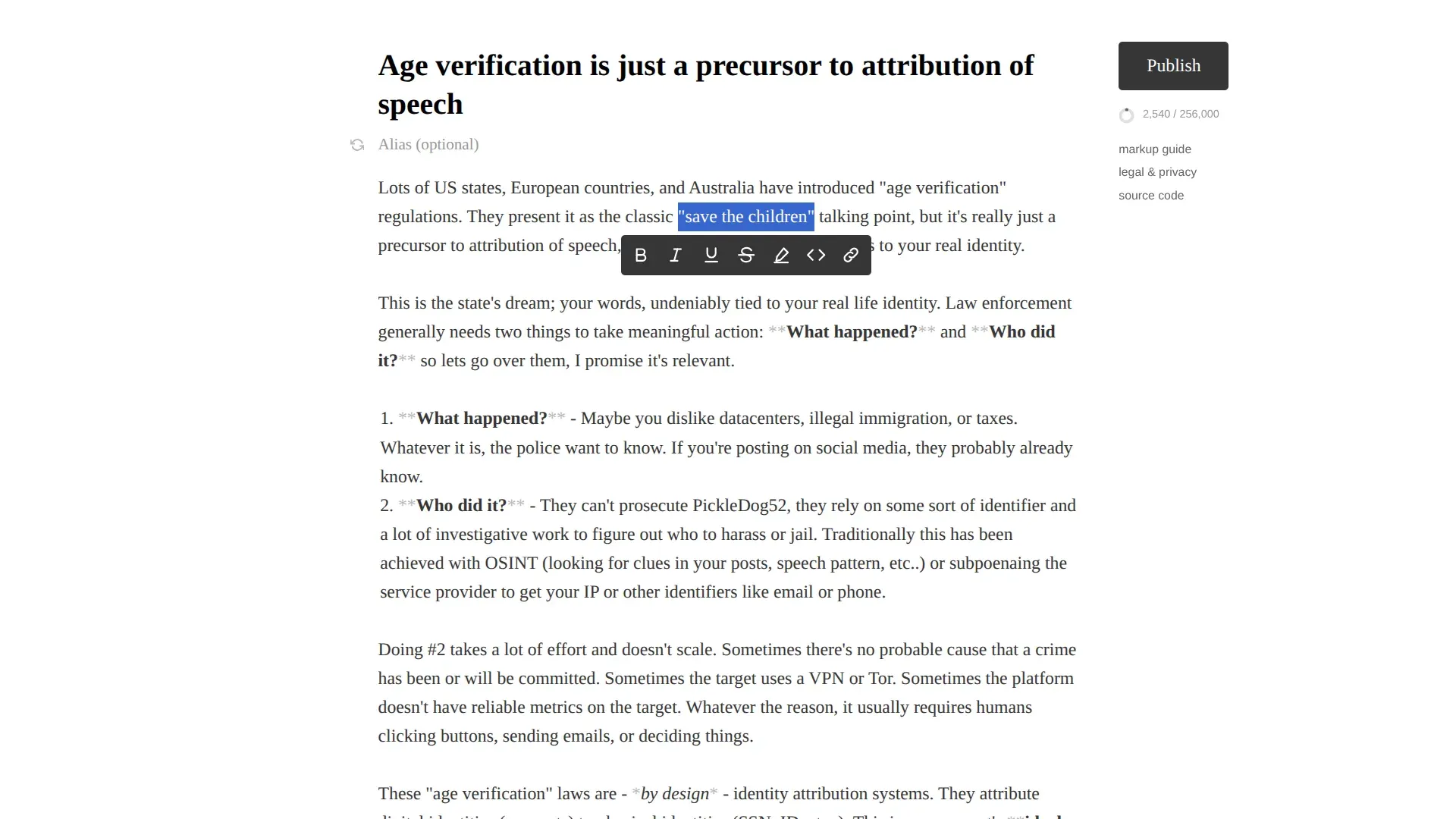
Official README screenshot of the editor: dimmed Markdown markers, the selection toolbar and the 256,000-character counter.
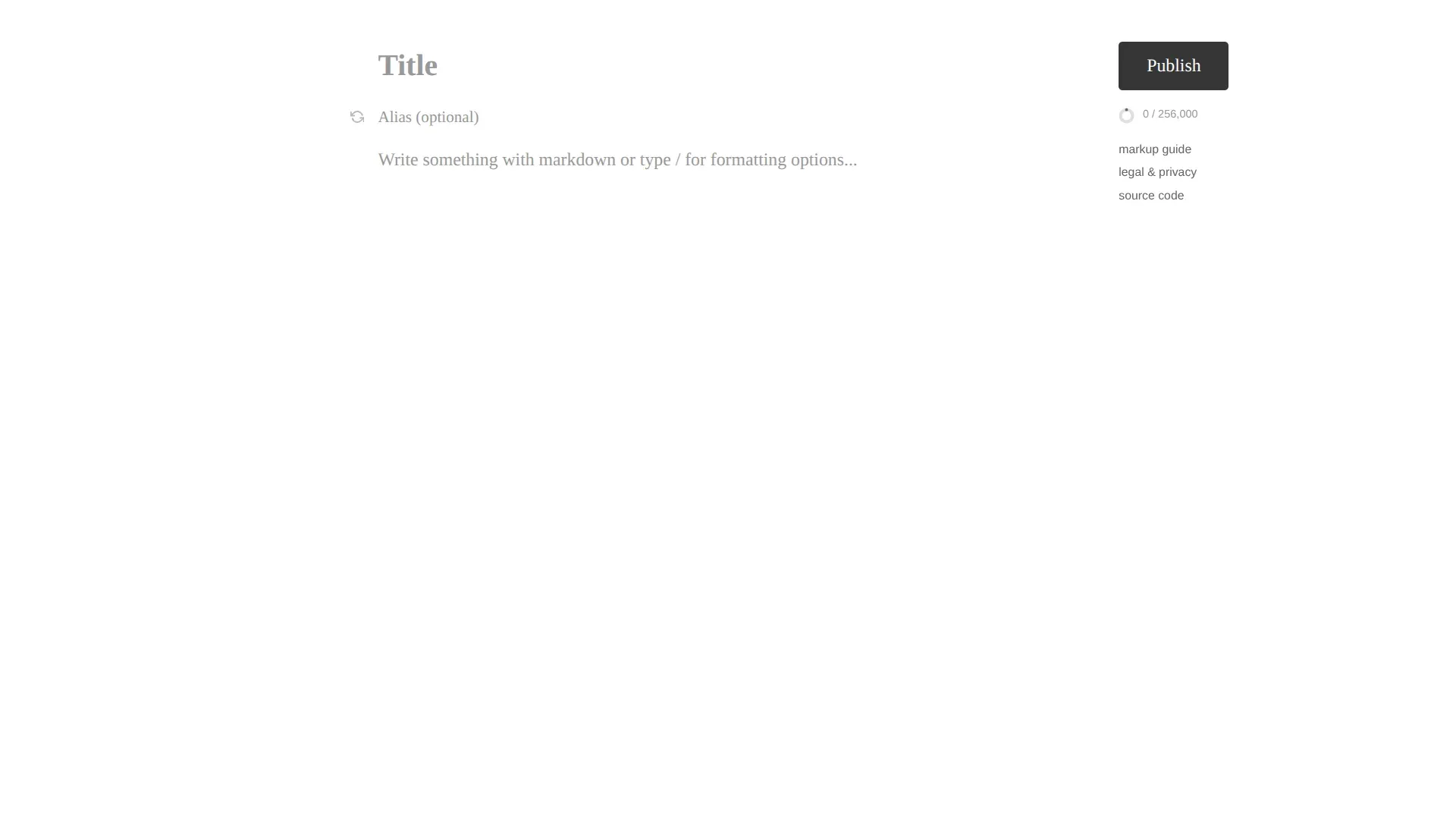
The home page doubles as the editor; there is no sign-in or account step before publishing.
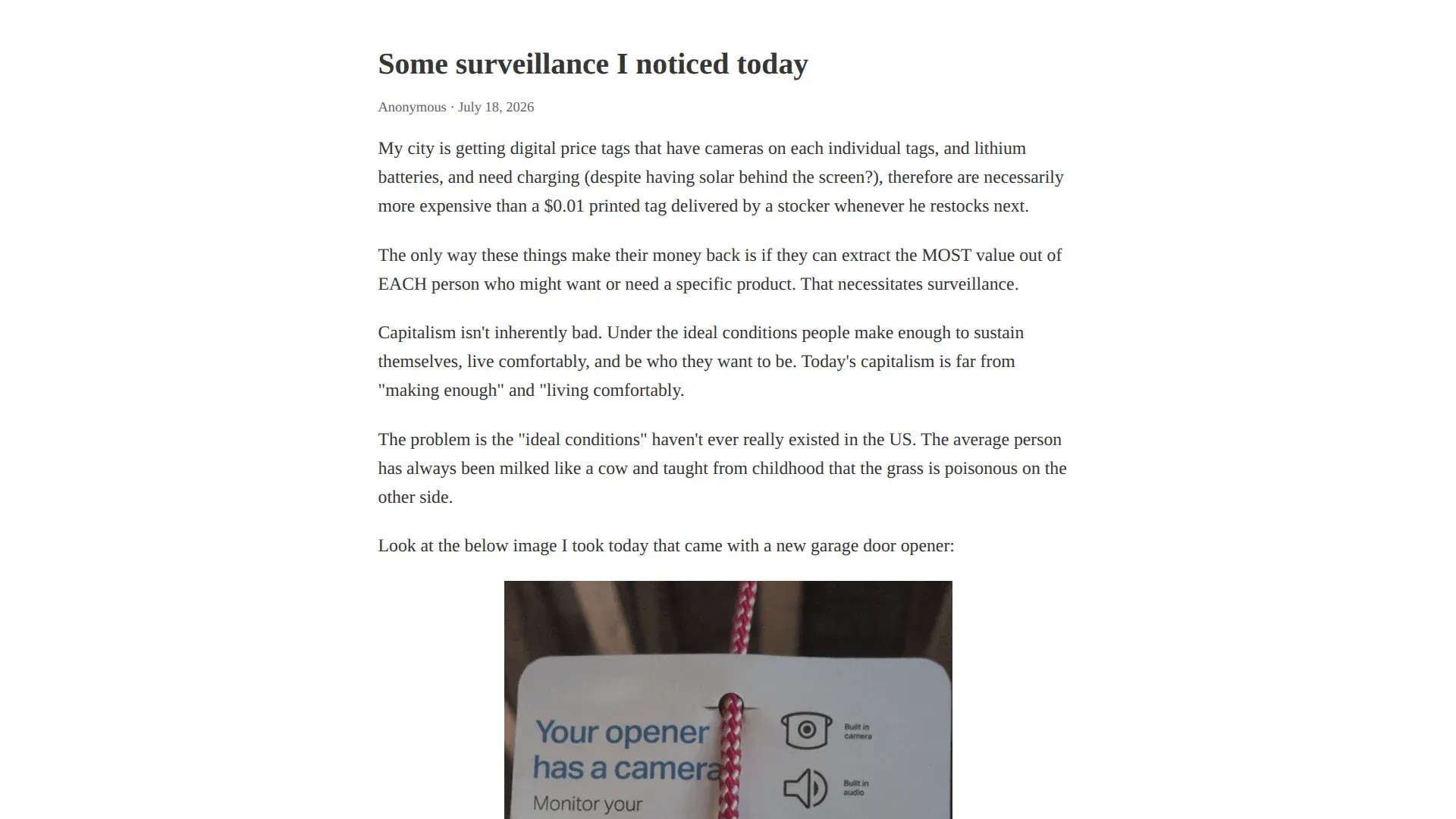
A published page with an embedded image; the image itself is loaded from an external URL, not stored by Nonograph.
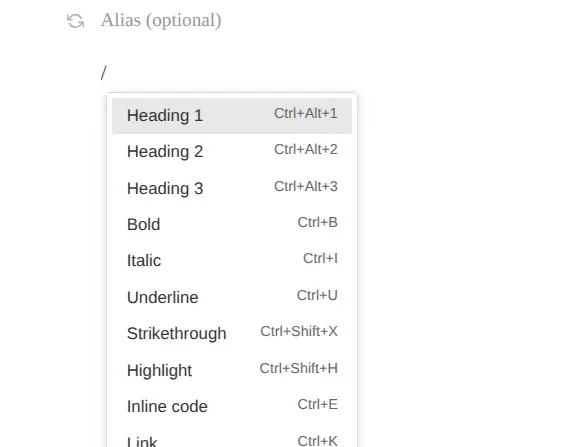
Typing a slash on a new line opens the formatting menu with its keyboard shortcuts.
Source: official Nonograph project page.
Key capabilities
- Run with Docker on Linux, macOS or Windows The documented command starts
ghcr.io/du82/nonograph:latestwith port 8009 published and two volumes:/app/contentfor posts and/var/lib/tor/hidden_servicefor the onion keys. The container runs the app as an unprivilegednonographuser and Tor asdebian-tor, and prints the generated .onion address indocker logs. The Docker guide has Linux/macOS and PowerShell variants. - Docker Compose and Makefile targets
make upbuilds the image from source, starts it with Compose and waits about 30 seconds before printing the onion address;make status,make onion,make logsandmake downcover daily operation. The Makefile can offer to install Docker on apt, yum or pacman systems. Be careful withmake clean: as written it stops and removes every container and image on the host and prunes all volumes, not only Nonograph's. - Native build on Debian The
./runscript targets Debian-based systems with apt only. It installs missing packages, installs Rust through rustup if needed, builds a release binary, writes a hidden-service entry into the system/etc/tor/torrcand starts the server in the background. Review it first on a host that already runs Tor. - Release binaries and Unraid template Each GitHub release provides archives for Linux x86_64, macOS x86_64, macOS arm64 and Windows x86_64 (about 2.5 to 2.7 MB in v0.5.3). These are the web server only, without Tor. An Unraid Community Applications template in the
unraidfolder maps the port, content directory and hidden-service directory. - One-click publishing without accounts The home page is the editor: title, optional alias of up to 32 characters, body and a Publish button with a live counter against the 256,000-character limit. The alias field has a randomize button, and anyone can type any alias, so impersonation is possible by design. The page goes live immediately at its own URL.
- Slash menu, shortcuts and selection toolbar Typing
/on a new line opens a menu of block and inline formats with shortcuts such as Ctrl+Alt+1 to 3 for headings, Ctrl+B, Ctrl+I, Ctrl+U, Ctrl+Shift+X for strikethrough, Ctrl+Shift+H for highlight, Ctrl+E for inline code and Ctrl+K for links. Selecting text shows a floating toolbar with the same inline styles. Markup characters stay visible but dimmed in the editor. - A Markdown dialect with extras The markup guide covers four heading levels, underline, strikethrough, superscript, highlight, blockquotes, reference and inline footnotes, bulleted, numbered and task lists, GitHub-style tables and four divider styles.
#text#creates click-to-reveal secret text, and lines starting with//are hidden from the HTML but remain visible in the raw Markdown. Nested formatting is not supported. - Code blocks with highlighting Fenced blocks accept a language tag from a list of roughly a hundred names and aliases, from Ada and Bash to Zig. Syntax highlighting uses one of nine syntect themes, InspiredGitHub by default. Blocks of 10 or more lines get a Collapse/Expand control, blocks over 256 lines start collapsed, and long lines get a Wrap control; all three thresholds are configurable.
- Embedded images and videos by URL Images (.jpg, .jpeg, .png, .gif, .webp) and videos (.mp4, .webm, .ogg, .mov, .avi, .mkv) are embedded from external URLs, with alt text shown as a caption. The server stores only the URL. Readers' browsers fetch that media directly from the third-party host, which the site's Content Security Policy allows over https and http.
- Several views of every page Each page is available as rendered HTML at
/{id}, as raw Markdown at/{id}.mdand as JSON metadata plus raw content at/{id}.json. Prefixing/nojs/serves the editor or a page with all script tags stripped on the server, for readers who disable JavaScript. - Predictable page addresses Page IDs are built from the transliterated title and the UTC date, for example
my-title-11-07-2026, with a numeric suffix up to 999 when the same title is used on the same day. Titles shorter than three characters receive random characters. IDs only contain letters, digits, hyphens and underscores, which the code uses as its path-traversal boundary. - HTTP API for scripted publishing
POST /api/page/createaccepts form-encodedtitle,content, optionalaliasand acsrf_token, and answers with a 302 redirect to the new page or to/?error=code.GET /api/page/limitsreturns the configured limits as JSON. The plain-text API reference served by each instance is the current specification; there is no authentication, so every created page is public. - Tor onion service and Onion-Location The container configures a hidden service that forwards port 80 to the app. When an onion address is known, from
Config.toml, theONION_URLvariable or Tor's hostname file, HTML responses served over HTTPS or onion carry anOnion-Locationheader so Tor Browser can offer the onion version. Keeping the hidden-service volume keeps the same address across rebuilds. - Flat-file storage with a memory cache Posts are saved by a background worker as Markdown files with front matter for title, date and alias. A cache of up to 128 MB keeps pages in memory and evicts the oldest entries; every 60 minutes it drops posts whose files were deleted. Backup is a copy of the content directory.
- Security headers and sanitization Every response carries a Content Security Policy,
Referrer-Policy: no-referrer,X-Frame-Options: SAMEORIGIN,Cache-Control: no-storeand related headers, and the Server header is removed. Rendered content passes through the Ammonia sanitizer, links are limited to 4,096 characters and form bodies to 512 KB. The policy still permits inline scripts; a source comment marks that for refactoring. - Configurable limits and local strings
Config.tomlsets title, alias and content limits, port and bind address, cache size and purge interval, streaming thresholds for very large posts, CSRF protection and the code-block options.Strings.tomlholds the interface text for each locale, so operators can edit or add translations without recompiling. - Telegraph import Running the binary with
archiveand a telegra.ph URL fetches that page through the Telegraph API, converts it to Nonograph Markdown with its original date where available and stores it in the content directory. This supports moving existing Telegraph pages to a self-hosted instance one URL at a time.
Where Nonograph fits
Running a private publishing endpoint for a group
Start the container with persistent volumes for content and onion keys, put it behind a reverse proxy with TLS if you also want a clearnet name, and confirm that docker logs nonograph prints an onion address. Replace the placeholder content/legal.md with your own policy before inviting writers, because the shipped page only tells operators to do so. Check that the proxy forwards X-Forwarded-Proto if you want the Onion-Location header on the clearnet site.
Publishing a one-off statement or document
Write the text on the home page or in a local editor, preview the formatting with the slash menu, and publish once you are certain: the documented routes offer no way for the author to edit or delete the page later. Leave the alias empty or use a throwaway one. Keep the returned URL, since there is no account history to find it again, and share the /nojs/ variant for readers who disable JavaScript.
Publishing reports from scripts
For automated notes such as status reports or build summaries, read /api/page/limits first, then fetch the home page to obtain a CSRF token and post the form to /api/page/create with --data-urlencode. Follow the 302 redirect to capture the page ID, and treat an error query parameter as a failure. Because the ID includes the date and title, scheduled jobs with the same title on the same day will receive numbered suffixes.
Offering an onion mirror for an existing site
Nonograph's container is a compact way to serve writing over Tor without a separate Tor installation. Back up the hidden-service directory, because it contains the private key that defines the onion address; losing it means a new address. Test the onion URL from Tor Browser, then check that the clearnet responses advertise it through Onion-Location.
Moving pages from Telegraph
Use the archive subcommand with each telegra.ph URL to convert it into a Nonograph Markdown file, then open the resulting page and compare headings, images and the publication date with the original. Images still load from their original hosts, so confirm they remain reachable, and keep a list of old and new URLs for redirects or announcements.
Moderating and removing content as an operator
Public instances accept anonymous posts from anyone, and the bundled API reference warns automated agents against spam. Moderation happens on disk: delete the Markdown file from the content directory and the cache drops the page within the purge interval, 60 minutes by default. Add rate limiting at the reverse proxy, since the application itself does not describe any, and keep server and proxy logs to the minimum your policy promises.
Install
docker run -d --name nonograph -p 8009:8009 -v ~/nonograph/content:/app/content -v ~/nonograph/onion:/var/lib/tor/hidden_service --restart unless-stopped ghcr.io/du82/nonograph:latestReviews of Nonograph
Be the first to share your experience with Nonograph.
Write a review
Loading review form…
Alternatives to Nonograph
 GhostGhost is an open source publishing platform for building a website, sending email newsletters and selling paid memberships, self-hosted or on Ghost(Pro).
 MemosMemos is an MIT-licensed, self-hosted note-taking server written in Go. Short Markdown memos land on a dated timeline with tags, Views, Spaces and per-memo visibility, stored in SQLite, MySQL or PostgreSQL on your own host.