

What is BookWyrm?
BookWyrm is a social network for tracking your reading, writing reviews and discovering what to read next. Each server (an instance) is run by a person or community, and instances talk to each other and to other ActivityPub software such as Mastodon and Pleroma. The project presents this as an alternative to a single centralised reading site: a book club can run its own instance and still follow a friend who lives elsewhere. The project homepage describes it as decentralized, friendly and anti-corporate software.
Day to day, a member shelves books on default to-read, currently reading, stopped reading and read shelves plus custom shelves, records start and finish dates and progress, posts reviews, comments and quotes, sets an annual reading goal, builds lists and joins groups. Federation also shares book and author metadata between instances, so the network gradually builds a shared catalogue. The documentation says it is not primarily meant as a cataloguing tool or a data source for books, although it does both to some extent.
The stack, as listed in the README, is a Django web application with PostgreSQL, Celery with two Redis instances for tasks and activity streams, Django templates with the Bulma CSS framework and a little vanilla JavaScript, and a Docker and docker-compose deployment with Gunicorn, Nginx and Flower for queue monitoring. The repository also contains an Anubis configuration for bot protection. Production installs use the production branch, as explained in the production installation guide, which also warns that the project is young and not yet very stable.
The latest GitHub release at the time of review is v0.9.4, published October 29, 2026. It adds detection and merging of duplicate editions, works, authors and series, with manual and automatic merge options that the notes say should be used with care, plus display changes for books and authors, list sorting and search, and dependency updates including Django 5.2.17. The code is released under the Anti-Capitalist Software License v1.4, which is not an OSI open-source license and limits who may use it. The README asks contributors not to submit AI-generated code or content.
BookWyrm screenshots
Explore the interface. Open a screenshot to view it at full size.
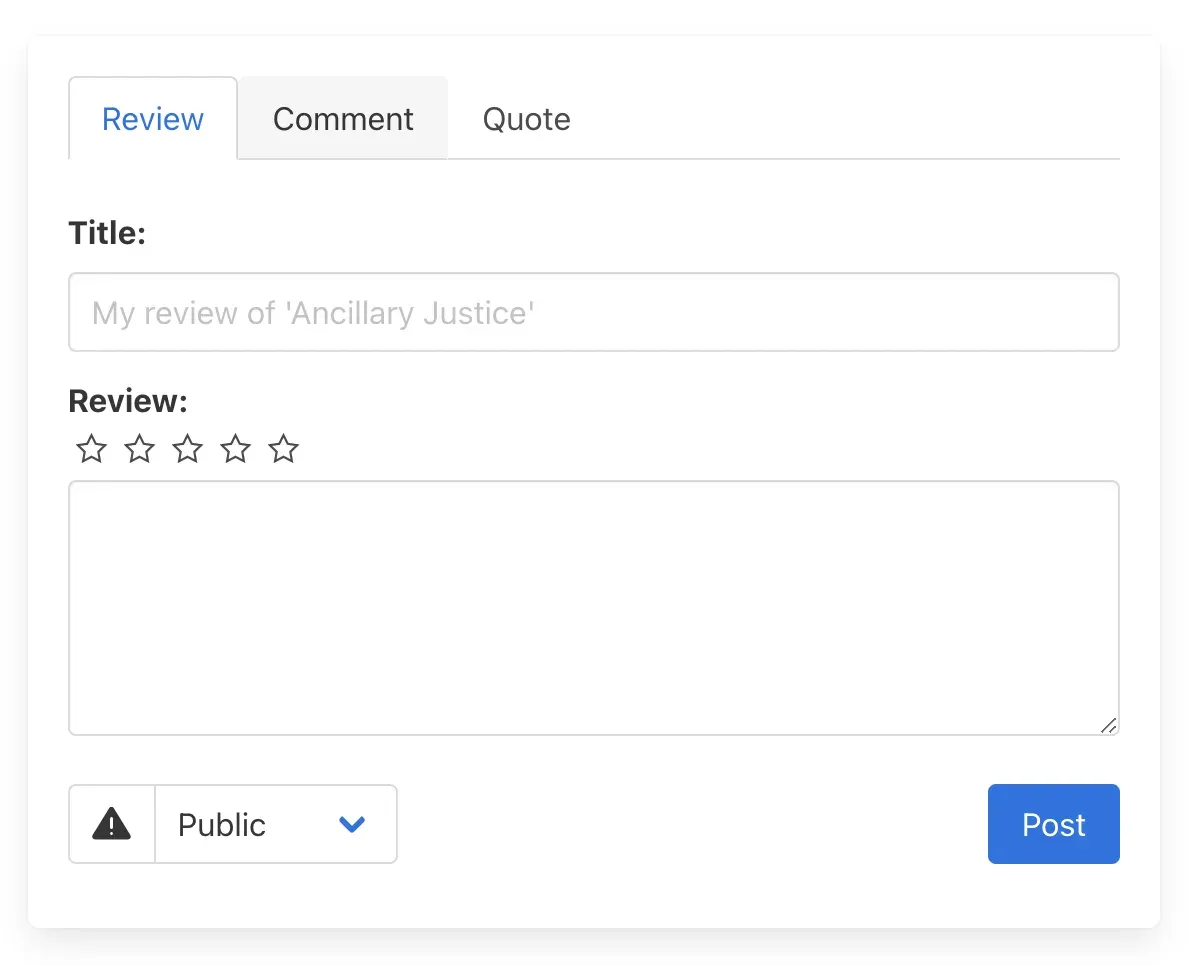
Official project website image of the status composer on the Review tab.
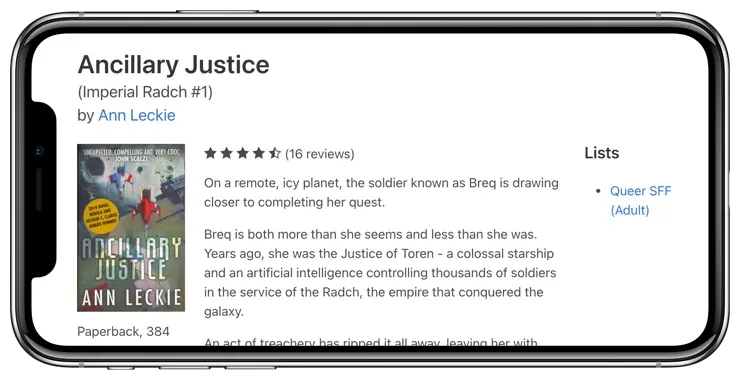
Official project website image of a book page with an aggregate rating, description and list membership.
Source: official BookWyrm project page.
Key capabilities
- Reading shelves and status updates Books move between default shelves for to-read, currently reading, stopped reading and read, with custom shelves added by the user. Start and finish dates and progress updates can be stored and optionally shared with followers. See the shelves guide.
- Reviews, comments and quotes Members can post reviews with or without a rating, comments on a book, quotes or excerpts, and replies. Ratings and reviews are aggregated on the book page, and local and federated reviews are distinguished. The posting guide explains each type.
- Annual reading goal and activity feed Users set a yearly reading goal and follow a feed of what friends are reading. The feed can be filtered, and the latest release separates plain ratings from reviews in the feed.
- Lists and groups Lists of books can be open to submissions from anyone, curated by approval, or edited only by their creator, and the latest release adds sorting, filtering and search within a list. Groups let several users collaborate on group-owned lists. See lists and groups.
- Privacy controls Each post can be public, unlisted, followers-only or direct, and warnings can be added. The privacy controls page lists the options, and administrators can also limit which instances they federate with.
- Federation through ActivityPub Users on one instance can follow and interact with users on others, including other BookWyrm instances and Mastodon-style servers. BookWyrm adds extended activity types for book data that only BookWyrm instances understand. The FEDERATION.md file documents the implementation for other developers.
- Book data sources and manual entry Adding a book searches the local database, connected BookWyrm servers and public sources such as Open Library, and users can create a book manually when no match exists. Identifier fields include ISBN, Open Library, Inventaire, LibraryThing and BNF IDs. See adding books.
- Importing from other services Import files can come from Calibre (CSV), Goodreads (CSV), LibraryThing (TSV), Open Library (CSV), StoryGraph (CSV) and OpenReads (CSV). The import reads an export file rather than pulling from the other service, and matches are searched in the local database, connected servers and public sources, so not every record is guaranteed to match.
- Export, aliases and account moves Account export produces a tar.gz file with profile, avatar, most settings, reading goals, shelves, reading history, reviews, statuses, lists, follows and blocks, but not direct messages, replies, groups or favorites. Aliases and a Move Account feature let people migrate between instances. See user migration.
- Duplicate detection and merging Administrators can enable automatic flagging of duplicate book records and give users permission to merge editions, works, authors, series and suggestions. The release notes call merging potentially destructive and advise manual review before automatic merging. Options are under Admin, then Manage Data.
- Moderation tools Users can report statuses or accounts, administrators are notified, and a moderator can message the user, delete the status or deactivate the account. Auto-moderation rules create reports from matching text, and instances can be blocked. See the moderation guide.
- Administration and settings Admins manage registration, invite requests, site themes, instance settings, email, data quality views and user permissions through the admin area. Optional features include generated preview images for books, users and the site, enabled by an environment setting.
- RSS feeds Users can expose feeds of their activity for readers outside the network, described on the RSS feeds page. As with any feed, check what a post privacy setting means for feed output.
- Docker production deployment The production branch includes docker-compose configuration, Nginx, Let's Encrypt certificate initialisation and the bw-dev helper script for secrets, migration and setup. A dockerless production guide is available as well. The update guide explains pulling code, rebuilding images and migrating.
- External storage Static files and media can be kept on S3-compatible storage, Apache Libcloud or SFTP through django-storages. The external storage guide was tested against Scaleway Object Storage and recommends sharing experiences with other providers.
- Queue monitoring and management commands Celery tasks run imports, exports and federation deliveries, and Flower shows the queues. Management commands handle repairs, such as the series repair command added in the latest release, and are listed in the documentation.
- Developer environment A developer setup with docker-compose and a bw-dev script runs the app locally, with Django debug toolbar notes, code review guidance and tests using pytest. See the development install.
- Translations and community Interface translations are managed through Crowdin, and the documentation invites contributions from non-programmers. Funding is requested through Patreon and Open Collective.
Where BookWyrm fits
Running an instance for a book club
Provision a small server with Docker, a domain, TLS and an email service, deploy the production branch and create the admin account with the setup code. Decide on open registration, invites or approval before inviting anyone, and check that email delivery works for password resets and notifications. Put the instance behind a reverse proxy only after reading the reverse proxy guide, and set up database and media backups on day one.
Moving off a centralised reading site
Export your data from the old service, import it into BookWyrm through Settings and compare shelves, ratings and dates. Expect some books not to match, check them manually and add missing editions. Keep the original export file in case a later import is needed, and tell members which fields, such as private notes or custom tags, may not carry over.
Federating with the wider network
Review which instances you allow, follow a few accounts on Mastodon-style servers, and confirm that a review you post appears for them with the right privacy. Read the federation documentation before relaxing blocks, and plan moderation for content arriving from other servers. Watch the Celery queues after enabling federation, because delivery to many followers can create bursts of work.
Maintaining the shared catalogue
Use data quality views, duplicate flags and merge permissions to keep editions and authors tidy. Turn on automatic flagging, review suggested merges by hand and take a database backup before any bulk merge.
Moderating a community
Set reporting rules, add auto-moderation terms, train moderators on report handling and write a code of conduct and publish it where members register. Test deactivating a local and a remote account and decide how you will handle appeals.
Contributing or translating
Set up the developer environment, pick a good first issue and follow the contributing guide, noting the project's rule against AI-generated contributions. Translations and documentation improvements do not require programming.
Reviews of BookWyrm
Be the first to share your experience with BookWyrm.
Write a review
Loading review form…
Related to BookWyrm
 MastodonMastodon is free, open-source social network server software. Each server runs its own community and moderation rules, and federates with other Mastodon and ActivityPub servers. It runs on Rails, PostgreSQL, Redis and Node.js.
 PixelfedPixelfed is an AGPL-3.0 photo and video sharing platform built on Laravel. Each server keeps its own accounts, media and moderation, uses chronological feeds without ads, and federates over ActivityPub. Official iOS and Android apps are available.