

What is OneHuman?
OneHuman, published as the onehumanai npm package from OneHumanAI/onehuman, is a session-protection layer for web applications whose customers let AI agents act inside their signed-in accounts. Its README summarises the idea as bot protection after login: when a customer hands a browser session to Claude, ChatGPT or Codex, the server sees the same cookies, IP address and browser, so OneHuman tries to tell a person from an agent inside that session and applies a rule per endpoint. The rule can allow the request, mask sensitive fields, ask the account owner for a passkey, or block.
The target reader is a B2B SaaS team whose product holds customer lists, invoices, settings or exports. The README says plainly what it is not: it is not workforce AI security and does not control agents run by your own employees, and it does not cover native mobile apps, server-to-server API keys, or Go, Ruby and PHP backends. Express 4 and 5, Connect, plain node:http and a Next.js custom server are supported; Python, .NET and Java backends work through a sidecar started with npx onehumanai sidecar.
The repository contains the engine (signals, assessment, a pointer-kinematics model, policy, audit log, WebAuthn, Web Bot Auth and storage on SQLite or libSQL), a browser SDK, the Express middleware, a CLI with init, verify, scan, inspect and report commands, and adapters. The latest npm release is 0.8.0, last modified on October 9, 2026; the repository has no GitHub releases, and Node 22.13 or newer is required. The project is young: the repository was created in September 2026, and the README roadmap still lists Fastify and Next.js adapters and a touch layer for mobile browsers as open items.
Licensing is split. The browser SDK, middleware, CLI, sidecar, proof verifier and language adapters are Apache-2.0, while the engine is under the Business Source License 1.1, which the README says grants production use, including protecting your own apps, but not offering OneHuman itself as a competing hosted or embedded product. Versions before 0.4.0 were MIT. That makes the project source-available rather than fully open source. The company is OneHuman Inc., and the official site is onehuman.ai, which was returning a deployment-disabled error when iThub checked, so this profile relies on the repository.
OneHuman screenshots
Explore the interface. Open a screenshot to view it at full size.
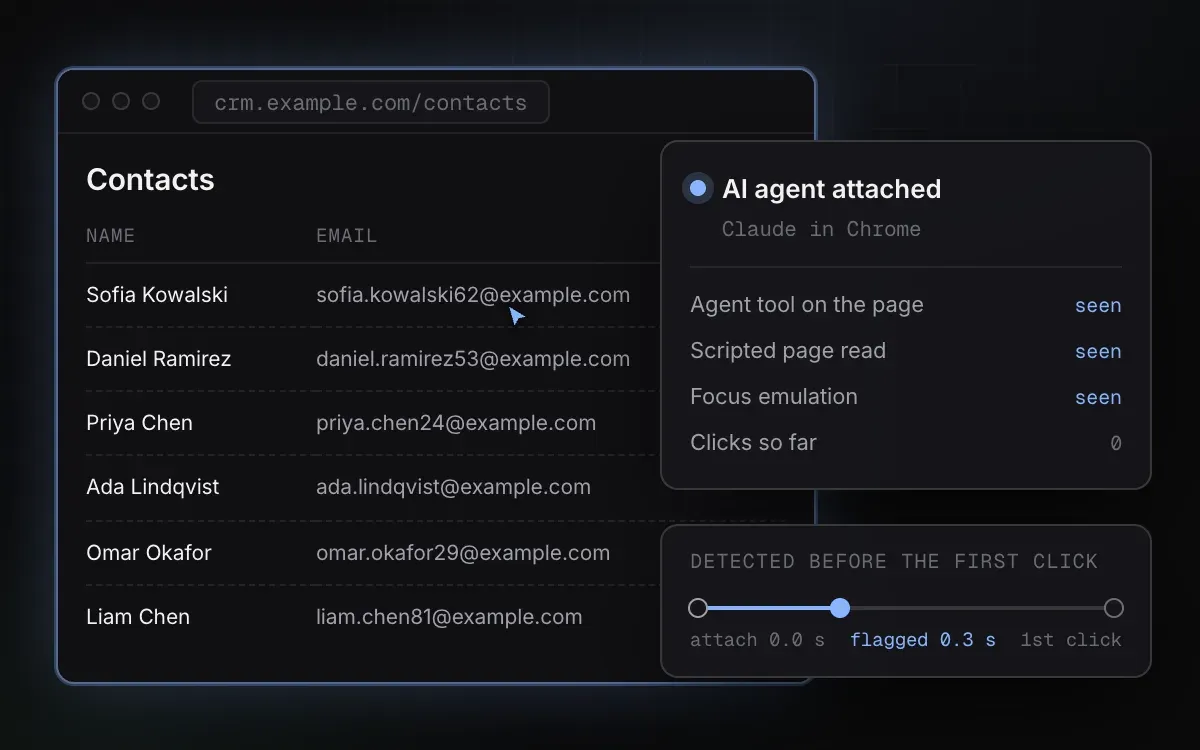
Official README illustration of attach-time detection. It uses synthetic example contacts.
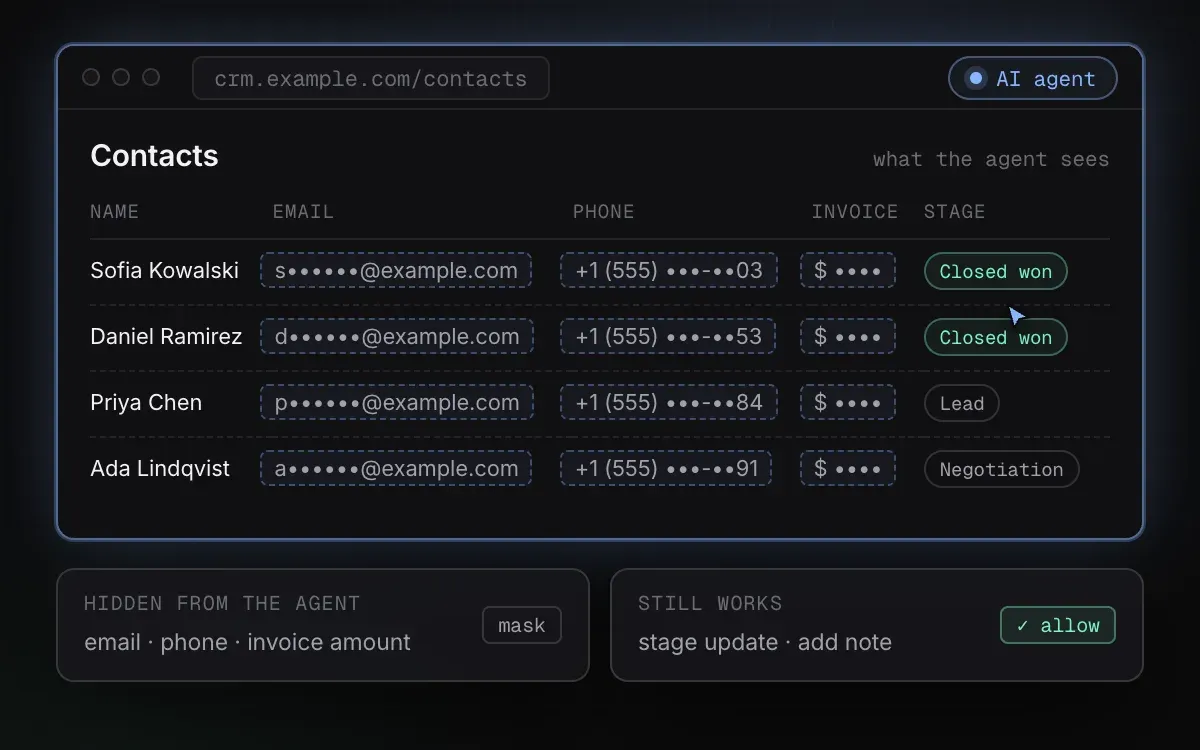
Official README illustration of field masking for an agent, with synthetic example data.
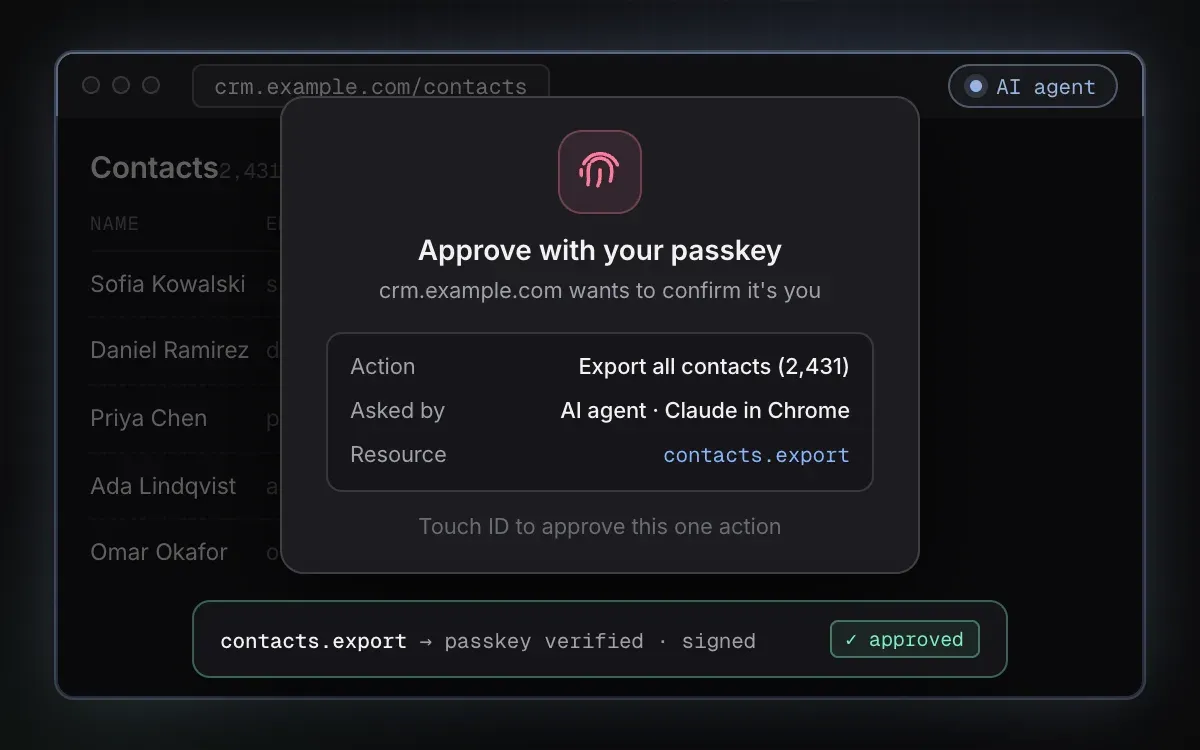
Official README illustration of a passkey step-up for an export, using synthetic data.
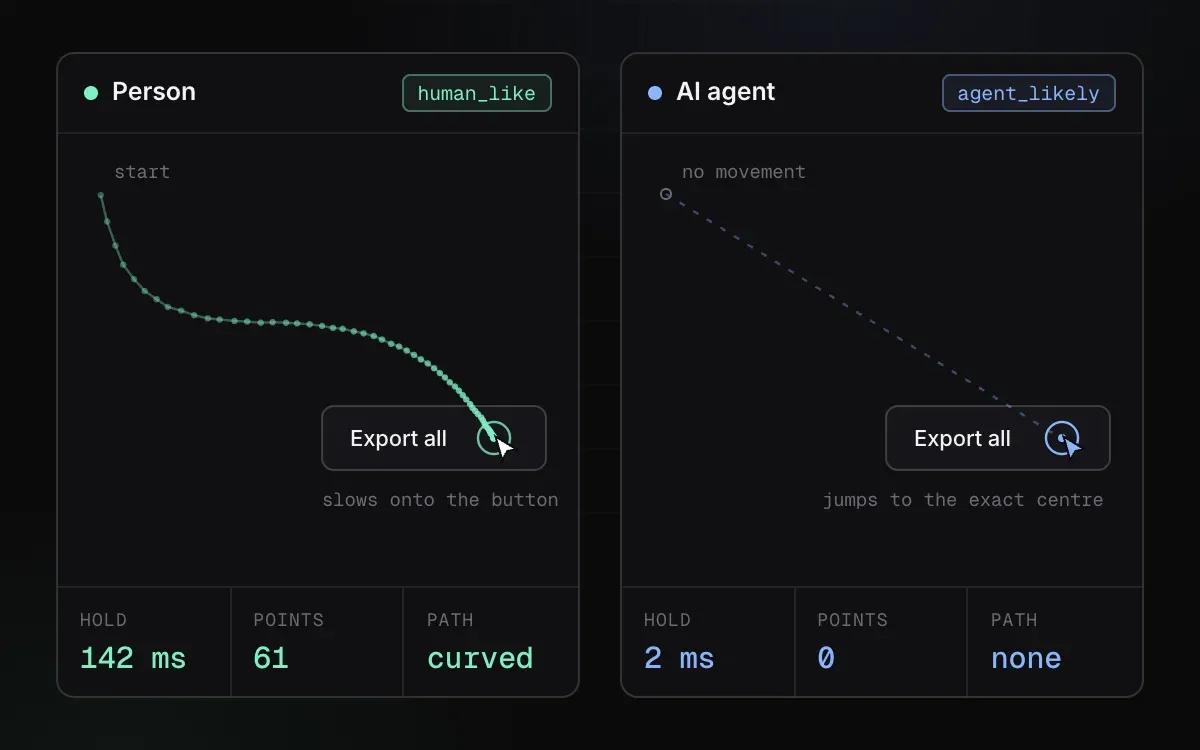
Official README illustration comparing human and agent pointer kinematics.
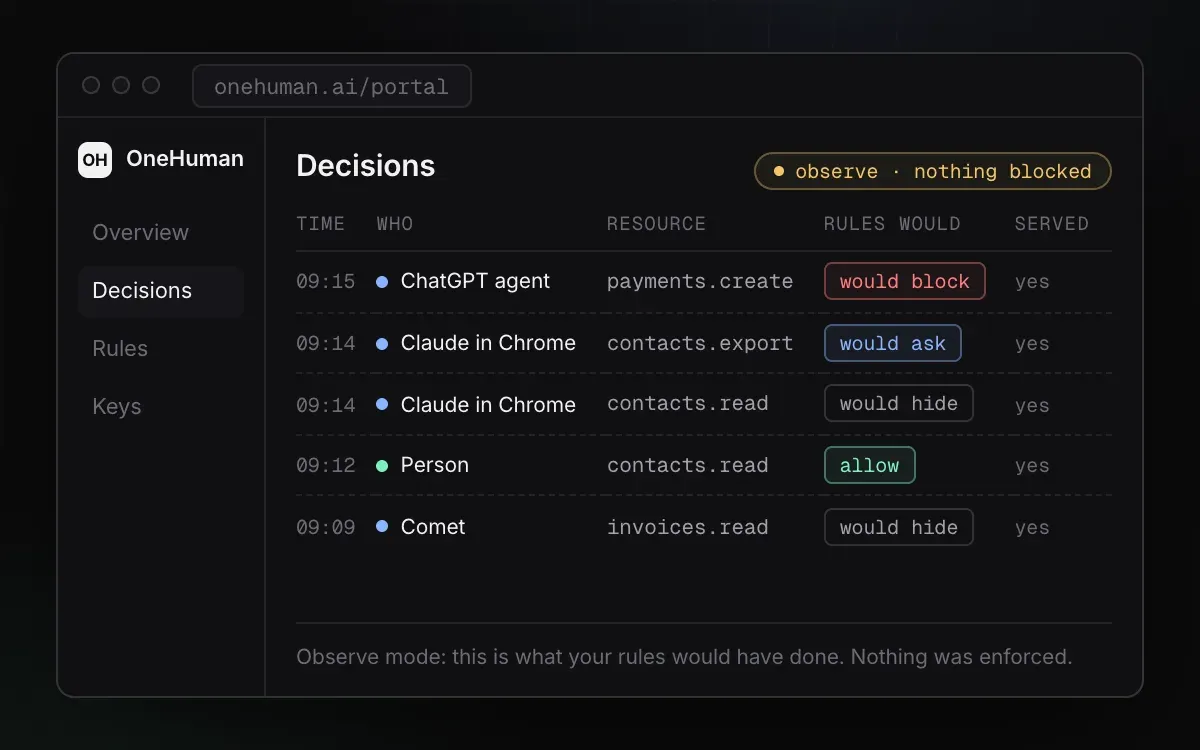
Official README illustration of the portal in observe mode, with synthetic decisions.
Source: official OneHuman project page.
Key capabilities
- Attach-time agent detection The browser SDK looks for traces that agent tools leave in a page and flags an agent when it attaches, before its first click. The README reports flags about 0.1 to 0.3 seconds after attach in its examples. Detection is a heuristic, and the README documents a case that gets through.
- Published test results The README tabulates results against Claude in Chrome (37 of 37 steps caught), the Claude desktop app (10 of 10 clicks), Codex in Chrome and its built-in browser, and plain Puppeteer or Playwright. A stealth script written for one site got through in 16 of 16 runs, and 395 of 397 human clicks read as human. These are the vendor's own measurements.
- Per-endpoint policy Each protected resource has a rule with branches such as
onAgent,onArtifact,onUnknownandonHumanLike, each resolving to allow, mask, step-up or block. Unknown is its own outcome and is never treated as human. Rules live in a JSON file such asonehuman.policy.json. - Field masking For an agent, emails, phone numbers and invoice totals turn into dots before the agent reads them, while other actions such as updating a stage keep working. On the server,
oh.sendapplies the masking function you write for that endpoint. - Passkey step-up Exports, deletes and billing changes can require the owner's passkey (Touch ID or Windows Hello), and the endpoint returns a 428 until confirmed. The agent cannot approve its own request. Money-moving actions ask everyone for a passkey by default because a stealth script can pass the click check.
- Pointer kinematics The SDK compares pointer paths, hold time and click timing, such as a curved path with a 142 ms hold against a 2 ms jump-and-click. A person is let in by their own click. The README says two of 397 human clicks in its test were asked for a passkey instead of being blocked.
- Signed decisions and offline verification Every allow, mask or approval is signed with Ed25519 on your server and written to a hash-chained log.
npx onehumanai verify-proofchecks proofs offline using your published keys, so an auditor does not need to trust the vendor. - Observe mode In observe mode nothing is blocked, but each decision is logged as what would have happened. The docs recommend running this for the first week or two and reviewing
npx onehumanai reportor the portal before switching rules to enforce. - Fail-open behaviour If OneHuman is slow or fails, requests continue as before and the failure is signalled in a header and at
/onehuman/health. This protects availability, but it means a failure also removes protection, so alert on the health endpoint. - One-command setup
npx onehumanai initreads your app, lists routes an agent could misuse, asks what to protect and whether to observe first, and shows each change before writing. For Express it wires the middleware, andnpx onehumanai verifythen runs four checks against a URL. - Express middleware and browser script The middleware is added with
app.use(oh.middleware()), endpoints are guarded withoh.protect('customers.read'), and a script tag serves the SDK from your own server. The README says there is no proxy, no third-party script and no network call on the request path. - Language adapters via sidecar Python (Flask, Django, FastAPI), .NET and Java backends talk to a sidecar process started by the CLI, with adapters in the repository's
packagesfolder. Go, Ruby and PHP backends are listed as not yet supported. - Local data storage Decisions, sessions and the audit chain are stored in SQLite by default or libSQL if configured, on your own disk. The quickstart says the browser SDK collects click timing, pointer paths and agent traces, and never page content, typed text, form values, request bodies, names, emails or IP addresses.
- Portal and signed policy updates An optional hosted portal shows activity, lets owners mark decisions right or wrong and gives a 30-day report. Self-hosted engines can receive signed agent-signature updates, checked every 6 hours. Portal pricing and terms were not available to iThub.
- Coding-agent install protocol An
AGENTS.mdfile defines how Claude Code or Codex should install it: analyse, propose, ask, implement and verify. This lets an assistant wire the package under your review. - Security reporting The repository publishes a security policy with private reporting, a 72-hour acknowledgement target and a 14-day fix target. Detection bypasses are treated as welcome research and credited on the measurements page.
Where OneHuman fits
Protecting customer data from agents in the session
List the endpoints that return customer lists, invoices or settings, and give each a rule. Start with masking for agent traffic on read endpoints, then check what a real agent sees by opening your app in Claude in Chrome or another agent browser. Confirm that people's normal clicks are unaffected.
Gating exports, deletes and billing changes
Mark the high-impact actions as requiring a passkey and test the flow with the account owner's device. Confirm that the agent cannot proceed after a 428 response, and decide what happens for accounts without a registered passkey, since the step-up depends on WebAuthn support in the customer's browser.
Rolling out in observe mode
Install with npx onehumanai init, run in observe mode for one or two weeks and use npx onehumanai report to review decisions that would have been blocked, asked or hidden. Mark false positives, tune the rules, then switch individual rules to enforce rather than the whole policy at once.
Producing an audit trail
Keep the signed decision log and publish the proof keys. For an audit or an incident review, run verify-proof on exported proofs and confirm the hash chain is intact. This shows what the server decided, not who was at the keyboard, which is a limit worth stating to auditors.
Wiring a non-Node backend
For Python, .NET or Java, run the sidecar and install the matching adapter from the repository. Check the latency of the extra hop in staging and decide how the fail-open header is monitored, because the sidecar adds a process to operate.
Testing for bypasses
Use the verify command and your own agent scripts against a staging copy. The README says a script written for one site can pass the click check, so rely on passkeys for critical actions. Report working bypasses through the repository's issue template or security contact.
Install
npx onehumanai initReviews of OneHuman
Be the first to share your experience with OneHuman.
Write a review
Loading review form…
Related to OneHuman
 HankoHanko is an AGPL-3.0 authentication backend written in Go, with MIT-licensed web components. It handles passkeys, passwords, passcodes, MFA, social and SAML SSO, sessions and webhooks, self-hosted on PostgreSQL or MySQL or on Hanko Cloud.
 Better AuthMIT-licensed TypeScript authentication framework that runs in your own app and database. Plugins add 2FA, passkeys, organizations, SAML SSO, SCIM, an OAuth 2.1 provider and MCP auth. Optional managed dashboard and security services.