

What is SuperDelete?
SuperDelete is a Windows utility for deleting files and folders whose paths exceed the classic MAX_PATH limit of 260 characters, which Explorer and the del or rmdir commands can fail to remove. It uses extended-length paths with the \\?\ prefix together with the Unicode Win32 functions for enumerating and deleting files, which supports paths up to 32,767 characters. Microsoft documents this mechanism in Naming Files, Paths, and Namespaces. With administrative rights, SuperDelete can also bypass ACL checks, which the README describes for disks moved from another machine or Windows installation.
The repository navanem/superdelete is maintained by Navanem and is a fork of the original marceln/SuperDelete command-line tool, created in 2015; the source files carry a 2015 copyright notice by Marcel Nita. The code is licensed under the Apache License 2.0. Navanem's version 2 restructured the code into a shared deletion engine with two front-ends: SuperDelete.exe, the command-line tool with the original switches and output, and SuperDeleteUI.exe, a WPF desktop app.
Version 2.1.0 (June 14, 2026) added 16 unit tests for the engine, persistence of recent paths and the selected theme, a determinate progress percentage after an Analyze step, an offer to relaunch as administrator when Bypass ACL is enabled, dark-mode fixes and a new icon. Version 2.1.1 fixed a transparent status bar, simplified the window layout and replaced the menu bar with an About button; its release attaches self-contained single-file executables for Windows x64 (SuperDeleteUI.exe, about 72 MB, and SuperDelete.exe, about 35 MB). The latest release, v2.1.2 (September 6, 2026), adds .NET 8 restore, test and build validation in CI and Dependabot, contribution, security and protected-branch configuration, and states that deletion behavior is unchanged.
All three projects target net8.0-windows. SuperDelete.Core contains the engine, exposed through IDeletionService and IPathAnalyzer, and reports progress through IProgress<DeletionProgress>. The technical notes state that the recursion and Win32 calls of the original tool were kept verbatim, including FindFirstFileW, DeleteFileW, RemoveDirectoryW, backup-semantics deletion, reparse-point handling and read-only attribute clearing. The legacy .NET Framework 3.5 to 4.6 project files were dropped. The tool is Windows-only because it depends on kernel32, advapi32, ntdll and WPF.
The engine is fail-fast: it stops at the first error and returns a structured result with the status Success, Partial, Failed, Cancelled or PreviewCompleted. Deleted items are removed permanently; the notes list an optional Recycle Bin mode, a multi-path queue, localization and signed artifacts as future improvements, not current features. Other Windows utilities on iThub include RoboSync, a Robocopy front-end from the same maintainer, and WinDirStat for disk usage analysis.
SuperDelete screenshots
Explore the interface. Open a screenshot to view it at full size.
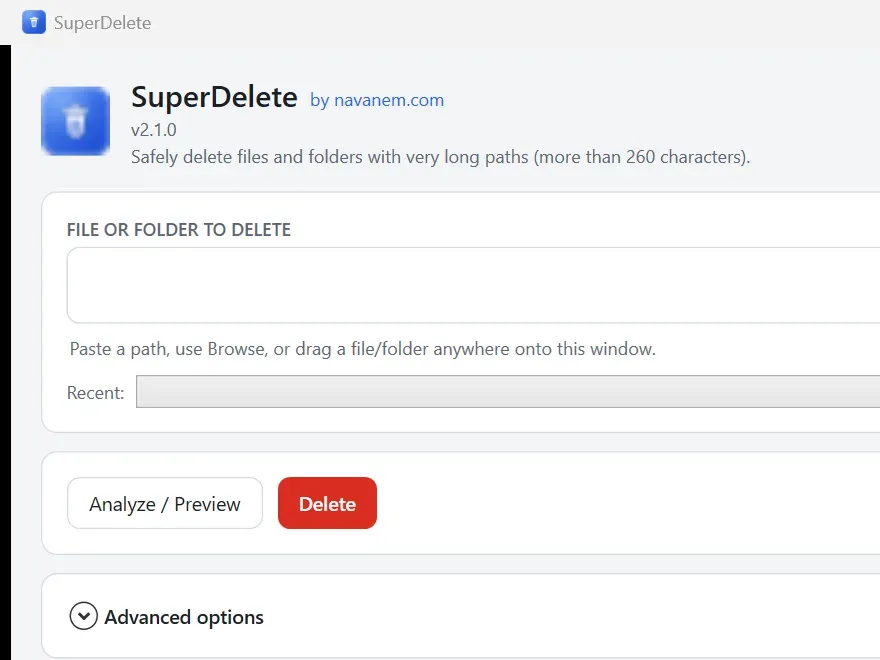
Source: official SuperDelete project page.
Key capabilities
- Long-path deletion engine The shared engine deletes single files and whole folder trees through extended-length
\\?\paths and Unicode Win32 calls, which supports paths up to 32,767 characters. It clears read-only attributes, handles reparse points and uses backup-semantics deletion throughCreateFileandNtSetInformationFile, as listed in the technical notes. - Command-line tool
SuperDelete.exetakes one file or folder path and asks for confirmation before deleting. The switches-sor--silentModeskip the prompt,--bypassAclbypasses ACL checks and--printStackTraceprints the full call stack on error; switches can be combined in any order. The console output matches the original tool, ending with a count of deleted files and folders and the elapsed time. - WPF desktop app
SuperDeleteUI.exeis a single-window utility for users who do not want to use a terminal. A header shows the name, version and a short description, with an About button and a dark mode toggle. - Path input options The target path can be typed, pasted, chosen with Browse file or Browse folder, or dropped onto the window by drag and drop. A Recent dropdown lists previously used paths, which are saved between sessions since version 2.1.0.
- Analyze and preview The Analyze / Preview action reports the type (file or folder), whether the path exists, the path length with a badge when it exceeds 260 characters, and item counts. It shows an amber note for access, ACL or reparse-point concerns and a red warning before a recursive deletion. Preview walks the tree with the same extended-length enumeration, so counts are correct for long paths, and it never changes the disk.
- Preview only mode The advanced option Preview only runs a dry run that counts items without deleting anything. In the engine this is
DeletionOptions.PreviewOnly, and it never requests administrator privileges. - Bypass ACL When the process runs as administrator, SuperDelete can enable the privileges needed to delete items regardless of their ACLs. The UI shows an indicator when the option is enabled and, since version 2.1.0, offers to relaunch elevated when the option is selected without admin rights. For the CLI, the README describes starting the executable with Run as administrator.
- Explicit confirmation A real deletion in the desktop app always asks for confirmation and names the target and the item count. The CLI asks for confirmation unless silent mode is set.
- Progress and cancellation A progress bar shows the current item and a live count of files and folders, and a percentage when a previous Analyze provided the total. Deletion runs on a background thread, the window stays responsive, and a Cancel button stops the operation mid-run.
- Activity log and diagnostics A timestamped real-time log has a Clear button and a collapsible Technical details panel with stack traces when something fails. The option Show diagnostic details adds further diagnostic output.
- Result status A colored status bar reports the outcome: green for success, amber for cancelled or partial, red for failure. Partial means that some items were removed before an error stopped the fail-fast engine.
- Light and dark themes The app ships light and dark theme dictionaries that can be switched at runtime, and the chosen theme is stored with the recent paths in
%AppData%\SuperDelete\settings.json. - Self-contained executables The v2.1.1 release provides single-file executables for Windows x64 that need no .NET installation:
SuperDeleteUI.exefor the desktop app andSuperDelete.exefor the command line. - Build from source Building requires the .NET 8 SDK and runs with
dotnet build SuperDelete.sln -c Release. The README documents thedotnet publishcommands that produce self-contained, compressed single-file builds of both front-ends. - Tests and CI The engine has unit tests for nested trees, paths over 260 characters, read-only files, preview counts, cancellation, the analyzer and path utilities. A GitHub Actions workflow on
windows-latestrestores, tests and builds the solution on every push to master and on pull requests.
Where SuperDelete fits
Removing a folder tree that Explorer cannot delete
When a nested folder structure exceeds 260 characters, Explorer, del and rmdir can fail with path errors. SuperDelete takes the top-level folder path, enumerates the tree with extended-length paths and deletes files and folders recursively. In the desktop app the folder is selected with Browse folder or dropped onto the window, and the deletion starts after an explicit confirmation that names the target and item count.
Inspecting a path before deleting it
The Analyze / Preview action, or the Preview only option, walks the target and reports whether it exists, its path length, and the number of files and folders, with warnings for access or reparse-point concerns. Nothing is changed on disk in this mode. A following deletion then shows a determinate progress percentage based on that total.
Cleaning up a disk from another Windows installation
Files on a drive moved from another computer or Windows installation can carry ACLs that block deletion for the current user. With administrator rights, the --bypassAcl switch or the Bypass ACL option enables the required privileges for the operation. The README describes right-clicking the executable and choosing Run as administrator; the desktop app can also offer to relaunch elevated.
Scripted deletion from the command line
SuperDelete.exe -s "C:\path\to\folder" deletes without a confirmation prompt, which allows use in batch files or scheduled scripts. Adding --printStackTrace prints the full call stack when an error occurs. Because the engine stops at the first error, a run can end with a partial result.
Diagnosing a failed deletion
When a deletion fails, the desktop app shows a red status, logs the event with a timestamp and opens a Technical details panel with the stack trace. Show diagnostic details adds more output to the log. The structured result distinguishes a failure before any change from a partial deletion.
Building the executables from source
The README documents dotnet publish commands for win-x64 with PublishSingleFile and EnableCompressionInSingleFile, which write the desktop app to dist/ui and the command-line tool to dist/cli. Both target net8.0-windows and need the .NET 8 SDK to build.
Reviews of SuperDelete
Be the first to share your experience with SuperDelete.
Write a review
Loading review form…
Related to SuperDelete
 RoboSyncOpen-source C# and WPF desktop application for Windows 10 and 11 that builds and runs Robocopy commands for copy, mirror, move and one-way sync jobs, with a live command preview, progress, log files and saved JSON jobs.
 WinDirStatWinDirStat is a GPL v3 disk usage analyzer for Windows that scans drives, shares and cloud storage and finds large or duplicate files.BBleachBitBleachBit is a GPLv3 cleaner that removes files to free disk space and maintain privacy, with a preview step and a command line interface.