

What is Temps?
Temps is a self-hosted deployment platform written in Rust. It deploys applications from a Git provider or a Docker image, then adds the services teams usually buy separately: managed databases, web analytics, session replay, error tracking, OpenTelemetry traces and logs, uptime checks, transactional email, AI sandboxes and an OpenAI-compatible AI gateway. The project describes it as one binary that replaces a stack such as Vercel, Sentry, PostHog, Pingdom, Resend and E2B. The main site is temps.sh and the documentation is at temps.sh/docs.
The code lives in the gotempsh organization on GitHub and is dual-licensed under MIT or Apache 2.0, with forks and rebranded or commercial distributions allowed if the notices are kept. Installation is a script run on a fresh Linux server: it installs Docker if missing, sets up PostgreSQL with TimescaleDB, registers Temps as a service and issues HTTPS certificates. The docs ask for at least 2 vCPUs, 4 GB of RAM and 20 GB of SSD, with ports 22, 80 and 443 open. Multi-node mode lets worker servers join a control plane for container workloads.
Versioning needs care. The latest non-prerelease on GitHub is v0.0.8, published on March 31, 2026, with Linux amd64 and macOS binaries, an install script and a Homebrew formula. The documentation and changelog describe a newer 0.1.0 line: its changelog lists beta.61 on November 6, 2026, and GitHub also carries nightly builds, all marked as prereleases. The docs say stable APIs stay compatible within 0.1.x, while web analytics, session replay, error tracking and OpenTelemetry carry a Beta label and the AI features carry an Experimental label.
Pricing is stated on the pricing page: self-hosting is free, a self-hosted Premium edition with SAML SSO, SCIM, a per-project firewall, approval gates and a tamper-evident audit log costs $399 per organization per month, and Temps Cloud, a hosted control plane for servers you already run, is $29 per month in an invite-only beta (prices as of November 3, 2026).
Temps screenshots
Explore the interface. Open a screenshot to view it at full size.
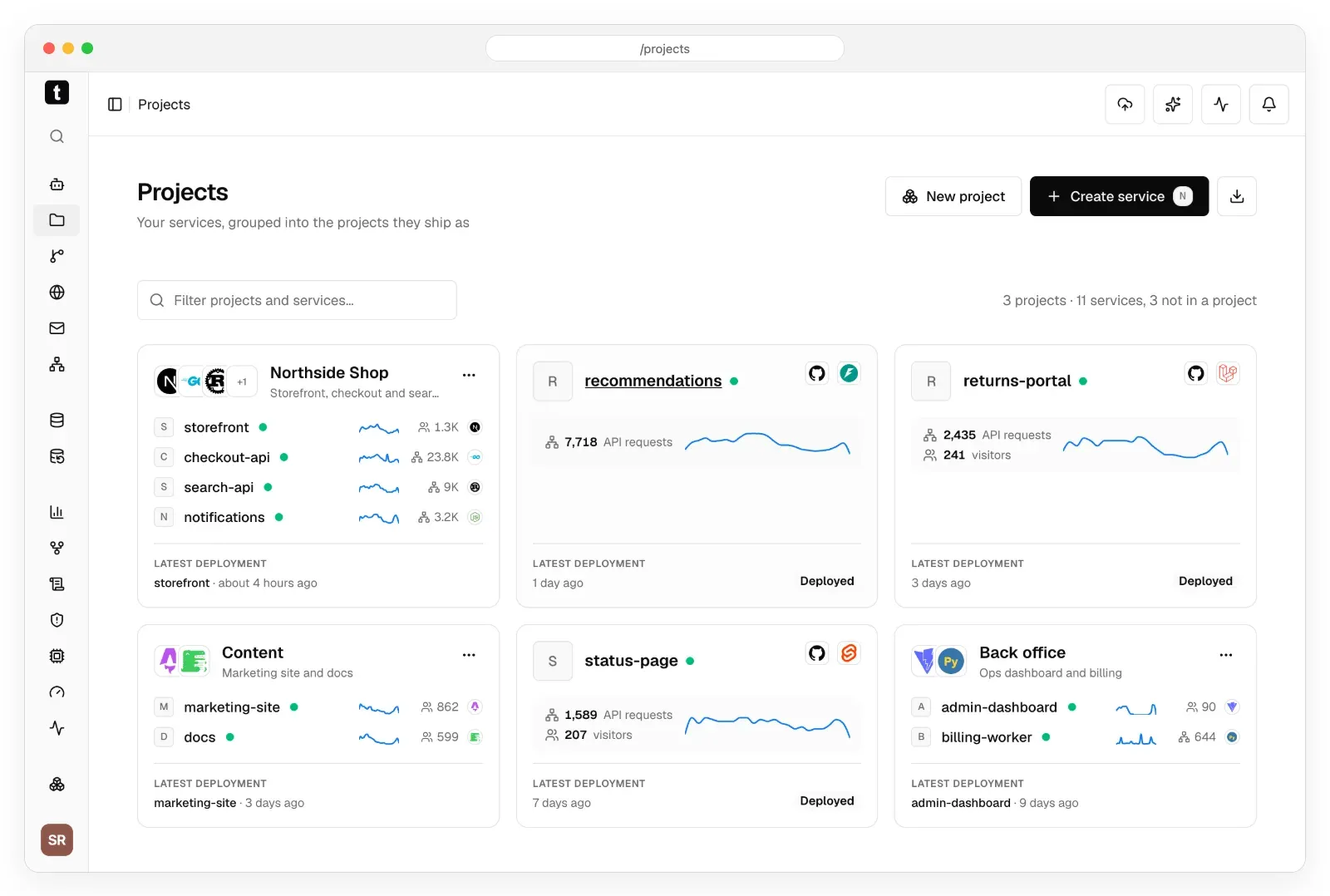
Official README screenshot: projects with their services, traffic and latest deployment. Sample data.
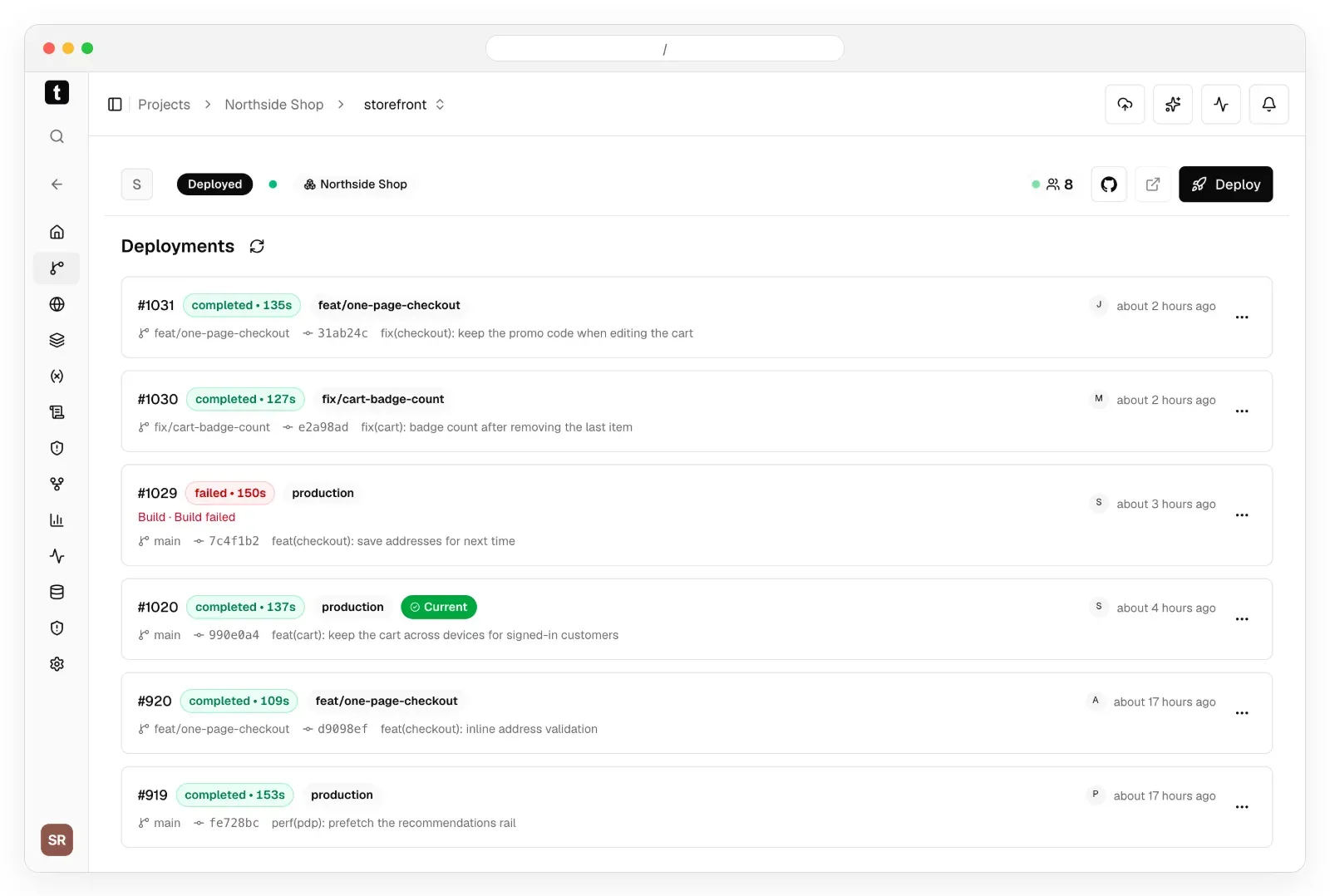
Official README screenshot of the deployments list, including a failed build and the current production release. Sample data.
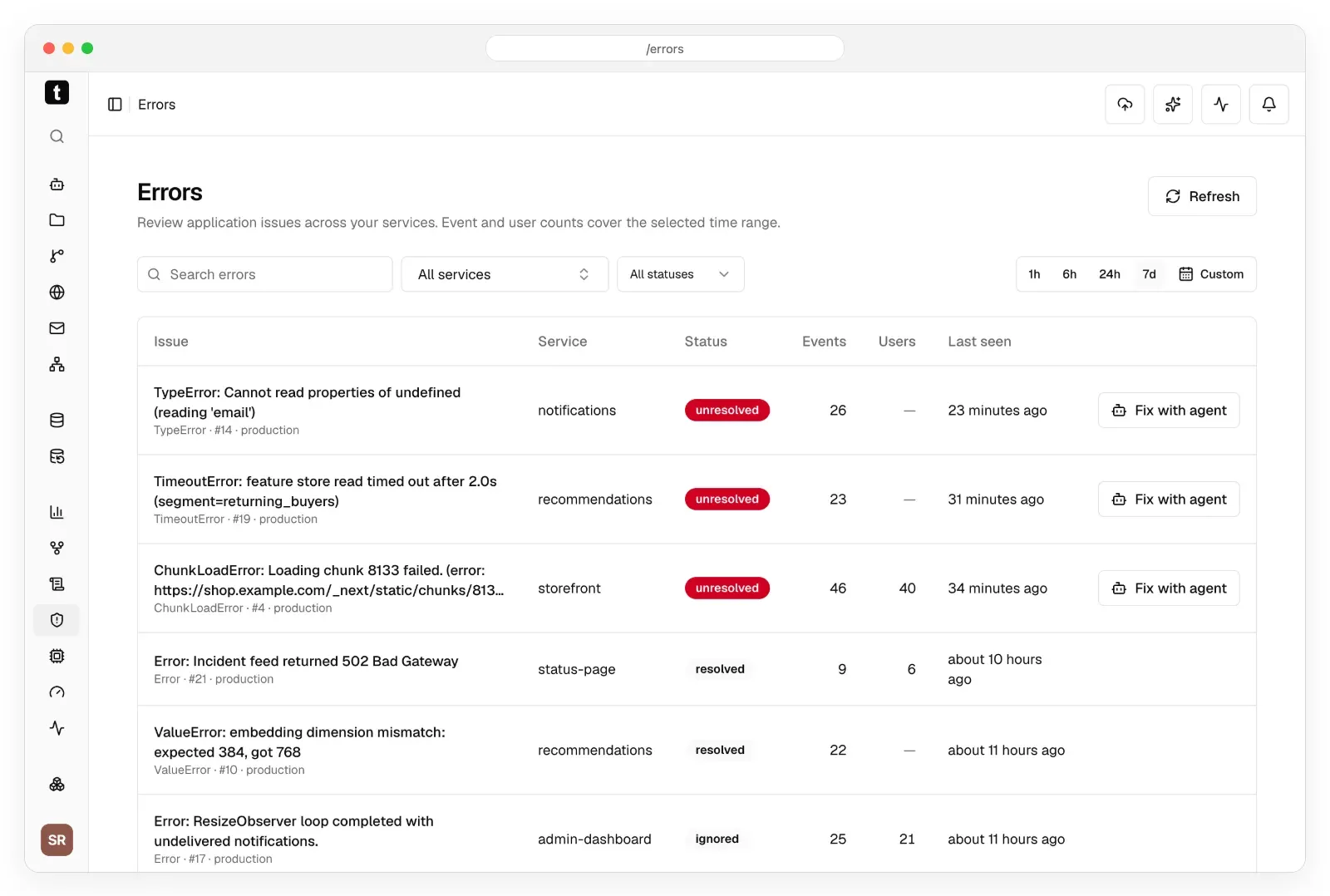
Official README screenshot of Sentry-compatible error tracking. Sample data.
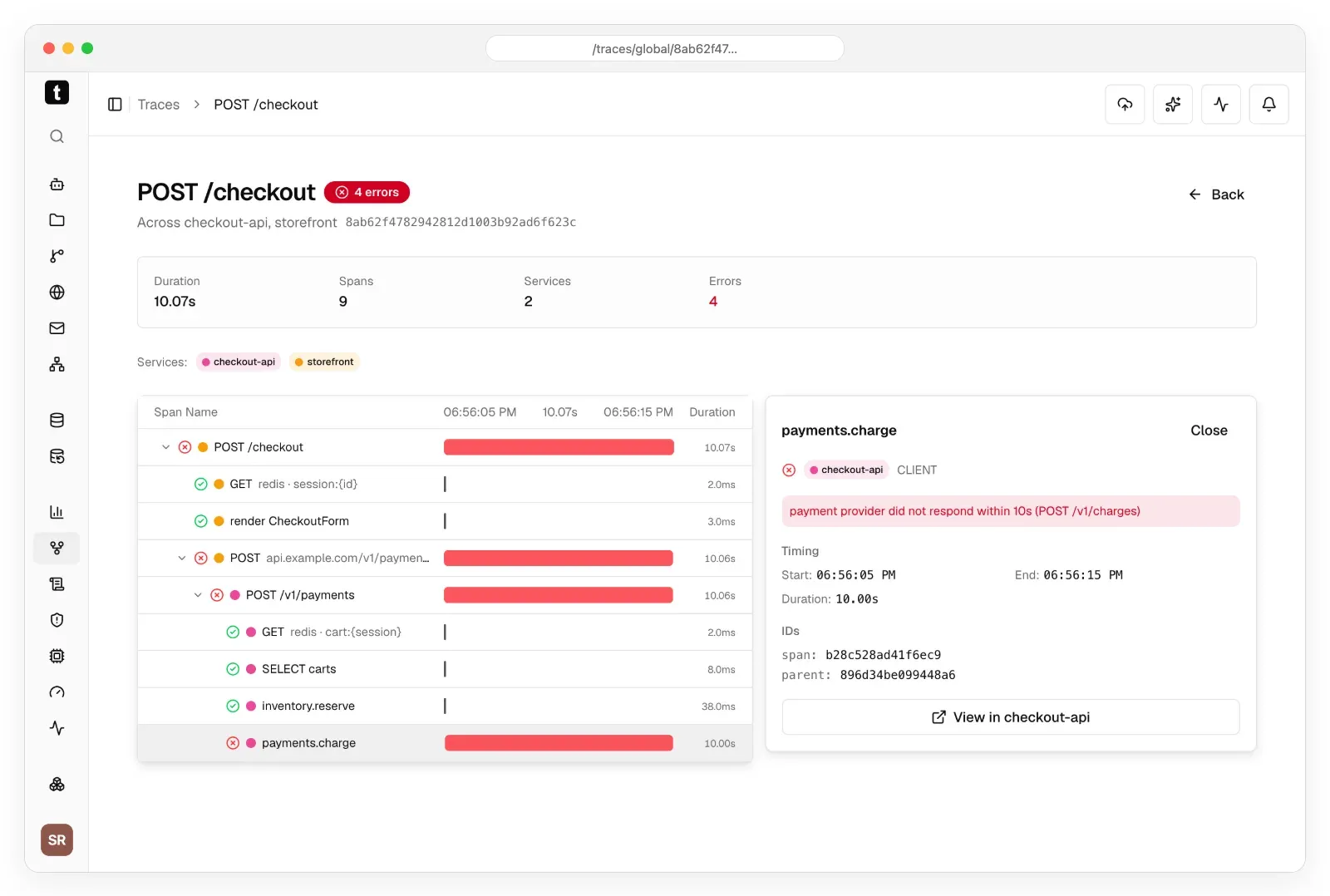
Official README screenshot of a trace that follows one request to the failing span. Sample data.
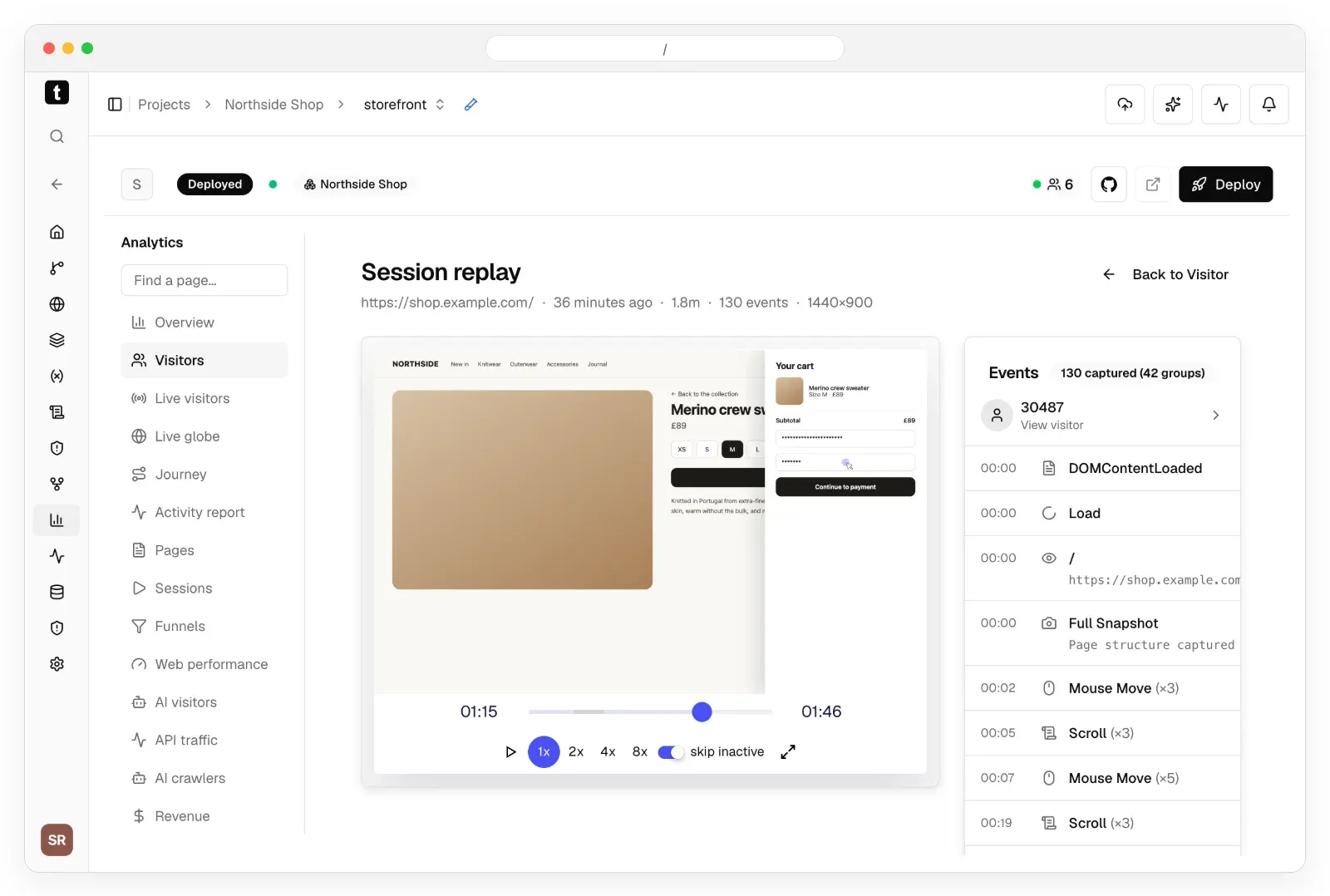
Official README screenshot of session replay with masked inputs and the event list. Sample storefront.
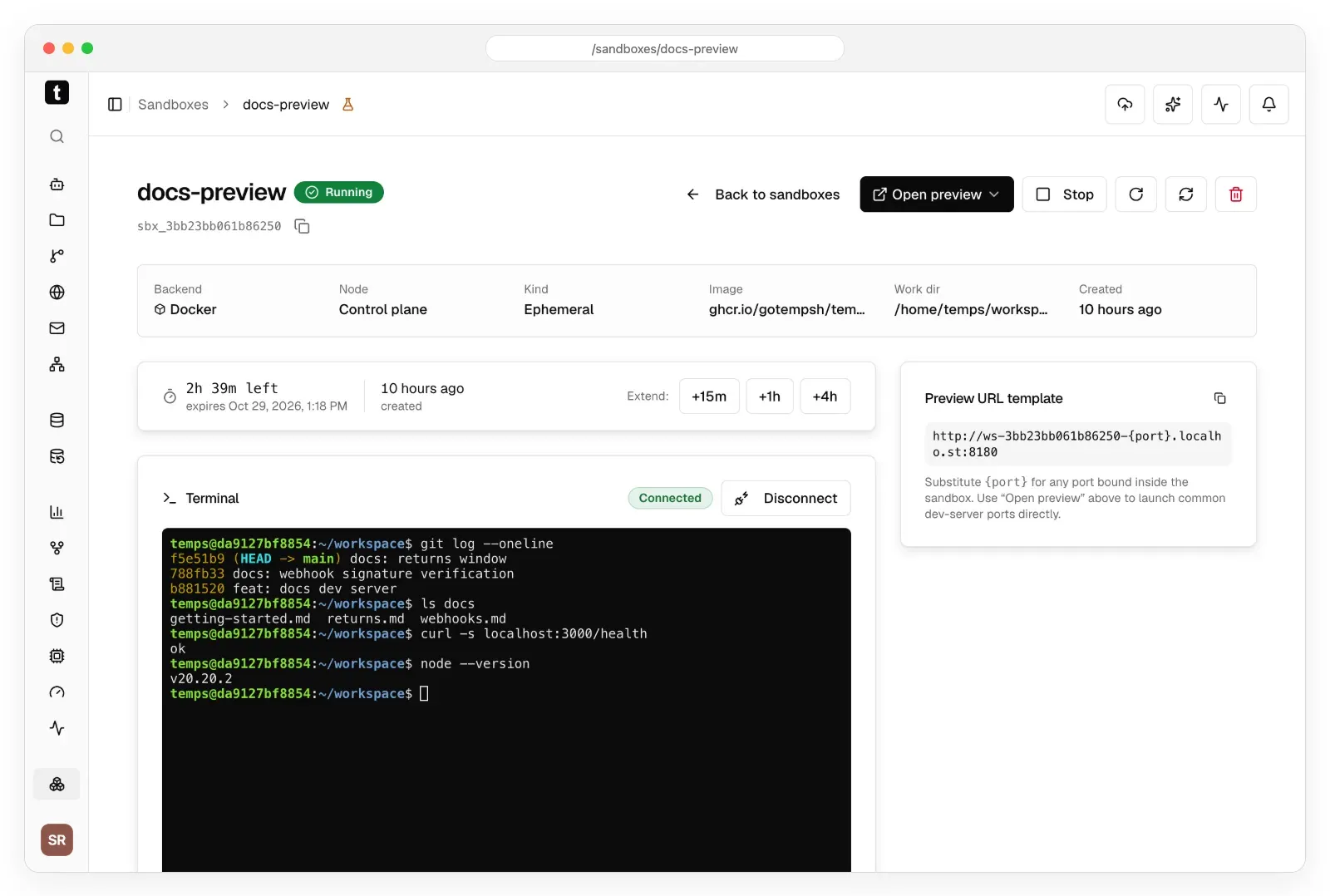
Official README screenshot of an ephemeral sandbox with its terminal and preview URL. Sample data.
Source: official Temps project page.
Key capabilities
- Install on a VPS The documented route is a script from temps.sh run on Ubuntu 22.04 or 24.04, Debian 11+ or a RHEL-family server. The quickstart suggests downloading and reading the script before running it, then choosing local, quick (an sslip.io domain with automatic HTTPS) or advanced mode with your own domain. The wizard prints the console URL and the admin password.
- Binaries and Homebrew The v0.0.8 release provides Linux amd64 and macOS amd64 and arm64 archives with SHA-256 files, plus an install script and a Homebrew formula. The homepage also advertises a desktop app called Temps Fleet for macOS. Linux ARM64 binaries appear in the 0.1.0 beta line, not in v0.0.8.
- Git push to deploy Projects connect to GitHub, GitLab, Bitbucket or Gitea and deploy on push, with preview URLs per branch and zero-downtime rollouts. Languages are auto-detected, or you can supply a Dockerfile or Docker Compose file. A failed build shows its cause in the deployments list.
- Managed databases and storage The console can provision PostgreSQL, Redis, MongoDB, MariaDB and S3-compatible storage (RustFS) next to your apps. Scheduled backups go to an S3-compatible bucket you configure, using WAL-G or dump tools depending on the engine. App containers and their volumes are not backed up, so keep that in mind for stateful apps.
- Domains and TLS Custom and wildcard domains get automatic Let's Encrypt certificates, with expiry shown per domain. A built-in reverse proxy based on Pingora routes public traffic to containers on the control plane or on workers.
- Web analytics and funnels Visitors, pages, sources, funnels, live visitors and web performance are collected by your own server. The docs label the analytics data model as Beta, so expect changes between releases.
- Session replay Recorded visits play back with an event timeline, skip-inactive and speed controls, and form inputs masked by default. Replay is a Beta feature, and recordings are personal data you must handle under your own privacy policy.
- Sentry-compatible error tracking Point an existing Sentry SDK at a Temps DSN and errors are grouped using stack traces and a locally computed vector similarity, with source maps and trace correlation. A Fix with agent button hands an issue to a coding agent.
- OpenTelemetry traces and logs OpenTelemetry ingest shows a request across services down to the failing span, and container and request logs are searchable in one view. Retention and volume controls are labeled Beta and may change.
- Uptime, status pages and alerts Health checks, status pages, alert rules and Web Vitals monitoring are included. Notification channels need to be configured before they are useful, as the production checklist stresses.
- Transactional email Send through SMTP or Amazon SES with DKIM and view each message with delivery, opens and clicks. You need a sending domain and a provider account, and sender reputation stays your responsibility.
- AI sandboxes Isolated Docker or Firecracker sandboxes run code with a terminal and preview URLs. The docs mark the sandbox features as Experimental.
- AI gateway One OpenAI-compatible endpoint under /api/ai/v1 fronts OpenAI, Anthropic, Gemini and xAI with your own provider keys, stored encrypted, plus usage and estimated cost per model. Gateway rate limiting and cost attribution are listed as incomplete.
- CLI, SDKs, MCP and skills A CLI published as @temps-sdk/cli, a Node SDK, a React analytics SDK, MCP servers and agent skills let tools such as Claude Code, Codex and Cursor install Temps, connect and run console operations. The README describes an unattended-agent setup with a dedicated API key.
- Importers and migrations Importers bring apps, environment variables, domains and database data from Coolify, Dokploy, CapRover, Portainer, Kubernetes, Kamal and plain Docker, and migration guides cover Vercel, Netlify, Heroku, Railway, Render and Fly.io. The importers are labeled Beta.
- Teams, SSO and audit Teams with roles and API keys, OIDC sign-in and audit logging are documented. SAML, SCIM and the tamper-evident audit log belong to the paid Premium edition.
Where Temps fits
Replacing a managed deployment platform
Install Temps on a server sized for your apps, connect a Git provider and deploy a staging app first. Compare build times, preview URLs and rollbacks with your current host, and move DNS only after the production checklist items for backups, TLS and alerts are done. Keep the old host running for a few days so you can switch back if a build or a certificate misbehaves.
Moving from Coolify, Dokploy or Kubernetes
Use the importer for your current platform to bring apps, environment variables, domains and databases across, then review each result by hand. Run the old and new stacks in parallel, check that database data arrived intact and keep a rollback path, since importers are labeled Beta in the docs.
One place for errors, traces and logs
Point your Sentry SDK and an OpenTelemetry exporter at the instance, then reproduce a failing request. Confirm that the error links to its trace and logs, and test how long data is retained before you rely on it for incident review. Also check disk growth, because logs, traces and replays are stored in your own database.
Privacy-conscious product analytics
Use the built-in analytics and funnels for sites where visitor data must stay on your own server. Decide which pages may be replayed, check that sensitive fields are masked and document the retention period in your privacy notice.
Giving coding agents a sandbox
Run agent-generated code in an isolated sandbox with a preview URL instead of on a developer laptop. Treat the feature as Experimental, set expiry times and review the sandboxes documentation for backend and isolation differences between Docker and Firecracker.
Operating several servers
Add worker nodes to a control plane to spread containers across machines. Plan the network, enrollment security and failure behavior from the multi-node guide first, because requests still enter through the control plane.
Install
curl -fsSL https://temps.sh/deploy.sh | bashReviews of Temps
Be the first to share your experience with Temps.
Write a review
Loading review form…
Alternatives to Temps
 CoolifyCoolify is an open-source, self-hostable platform for deploying apps, databases and 360+ one-click services to your own servers over SSH.
 DokployDokploy is an open-source, self-hostable deployment platform on Docker and Traefik for apps, databases and Docker Compose stacks, with an optional paid cloud.
 CapRoverCapRover is a free, self-hosted PaaS under the Apache 2.0 license that deploys apps from a dashboard, CLI, webhook or Git workflow onto Docker Swarm.