

What is Horilla?
Horilla HRMS is a free and open-source human resource management system for companies that want employee records, hiring, time, leave, pay and reviews in one web application. The source code is published at github.com/horilla/horilla-hr under the GNU Lesser General Public License v2.1, the product site is horilla.com and the user and technical manuals are at docs.horilla.com. The website footer describes Horilla as an open-source product by Cybrosys Technologies, and the about page states that Cybrosys, based in Kerala, India, started building Horilla in 2021.
The application covers employee management with LDAP integration, recruitment, onboarding and offboarding, attendance with biometric integration, leave, payroll, performance management, asset management, an HR helpdesk, project management with timesheets, employee documents, role-based dashboards and reports, and spreadsheet import of master data. A token-based REST API serves the companion mobile app, and integrations listed in the README include LDAP, Google Meet, Google Drive backup and WhatsApp. Geofencing, face detection and Outlook (Microsoft 365) mail ship in the repository as optional apps that are not enabled by default. A public live demo runs at demo.horilla.com.
Horilla is distributed in three ways. The official Docker image horilla/horilla-hr is published for linux/amd64 and linux/arm64, the repository contains a Docker Compose setup with a production profile, and a manual installation runs from source with Python 3.12, 3.13 or 3.14. The vendor also operates Horilla Cloud, a managed service, and offers an Enterprise plan with on-premises or private cloud deployment. The default 2.0 branch holds the stable v2 code, dev/v2.0 is the integration branch for contributions, and the v1 branches (1.0 and master) are deprioritized.
The latest GitHub release, 2.4.0 (November 10, 2026), is a payroll and recruitment release. It adds Arrears and Recovery payroll entries with an Excel import, speeds up payslip generation with per-employee caches and parallel slices, reworks the payroll batch page, adds a Vacancy step and job position headcounts to the recruitment pipeline wizard, and adds offboarding task management, asset category counts and a Service Request tab. It fixes four privately reported vulnerabilities, including bank and payroll fields exposed through the generic export and uploaded files readable by any signed-in user. In production Docker setups, the web container's port 8000 is now published on 127.0.0.1 only, so access from other machines goes through nginx. Release 2.3.0 (November 3, 2026) was a security release that disabled new Python tax formulas by default and introduced the HORILLA_TRUSTED_PROXIES setting. Every change is listed in the changelog.
The stack is Python with Django 5.2, HTMX and jQuery on the front end, PostgreSQL 16 and Redis 7 in the Docker setup, Gunicorn as the application server and nginx in the production profile. Scheduled jobs such as automatic payslips, leave resets, contract expiry and reminders run in a separate scheduler process. The same vendor publishes Horilla CRM, a separate sales CRM application with its own repository at github.com/horilla/horilla-crm; the CRM page on the website describes Horilla HR as a separate, independent app without CRM features. Other HR software on iThub includes Workday, listed in the HR and Payroll category.
Horilla screenshots
Explore the interface. Open a screenshot to view it at full size.
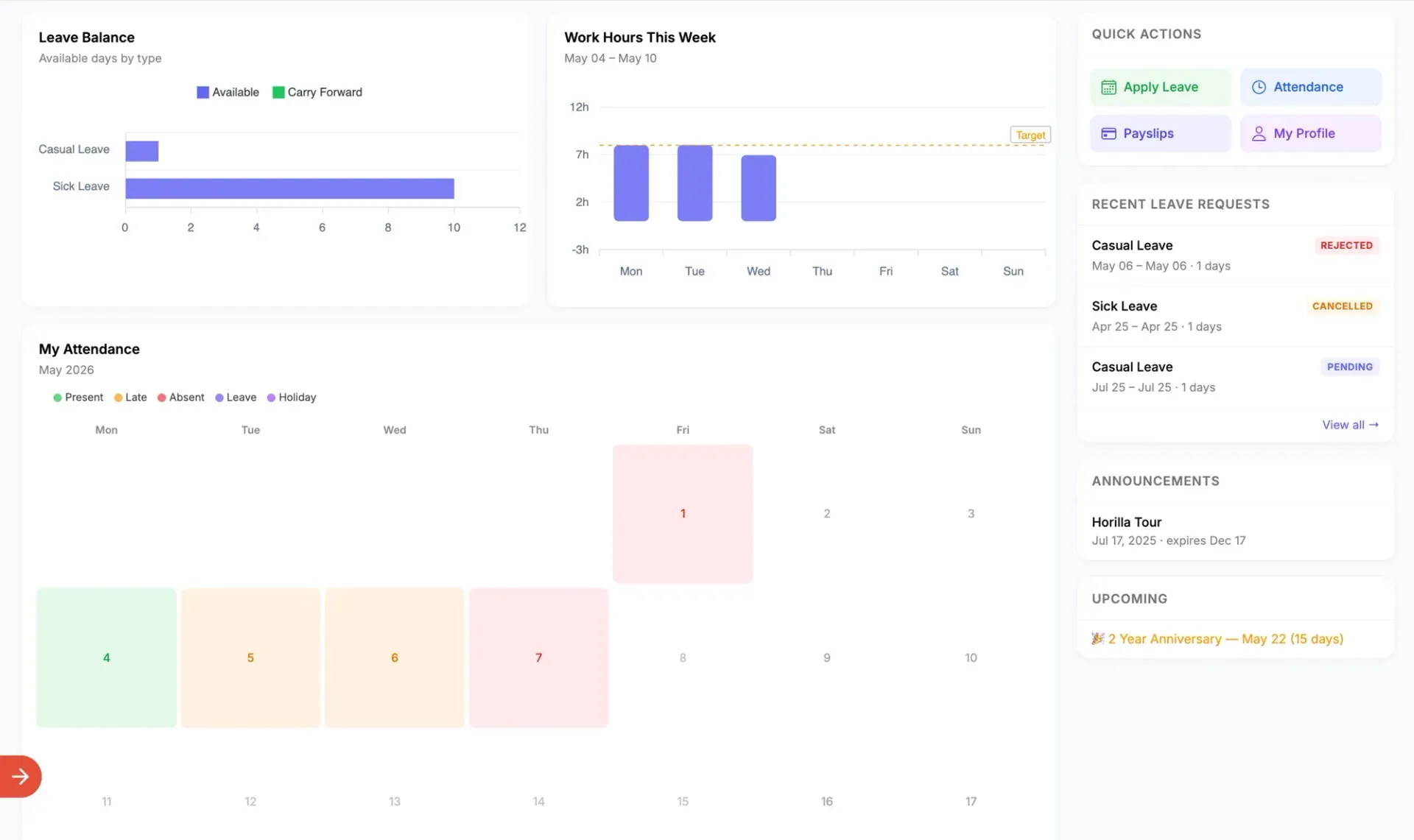
Employee self-service dashboard from the official website, with leave balance, work hours this week, a monthly attendance calendar and recent leave requests. Shows sample data.
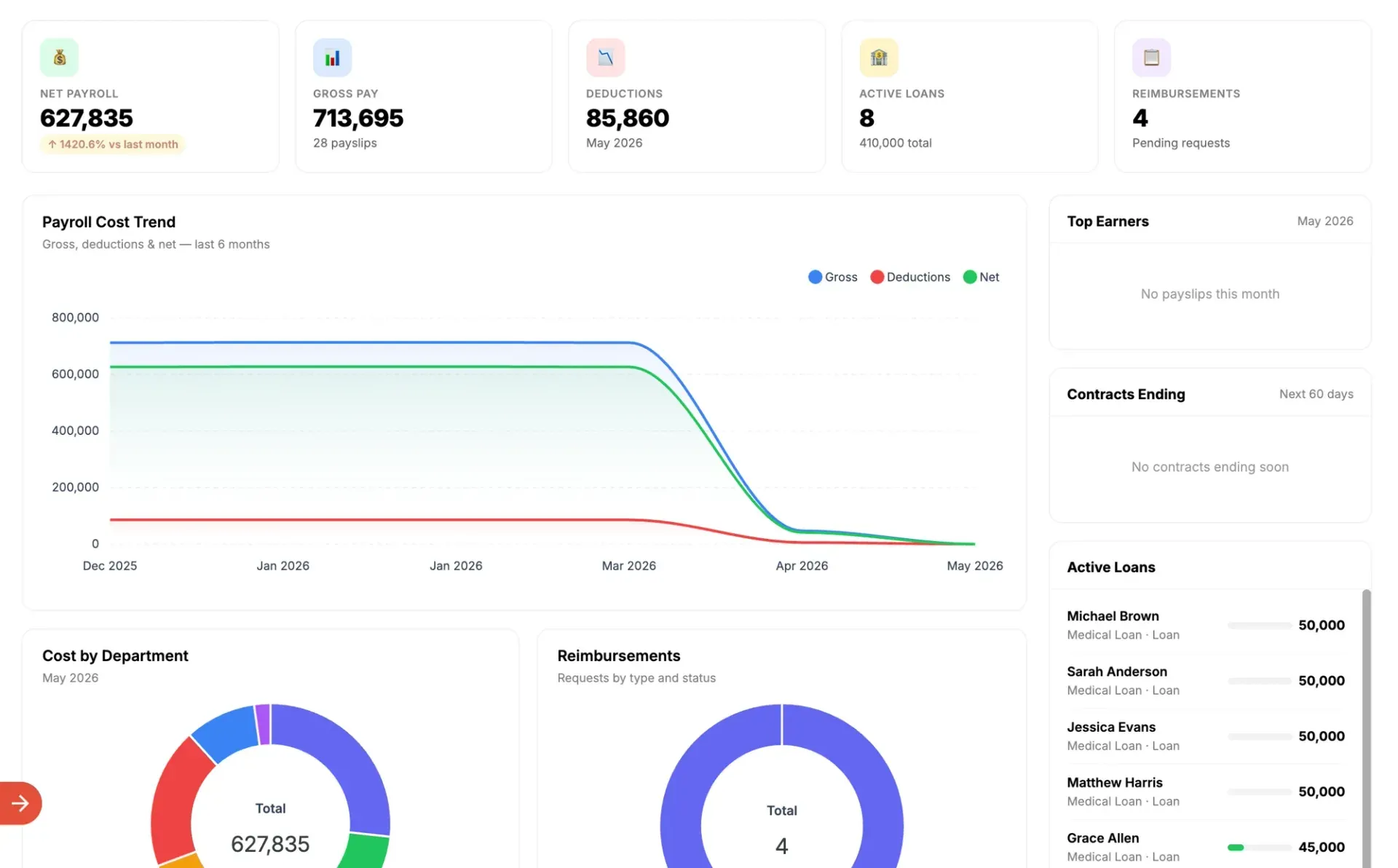
Payroll dashboard from the official website: net and gross pay, deductions, a six-month cost trend, cost by department, reimbursements and active loans. Names and amounts are sample data.
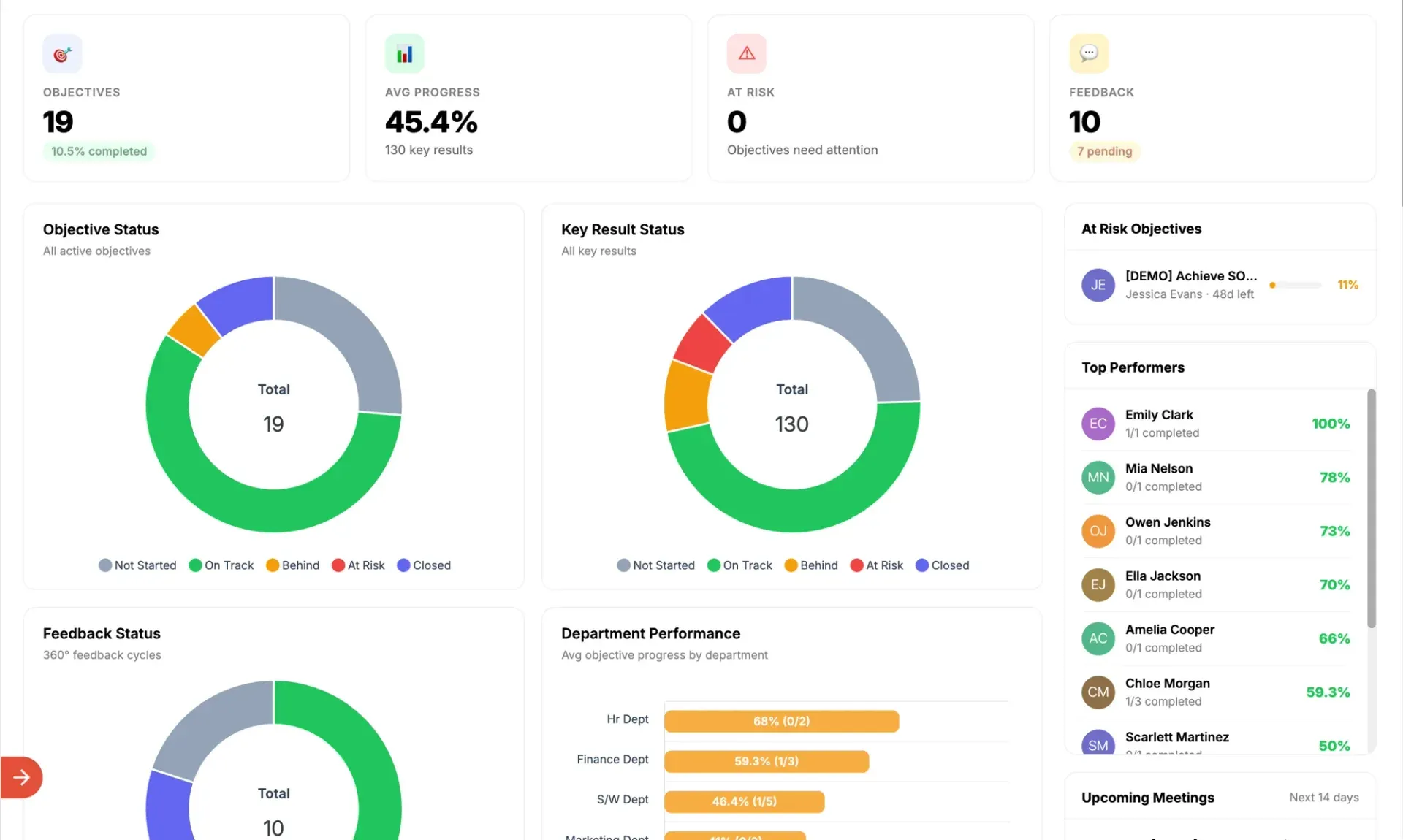
Performance dashboard from the official website: objective and key result status, 360-degree feedback status, at-risk objectives and progress by department. Shows sample data.
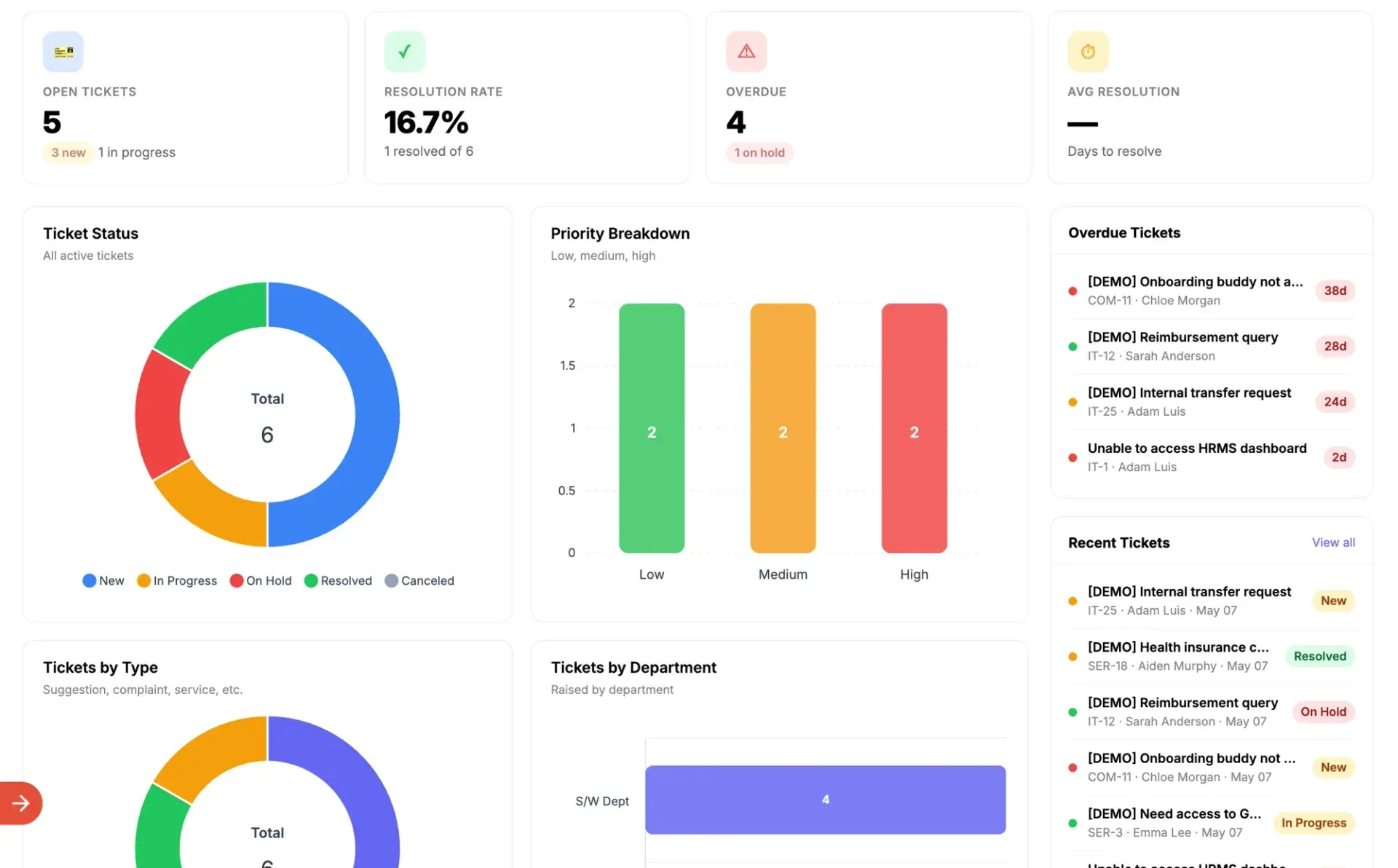
Helpdesk dashboard from the official website: open, overdue and resolved tickets, priority breakdown, tickets by type and department and recent demo tickets. Shows sample data.
Source: official Horilla project page.
Key capabilities
- Self-hosting with the official Docker image The image
horilla/horilla-hris published on Docker Hub for linux/amd64 and linux/arm64, with tags per release such as 2.4.0. The Docker Hub overview documents the environment variables, the volumes to back up and a Compose file. The first boot applies the full migration set before the web server binds, which the README says takes a few minutes on an empty database. - Docker Compose from the repository Cloning the repository and running
docker compose up -dbuilds and starts the web application, PostgreSQL 16, Redis 7 and the scheduler service. The Docker deployment guide lists Docker 24.0 or newer, Docker Compose 2.20 or newer and Git 2.30 or newer. Its sizing table gives 2 cores, 4 GB RAM and 20 GB disk for under 50 users, 4 cores and 8 GB for 50 to 500 users, and 8 cores, 16 GB and 100 GB or more above 500 users. The production profile adds nginx with static files, gzip and security headers. - Manual installation from source A source install requires Python 3.12, 3.13 or 3.14 and pip 21.3 or newer; the README states that Python 3.15 cannot run the application yet because spaCy declares an upper Python bound. The steps are a virtual environment,
pip install -r requirements.txt, a.envfile from.env.dist, then migrate, compilemessages and collectstatic. On a new database the sign-in page shows an Initialize Database button that asks forDB_INIT_PASSWORDand creates the first administrator. Production deployment with nginx and Gunicorn is covered in the deployment guide. - Background scheduler Scheduled jobs only run while
python manage.py run_scheduleris running. The README lists automatic payslips, leave resets, work records, shift rotation, contract expiry, document and asset reminders, clearing expired sessions and trimming job-run history. The Docker Compose file starts this process as its own service. - Employee management Employee profiles hold work information, documents, policies and disciplinary actions, with an organization chart and LDAP integration. Employees can file shift requests, work type requests and document requests, and rotating shifts and work types can be assigned. Release 2.3.0 added a Penalty tab on policies and disciplinary actions.
- Recruitment The recruitment module covers open jobs, recruitment stages, candidate shortlisting, resume handling, interviews, surveys, a skill zone and candidate self-tracking. Release 2.4.0 adds a Vacancy step to the pipeline wizard, a headcount per job position that limits its vacancies, a filled-places count with figures per position and flags for over-selected positions.
- Onboarding and offboarding Onboarding uses stages, task assignment and bulk mail to selected candidates. Offboarding handles resignations and an offboarding pipeline; release 2.4.0 adds task management components for assigning offboarding tasks and updating their status, and removes an employee from the pipeline when an approved resignation is cancelled.
- Attendance and time tracking Attendance supports biometric device integration, check-in and check-out, attendance validation by reporting managers, overtime approval, an allowed IP restriction and a monthly attendance summary with nested grouping. Release 2.4.0 limits attendance validation, bulk validation and overtime approval to a manager's own reports, following a privately reported vulnerability.
- Leave management The leave module handles leave types, allocations, leave requests with approval, holidays and company leaves, with balance tracking and carry forward. Leave resets run through the scheduler. Release 2.4.0 restyles the leave type card in My Leave Requests and fixes the bulk approve for signed-out requests.
- Payroll Payroll covers contracts, allowances, deductions, payslips, loans and advanced salary, reimbursements, encashments and federal tax, with bulk payslip batches that move through draft, review, confirmed and paid states. Release 2.4.0 adds Arrears and Recovery entries that become pay lines on the month's payslip once confirmed, an Excel import for them that previews and checks the file first, and faster payslip generation in parallel slices with a progress dialog. Since 2.3.0, new Python tax formulas require
HORILLA_ALLOW_PYTHON_TAX_FORMULAS=True; slab-based filing statuses need no setting. - Performance management The performance module covers objectives with key results, feedback cycles including 360-degree feedback and review meetings. Its dashboard shows objective and key result status, at-risk objectives, feedback status and average progress by department.
- Asset management Assets are tracked by category with assignment, requests and an asset history. Release 2.4.0 adds an available count on asset categories, a Service Request tab visible to regular users with status changes by admins, and multi-level grouping on the asset history.
- HR helpdesk Employees raise tickets by type and department, and the helpdesk dashboard shows open, overdue and resolved tickets, priority breakdown and tickets by department. Ticket statuses include new, in progress, on hold, resolved and canceled.
- Projects, documents and reports A project module manages projects, tasks and timesheets. Role-based dashboards and reports can be exported or scheduled by email, and export dialogs ask for a file name and a format (Excel, CSV or PDF) since release 2.3.0. A master data import brings in employees, leave balances, assets and salary structures from spreadsheets.
- REST API and mobile companion app A token-based REST API is used by Horilla HR Mobile, a separate Flutter app for iOS and Android published under LGPL-2.1 at github.com/horilla/horilla-hr-mobile. The app connects to a self-hosted or cloud Horilla server for punch in and out, leave, attendance corrections, requests, payslips, announcements and, for managers, an approvals inbox.
- Automations and integrations Mail and in-app notifications can be sent when records are created, updated or deleted. The README lists LDAP, Google Meet, Google Drive backup and WhatsApp integrations, plus optional Geofencing, Face Detection and Outlook (Microsoft 365) mail apps that are not enabled by default.
- Security features The README lists permission-based access control, optional two-factor login with a one-time code by email, account lockout after repeated failed logins, API rate limiting, change history on records and XSS checks on saved text. Vulnerabilities are reported through GitHub Private Vulnerability Reporting as described in SECURITY.md.
- Horilla Cloud and Enterprise plans The pricing page lists Self-Hosted at $0 with unlimited users and community support on GitHub, Horilla Cloud at $7 per user per month with managed infrastructure, daily backups with 7-day retention, SSL and a custom domain and priority email support with a 48-hour SLA, and a custom-priced Enterprise plan with on-premises or private cloud deployment, SSO (SAML 2.0, OAuth, LDAP), a dedicated account manager and white-labelling. The page states that features are the same across plans and lists 40% off Cloud for registered nonprofits and 25% for early-stage startups.
Where Horilla fits
Running a monthly payroll batch
In the payroll module, a bulk payslip action takes a batch name, a set of employees and a start and end date, then generates payslips for the period. Each payslip shows basic pay, paid and loss-of-pay days, allowances, deductions, taxable gross and net pay, and moves through draft, review, confirmed and paid states. Since release 2.4.0 the batch page refreshes in place, cancelled runs can be reopened, payments can be undone and Arrears and Recovery entries are added to the month's payslip once confirmed. Loans, reimbursements and encashments feed the same payslips.
Hiring through the recruitment pipeline
A recruitment is created with job positions and stages, and the 2.4.0 pipeline wizard adds a Vacancy step with a headcount per job position. Candidates move through stages on the pipeline, with interviews, surveys and ratings recorded on their profiles, and candidates can follow their own application through the self-tracking pages. Dragging a candidate into a Hired stage that fills the vacancy shows a Vacancy is filled message. Hired candidates continue into onboarding stages with assigned tasks.
Tracking attendance, overtime and leave
Attendance records come from check-in and check-out in the web interface or mobile app, or from biometric devices, and can be restricted to allowed IP addresses. Reporting managers validate attendance and approve overtime for their own reports, and the monthly attendance summary groups days by status. Employees apply for leave against their allocated balances, managers approve or reject the requests, and the scheduler handles leave resets.
Handling resignations, offboarding and assets
A resignation request leads an employee into the offboarding pipeline, where tasks are assigned and their status updated. Cancelling an approved resignation removes the employee from the pipeline as of release 2.4.0. Assets assigned to employees are tracked by category with an asset history, and employees file asset and service requests whose status admins change from a dropdown.
Answering employee questions through the helpdesk
Employees raise helpdesk tickets by type, such as suggestion, complaint or service, and by department. HR staff work the tickets through new, in progress, on hold and resolved states, and the helpdesk dashboard shows open and overdue tickets, the resolution rate and tickets by priority and department.
Deploying and upgrading a self-hosted instance
A production deployment with Docker Compose runs the web, PostgreSQL, Redis, scheduler and nginx services, with the web port bound to 127.0.0.1 since release 2.4.0. The documented upgrade procedure is to read the changelog and release notes for skipped versions, back up the database and the media volume, then change the pinned image tag and run docker compose pull and docker compose up -d; migrations apply when the container starts. Source installs run git pull, the requirements install, migrate, compilemessages and collectstatic, then restart the web server and the scheduler.
Install
docker pull horilla/horilla-hr:2.4.0Reviews of Horilla
Be the first to share your experience with Horilla.
Write a review
Loading review form…
