What is LazySkills?
LazySkills is an open-source terminal interface for managing AI agent skills across a computer and its projects. It shows installed skills, their sources and the agents that can see them. The main task is understanding an installation: where a skill lives, whether its metadata is valid and which action would change it.
Read the full overview
The interface groups skills by source and offers inventory, metadata and preview panes. You can change the project or global scope, select an agent and inspect a skill's content. Health findings include missing SKILL.md files, invalid frontmatter, broken symlinks and inconsistencies with lock-file records.
The tool also offers registry search and commands for read-only diagnosis or restoring missing locked skills. Preview and confirmation steps surround supported changes. Those controls make the intended action visible; they do not establish that a downloaded skill's instructions or executable dependencies are trustworthy.
The checked release is LazySkills 1.2.0, published September 26, 2026. It adds discovery of native OpenCode project skills. The application is written in Go and uses MIT. This is a source-based profile, without an independent installation, performance measurement or audit of the skills shown in its official demonstration.
 LazySkillsDeveloper Tools
Inspect, diagnose and manage AI agent skills across projects, global installs and agent hosts
LazySkills screenshots
Explore the interface. Open a screenshot to view it at full size.
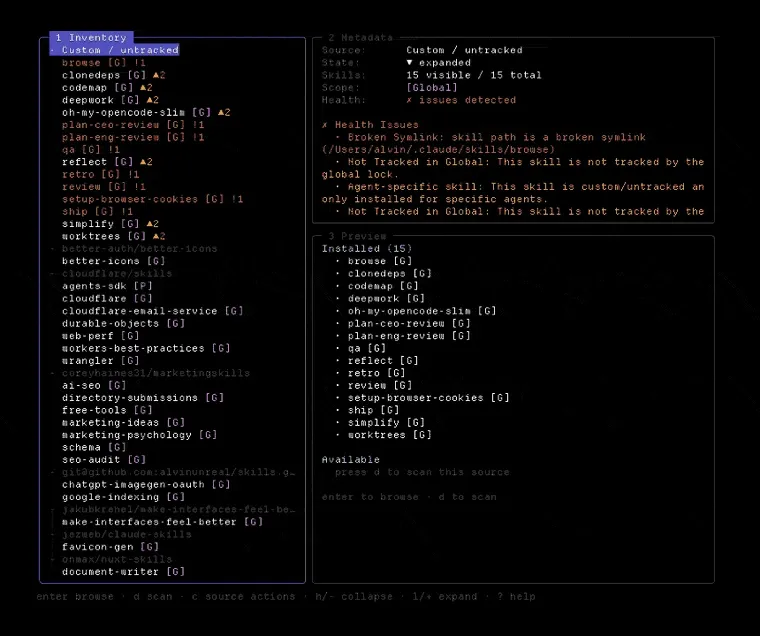
Official project demonstration frame. The findings shown are not an ITHub scan.
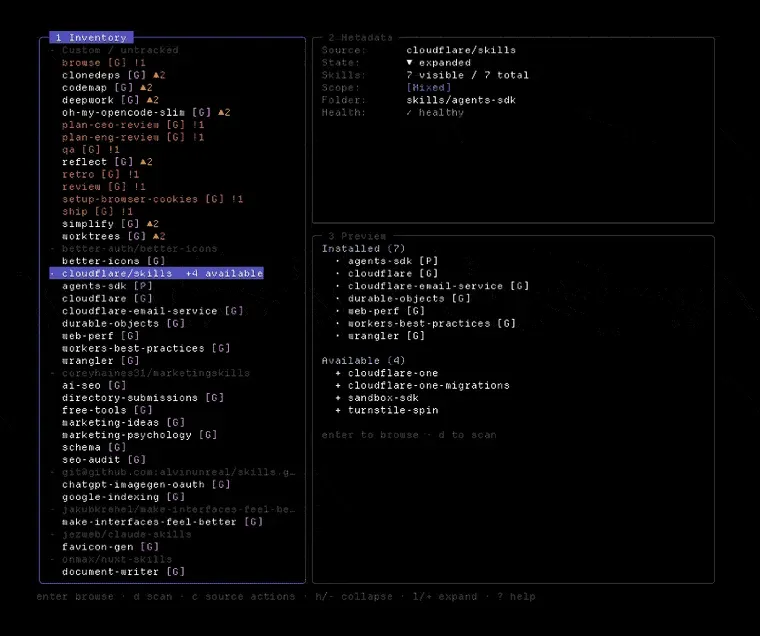
Still from the official demo illustrating source discovery; shown counts are example data.
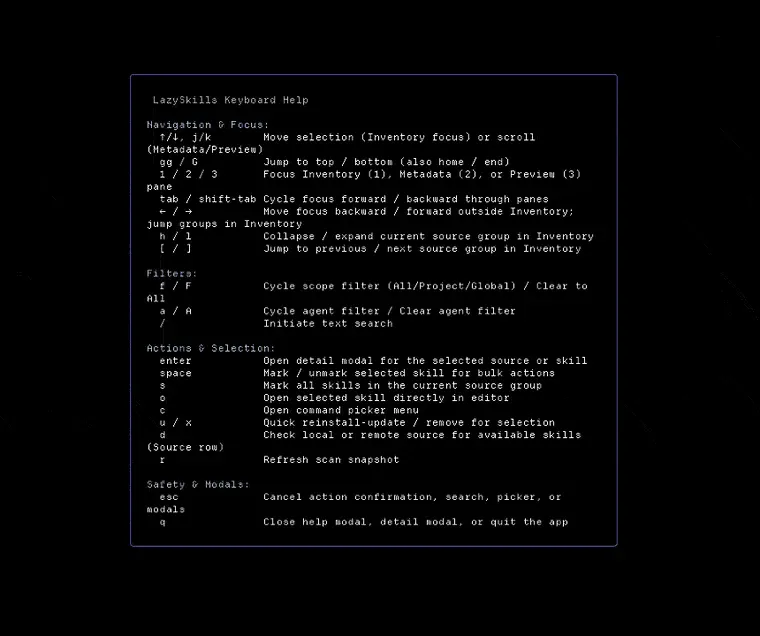
Official demo frame showing the built-in keyboard reference.
Source: official LazySkills project page.
Key capabilities
- A combined skill inventory Inspect project, global, universal and agent-specific installations in one terminal UI. Grouping by source helps distinguish skills from the same repository or local checkout. A combined view is useful when several agents use different directories. Read the actual path before changing a similarly named skill.
- Agent visibility filters The documented interface can show skill visibility for hosts including Claude Code, Codex, Cursor, Gemini CLI and OpenCode. Switching the filter helps investigate why one host cannot see a skill. Detected visibility is different from proving that a host can execute the skill successfully for a particular task.
- Metadata and content preview Inspect the selected skill's metadata and rendered instructions before choosing an action. The source and scope remain part of the context. Use that view to confirm you selected the intended installation. The preview exposes content for review; it is not a general-purpose security assessment of that content.
- Installation health findings LazySkills flags supported problems such as missing metadata, broken symlinks, absent lock entries and ghost installations. These findings describe the relationship between files and registry records. They can explain a visibility problem without implying that every other part of the installation is correct.
- Registry and source discovery Search skills.sh from the interface or use the find command with JSON output. The tool can also scan supported local or GitHub skill sources for additional entries. Discovery does not grant those sources any special trust. Inspect the source, scope and proposed install command before proceeding.
- Previewed maintenance actions Supported actions include opening, reinstalling or updating, removing skills and pruning orphaned lock records. Bulk selection can apply actions to several entries. Confirmation prompts make the operation explicit. Check the selected paths and scope before approving a change that affects multiple projects or agents.
- Read-only doctor reports The doctor command reports health findings for a project and can produce JSON for scripts. A cwd option targets another workspace. The documentation states that doctor does not modify skills or lock files. Keep that diagnostic mode separate from a later restore, update or removal action.
- Restoration from lock files The restore command can recover supported locked skills that are missing from disk. It previews installation and revalidates lock identity and commands before each operation. The restore documentation acknowledges that this narrows concurrent-change races without eliminating every possible race.
Where LazySkills fits
Finding a skill that an agent cannot see
Open LazySkills from the relevant project, choose the agent and inspect the expected skill. Compare its path, scope and health findings with the host's actual installation. A broken symlink or a global-only entry can explain the mismatch. Confirm the skill in the agent after addressing the reported cause.
Reviewing a machine with several agent hosts
Use the combined inventory to understand which installations are shared and which belong to one agent. Inspect duplicate names by source and path rather than assuming they represent the same content. Keep project-specific requirements distinct from global convenience tools. A broad update can affect more than the workspace currently in view.
Preparing a maintenance change
Read the proposed command and the selected scope before updating or removing a skill. For bulk work, inspect the full selection first. Retain a recoverable copy or the relevant lock information when it matters. A confirmation prompt helps prevent an accidental click, but it does not establish compatibility with every dependent workflow.
Checking a workspace from a script
Run doctor with JSON output when another tool needs structured findings. Treat scan errors and warnings according to their actual status instead of collapsing them into a healthy result. The output is a local diagnostic interface. It is not evidence that LazySkills exposes a hosted HTTP API or monitors agents in production.
Recovering a known skill setup
Use restore for entries that the lock file records but the filesystem lacks. Choose project, global or both scopes deliberately. Review each proposed source and command. If a concurrent change causes restoration to stop, inspect the reported completed actions before retrying rather than assuming the entire batch either succeeded or did nothing.
Positioning and limitations
LazySkills fits developers who work with agent skills as files and need a clear inventory across several hosts. Its terminal interface concentrates discovery, inspection and maintenance controls. The Go command-line tool runs on documented Windows, macOS and Linux release targets. There is no corresponding mobile application or hosted management dashboard established by these sources.
The MIT application is free. Some maintenance actions call installation tools or retrieve remote content, so their network access and requirements need separate consideration. The project also supports manual update guidance for LazySkills itself. Updating this manager and updating a managed skill are distinct operations with different effects.
A valid SKILL.md and a consistent lock record establish useful installation facts. They do not establish that a skill is appropriate, licensed for your use or safe to run with broad permissions. Source review and the agent host's permission controls remain necessary parts of choosing an extension.
The official demo illustrates metadata, health findings and source discovery. Its displayed paths, skill counts and warnings are examples from the project, rather than an ITHub scan. Related developer tools provide other workflow components; compatibility should be checked against the actual agent and installation format you use.
An agent extension can be present on disk and still be unavailable to the agent running in a particular project. Scope, directory conventions, links and metadata all affect discovery. LazySkills makes those installation details visible together. That gives a developer a concrete starting point when troubleshooting an apparently missing skill.
The distinction between diagnosis and mutation is useful for repeatable maintenance. Doctor reports findings without changing the installation. Restore, update and removal then have their own previews and effects. Read the reported state after a change and verify the intended agent can use the expected version.
Start with one project and a skill whose source you recognize. Compare the manager's path and visibility information with the host, run a read-only report and inspect a proposed action. Confirm the resulting files and lock state afterwards. Keep review of the skill's own instructions separate from the health of its installation.
“Inspect, diagnose and manage AI agent skills across projects, global installs and agent hosts”
Technical details
- Access
- Windows / macOS / Linux app
- Source model
- Open source
- License
- MIT
- Founded
- Not specified
- Data location
- Local skill files, workspace and lock metadata; registry searches, source downloads and update checks contact their providers
- Pricing model
- Open source
- API
- Not specified
- Version reference
- 1.2.0 ↗
- Source checked
- October 20, 2026
- Website
- lazyskills.sh ↗
- GitHub
- Source repository ↗
What to verify
Profile audiences: Developers, IT Teams.
- Confirm current features, licensing and support terms.
- Validate deployment, data location and access control.
- Test integrations, exports and recovery workflows.
Reviews of LazySkills
No published reviews yet.
Loading review form…