What is Anatomy?
Anatomy is an open-source agent skill and drawing kit for explaining technical ideas through interactive isometric figures. A compatible coding agent turns a concept into a concrete mechanism, builds its parts with the supplied kit and connects pointer or keyboard interaction to a small state model. The result is editable source rather than a flattened generated picture.
Read the full overview
The project supports static SVG, standalone HTML and React or Next.js components. WebGL layers add effects such as water, light or exhaust inside the same projected scene. A separate beta 3D mode handles parts that rotate or move in true three-dimensional space. These output paths have different runtime and verification requirements.
The workflow starts with the idea and the values the figure must explain, then plans parts, constructs geometry, adds motion and inspects the output. Numbers in a readout are intended to come from the same model that moves the figure. That model still needs a valid explanation and assumptions; visual coherence is not scientific or engineering certification.
The reviewed release is Anatomy 1.1.0, published October 12, 2026, under MIT. The documentation names Claude Code, OpenCode and Codex as compatible hosts. The gallery shows official example figures captured by the project. ITHub has not commissioned a new illustration or reproduced the project's rendering benchmarks.
 AnatomyDeveloper Tools
Build interactive isometric technical figures with an agent, SVG geometry, WebGL layers and a reusable drawing kit
Anatomy screenshots
Explore the interface. Open a screenshot to view it at full size.
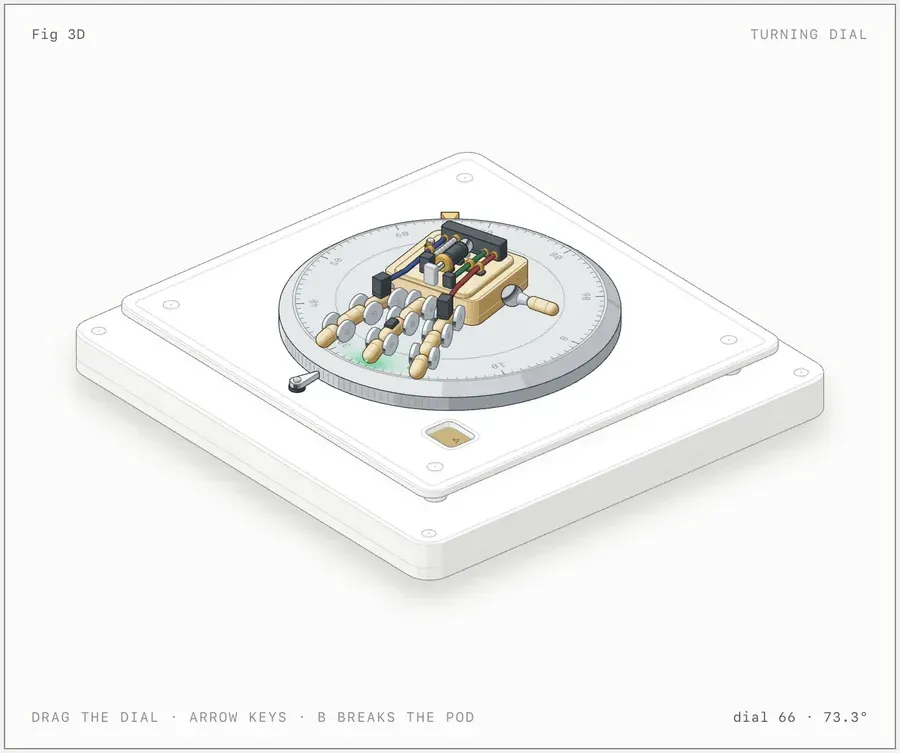
Official screenshot of the beta 3D example; no independent performance measurement or engineering validation is claimed.
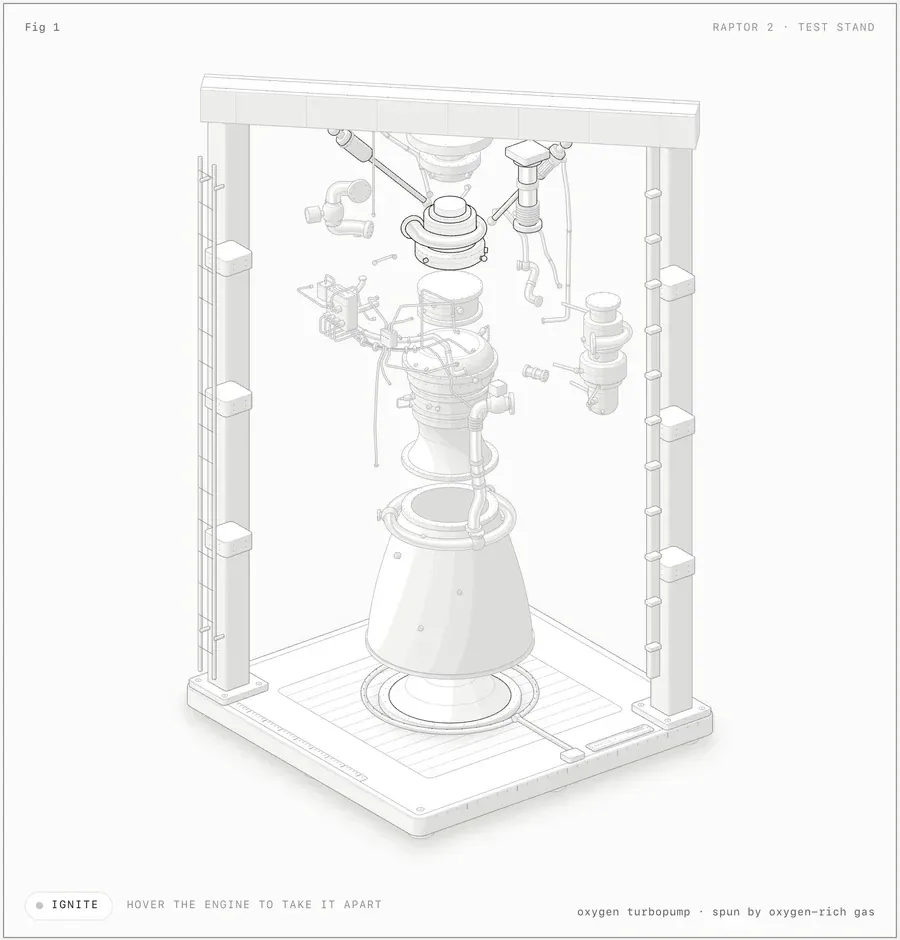
Official generated example from the project. The figure illustrates a mechanism and is not a certified engineering model.
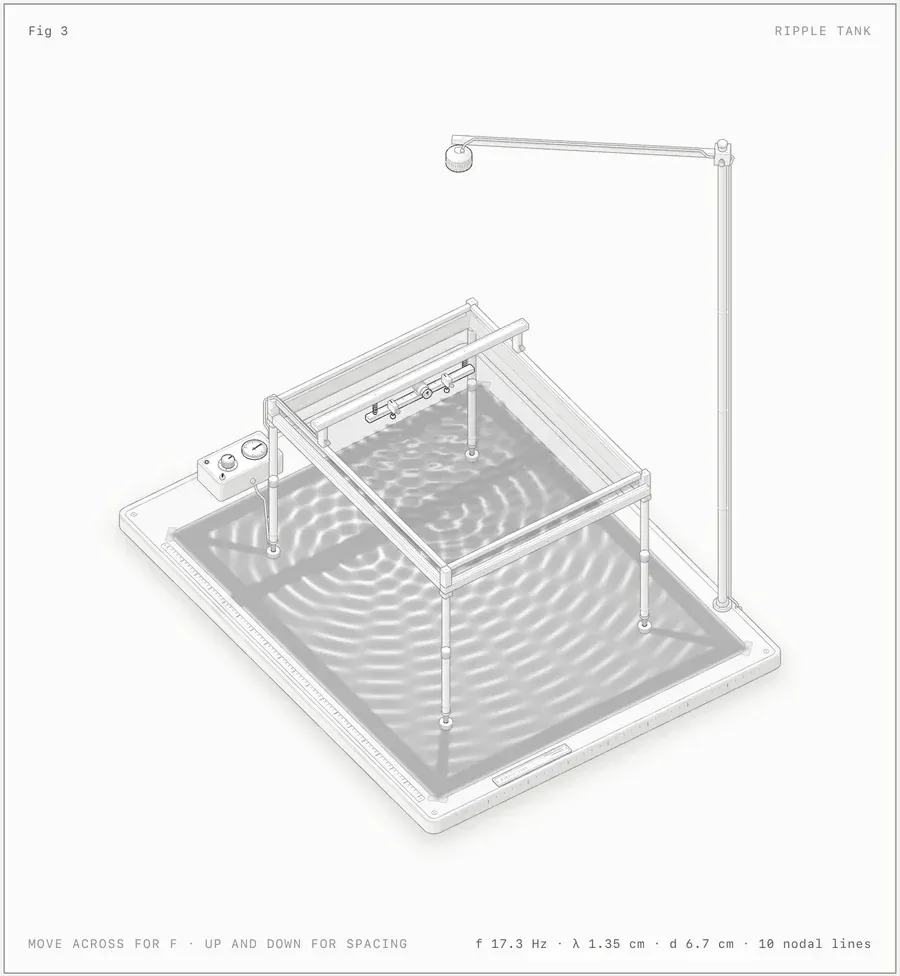
Official SVG and WebGL example supplied by the project; not an ITHub-created simulation or scientific validation.
Source: official Anatomy project page.
Key capabilities
- A concept-to-mechanism workflow The skill asks what a figure should explain before choosing the object to draw. A stateful software idea can become an inspectable physical analogy with parts, motion and a live readout. Supply the true counts, units and thresholds so the generated mechanism has something concrete to represent.
- A programmatic isometric drawing API The kit API documents projection, solids, shading, parts, pipes and geometry audits. TypeScript and plain ESM variants support source-controlled builds. This is a drawing-library API used inside a project, not a hosted image-generation endpoint.
- SVG and standalone HTML output Framework-free figures can be delivered as a page or a standalone SVG with embedded styles. Static geometry remains inspectable and can be versioned with documentation. Interactivity needs the corresponding runtime; exporting a lone image does not retain every interaction from the HTML figure.
- React component output React output separates server-safe drawing components from client-side interaction hooks. The documented requirement is React 18 or later for that path. The React guide explains integration choices; the kit's general no-dependency statement does not remove the host application's React dependency.
- Registered WebGL effects The WebGL layer sits between back and front SVG geometry using the same isometric camera. It can represent effects that a collection of simple outlines cannot. The WebGL reference describes this arrangement. Browser capability and graphics performance still need checking on the intended devices.
- Geometry and visual verification The toolkit checks configured intersections, attachments and depth ordering, while browser scripts capture close-ups and interactions. These checks help find broken joins and rendering mistakes. They do not establish that the illustrated machine, physical dimensions or teaching model is correct outside the authored scene.
- Light, dark and motion behavior The documented workflow considers both themes and reduced-motion behavior. Pointer and keyboard interactions are part of the figure design. Review them in the page that will host the output, including a static or reduced-motion state, rather than judging accessibility from an attractive still image.
- An explicitly beta 3D path Moving 3D groups are reprojected and reshaded while other scene parts can remain static. The project labels this path beta and documents complexity-related limits. It should be evaluated on a representative scene and target device, especially when many parts or continuous movement are involved.
Where Anatomy fits
Explaining a software mechanism in documentation
Start with the actual state transitions: a request entering a queue, a connection being borrowed or a cache item expiring. Provide the counts and conditions that make the behavior meaningful. Ask for a figure whose interaction reveals those changes, then review its labels and readouts against the real system rather than only the visual analogy.
Building an interactive technical article
Choose standalone HTML when the figure should be easy to inspect without a framework. Choose React output when it needs to live inside an existing React application. Test the figure at the article's real content width. A full-screen example can become illegible when embedded beside text or inside a narrow mobile column.
Illustrating a machine or instrument
Name the parts and the movement that carry the explanation. Use the included drawing primitives to keep geometry and animation connected, then inspect joints and depth order. The example engines, gauges and ripple tank show the intended style; they do not establish exact accuracy for a different machine generated from a prompt.
Maintaining a visual with source control
Keep the generated build script, model, geometry and relevant kit version alongside the page. When a system parameter changes, update the model and the explanation together, rebuild and rerun the checks. The verification guide describes the evidence to inspect after a visual or interaction change.
Positioning and limitations
Anatomy fits developers and technical authors who want a crafted explanatory figure with editable source. It is a skill and toolkit rather than a general browser drawing editor. It is also not a chart library: axes, series and statistical plots are outside its main design. The strongest subjects have a mechanism that can be shown through parts and state changes.
The baseline Node kit uses built-in modules, with Node.js 20.10 or later documented for builds and checks. A compatible agent and model access are separate prerequisites. Chrome or Chromium is needed for the browser checks; React is needed for React output, and WebGL for the relevant effects. The MIT source license does not make model usage free.
HyperFrames focuses on programmatic video output, while PPT Master targets editable PowerPoint presentations. Anatomy's main artifact is a technical figure that can remain interactive on a web page. Select the output and maintenance workflow before comparing these adjacent tools.
The skill can send supplied material to the selected agent provider. Local generated files do not establish offline model processing. A figure may also take substantial generation and review time, particularly for dense geometry or beta 3D. Browse developer tools for related workflows and apply the ITHub evaluation method to the actual output contract.
A technical figure earns its place when a reader can connect a visible change to the idea being explained. Anatomy couples geometry, a small model and interaction, which can make that connection inspectable. The useful question is whether the mechanism teaches the intended behavior with correct labels and assumptions.
Editable source gives the figure a maintenance path. A changing queue limit or connection count can be reflected in the same model that drives the readout, instead of being patched into a screenshot. Geometry checks and browser captures then provide review artifacts for that change, while factual review remains the author's responsibility.
Evaluate one small figure before planning a whole visual system. State the concept, true values, output format and device constraints, then inspect the resulting source, static state, keyboard behavior and reduced-motion presentation. Add WebGL or 3D only when it contributes to the explanation and the target browser can support it.
“Build interactive isometric technical figures with an agent, SVG geometry, WebGL layers and a reusable drawing kit”
Technical details
- Access
- Web platform
- Source model
- Open source
- License
- MIT
- Founded
- Not specified
- Data location
- Generated figure source and builds in the local project; prompt and source handling depends on the selected coding-agent model provider
- Pricing model
- Open source
- API
- Available
- API documentation
- Read API documentation ↗
- Version reference
- 1.1.0 ↗
- Source checked
- October 21, 2026
- Website
- skills.wheresryan.sh ↗
- GitHub
- Source repository ↗
What to verify
Profile audiences: Developers, IT Teams.
- Confirm current features, licensing and support terms.
- Validate deployment, data location and access control.
- Test integrations, exports and recovery workflows.
Reviews of Anatomy
No published reviews yet.
Loading review form…