
What is OpenWolf?
OpenWolf is a local project-memory tool for developers using AI coding agents. It keeps task objectives, completed work, unresolved problems, project notes and known fixes in a project's .wolf/ directory. Its code index records file descriptions, symbols, line ranges and import relationships to help agents locate relevant code.
Installed through npm, OpenWolf runs on Windows, macOS and Linux with Node.js and a supported agent. Claude Code and Codex CLI connect through hooks, while OpenCode uses a native plugin. Grok Build uses compatible hooks; Cursor, Gemini CLI and Antigravity receive project instruction files only. Memory, indexing and usage processing run locally without additional model calls, although background runtime updates contact npm.
The local dashboard displays saved context, handover records, integration health and available token counters by agent and model. Cost estimates reflect provider API list prices rather than subscription charges. Recovery restores selected saved evidence, not an entire live conversation, and integration coverage varies by agent and installed version.
OpenWolf screenshots
Explore the interface. Open a screenshot to view it at full size.
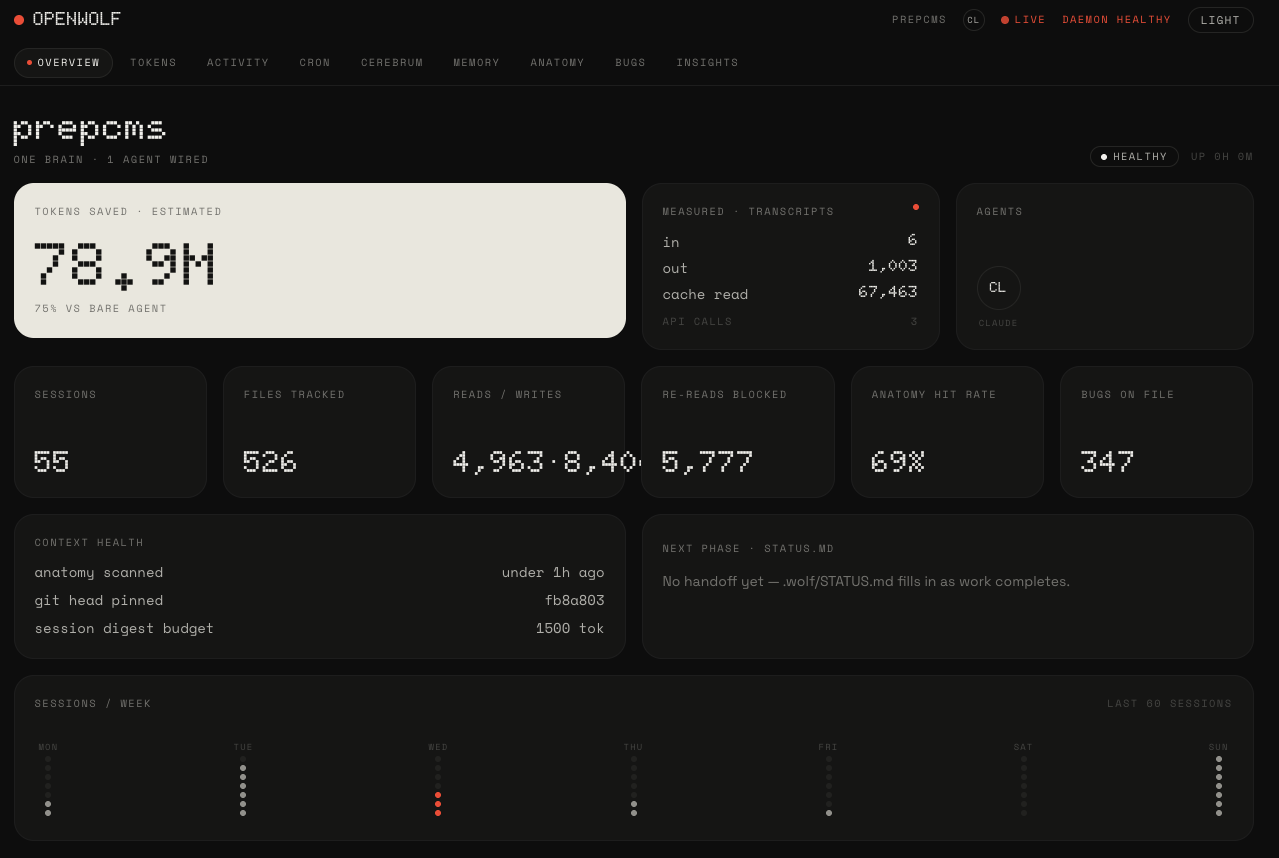
Source: official OpenWolf project page.
Key capabilities
- Task checkpoints Saves objectives, completed work, unresolved items and next actions for supported recovery paths.
- Code indexing Maps files, symbols and imports, with focused search and preservation of entries during incomplete scans.
- Persistent notes Stores project notes and known fixes, with archival and verified restoration of eligible older session notes.
- Context controls Identifies repeated reads of unchanged files and can shorten selected Claude Bash output while retaining originals locally.
- Usage reporting Reconciles available agent usage records and separates provider counters from local content-size estimates.
- Agent handover Exports and imports selected Claude and Codex task evidence with project identity and repository-drift checks.
Where OpenWolf fits
OpenWolf fits development workflows where work continues after session compaction, restarts or changes of coding agent. Checkpoints and known-fix records provide continuity, while the project map helps locate relevant files without repeatedly supplying broad project context. Its dashboard also brings available usage records together for inspection.
Before deployment, developers should verify their agent's hook support, project trust settings and actual event delivery. Saved notes, indexed content and handover packets need review before sharing because automatic filtering has limits. Protected durable instruction injection requires an independently protected runtime and administrator approval; ordinary checkpoints, indexing and reporting do not require that setup.
Install
npm install -g openwolfReviews of OpenWolf
Be the first to share your experience with OpenWolf.
Write a review
Loading review form…
Alternatives to OpenWolf
 CLI-AnythingCLI-Anything generates Python command-line interfaces for existing software so AI agents can operate it, with CLI-Hub for discovering and managing tools.CBClaude BlogClaude Blog is an open-source Claude Code plugin for sourced blog writing, SEO checks, multilingual content and editorial audits, with automated checks that can block delivery.