

What is book-to-skill?
book-to-skill is an MIT-licensed agent skill and Python extraction tool that converts a technical book, a folder of documents or a set of files into a structured skill that coding agents load on demand. The repository describes its purpose as turning any technical book PDF into a Claude Code skill, and the README extends that to any host following the open Agent Skills standard: GitHub Copilot CLI, Amp, Claude Code, Codex, Hermes Agent, OpenCode and OpenClaw, which all read the same SKILL.md format. The project is maintained on GitHub by the account virgiliojr94 and documented on its own site, booktoskill.is-a.dev.
According to the architecture page, the tool has two halves. A deterministic Python extractor turns each source into clean text and metadata, choosing the first available parser per format and falling back to standard-library code where possible. A spec-driven generator, which is the agent following the repository's SKILL.md, then analyzes the structure and writes chapter summaries, a glossary, a patterns file, a cheatsheet and a master SKILL.md. The FAQ contrasts this with retrieval-augmented generation: there is no embedding index or similarity search at query time, only pre-written files that the agent opens when a topic is requested.
The latest release is v1.4.0, published on August 10, 2026. Its changelog lists warnings for unknown CLI flags, pdftotext-style cleanup applied to the pypdf and pdfminer paths, CJK-aware token estimates, an early abort with an OCR hint for scanned PDFs, skipping unreadable sources instead of aborting a batch, and table-of-contents detection in any source. The master branch has continued past that tag with unreleased work such as optional GitHub publishing of generated skills, a default output root of ~/.agents/skills, Hermes Agent, OpenClaw and OpenCode discovery, pdf-inspector routing for PDFs, per-run work directories and chapter-heading detection for many additional scripts and languages.
Installation is either as an agent skill, with npx skills add virgiliojr94/book-to-skill or a git clone into a host's skills folder, or as a standalone extraction CLI installed with pip from the repository, since the package is not published on PyPI. The Python package requires Python 3.9 or later and keeps format support in optional extras. A security notice dated August 17, 2026 states that the only official repository is virgiliojr94/book-to-skill and that a re-upload under another account is not affiliated with the project.
The README states that the tool ships no book content and that extraction and analysis run on the user's machine; text sent to a cloud-hosted model follows that provider's data terms. It describes a generated skill as synthesized notes rather than a reproduction of the text, says that sharing a skill generated from a copyrighted work can infringe the rights holder's rights, and asks that skills of third-party books stay private. The MIT license covers the converter, not the documents processed with it. Related tools on iThub include OpenKB, anydoc and graphify.
book-to-skill screenshots
Explore the interface. Open a screenshot to view it at full size.
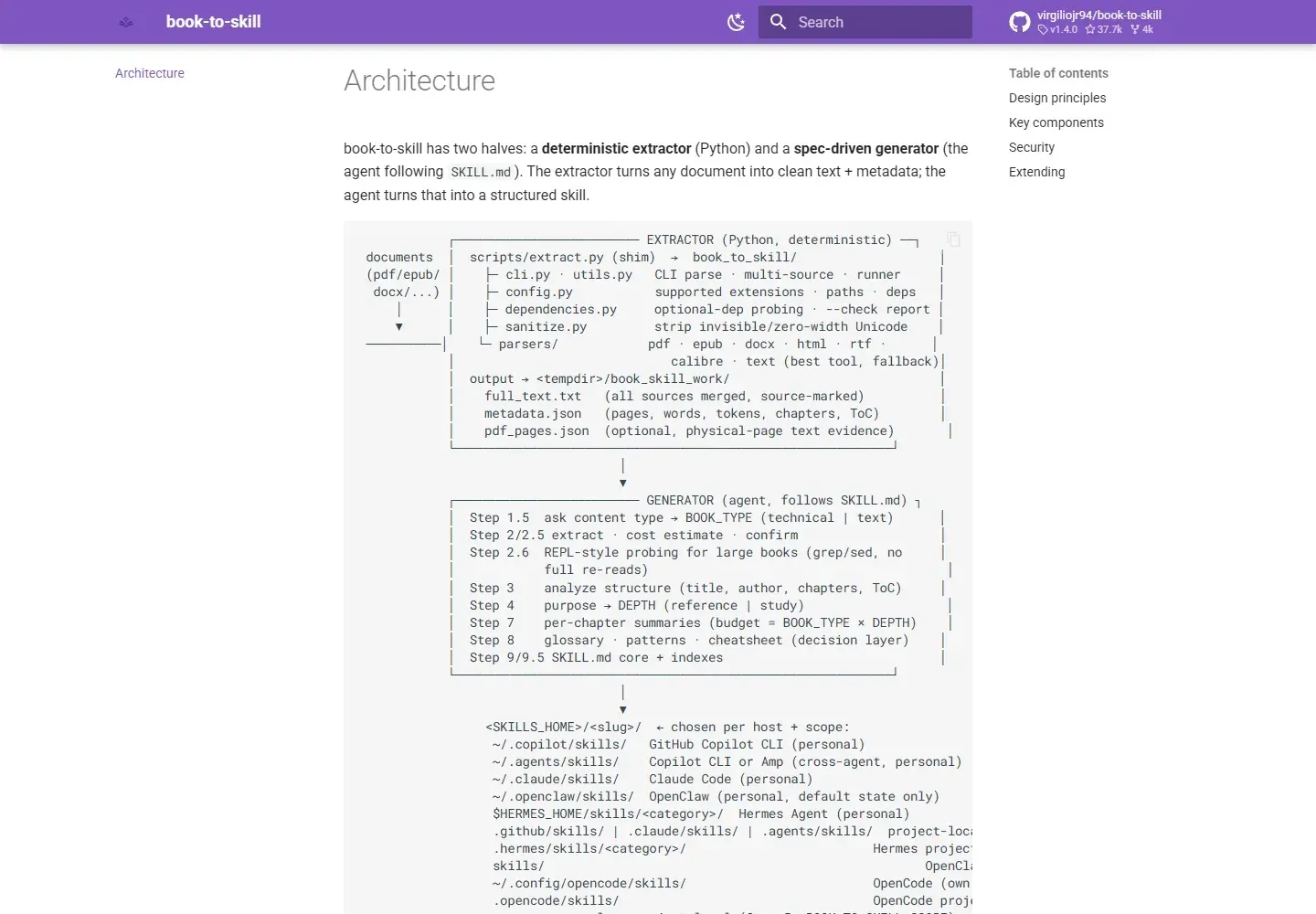
Screenshot of the official architecture page on booktoskill.is-a.dev: extractor components, generator steps 1.5 to 9.5 and host skill folders.
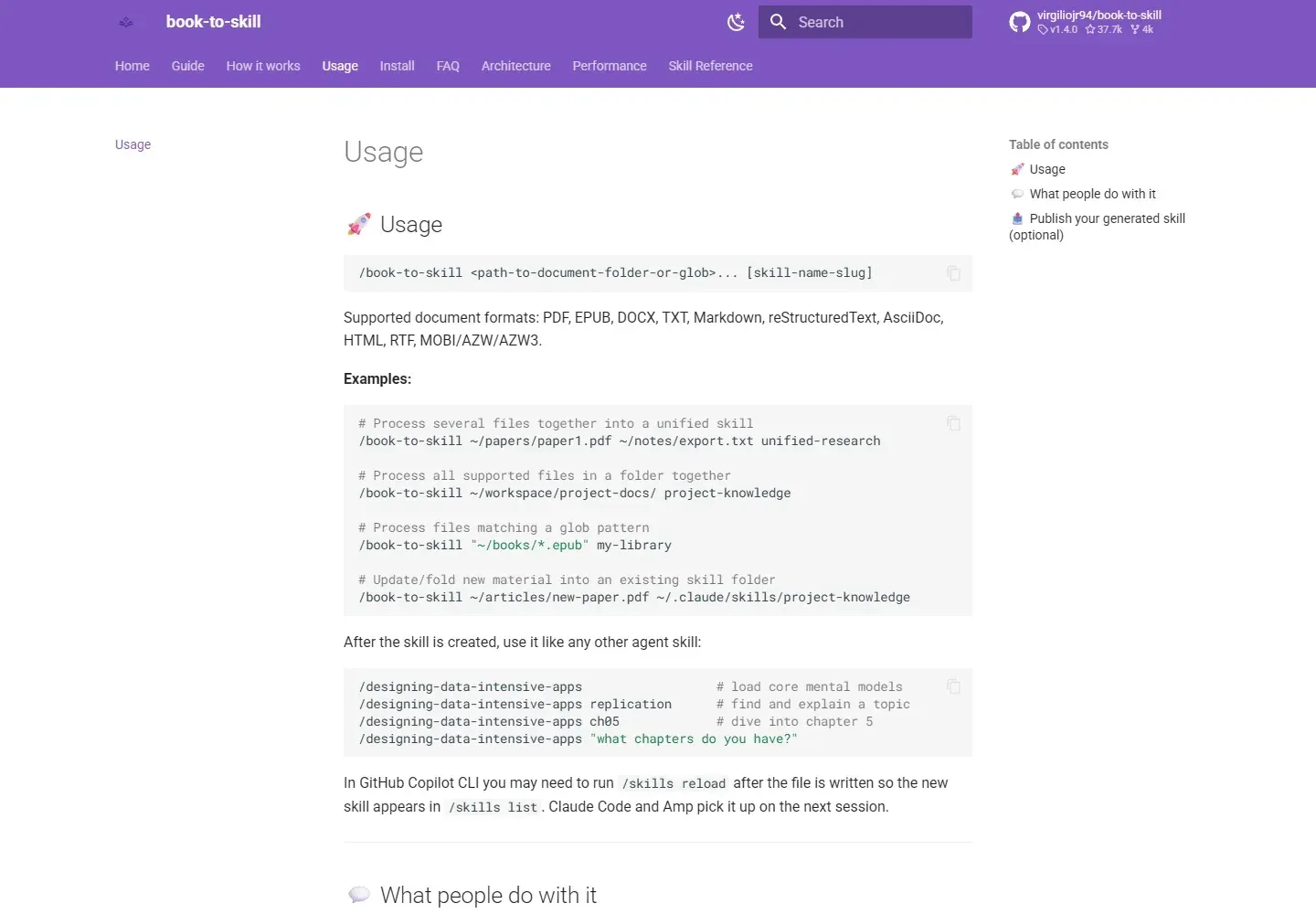
Screenshot of the official usage page showing the command syntax, supported formats and how a generated skill is called.
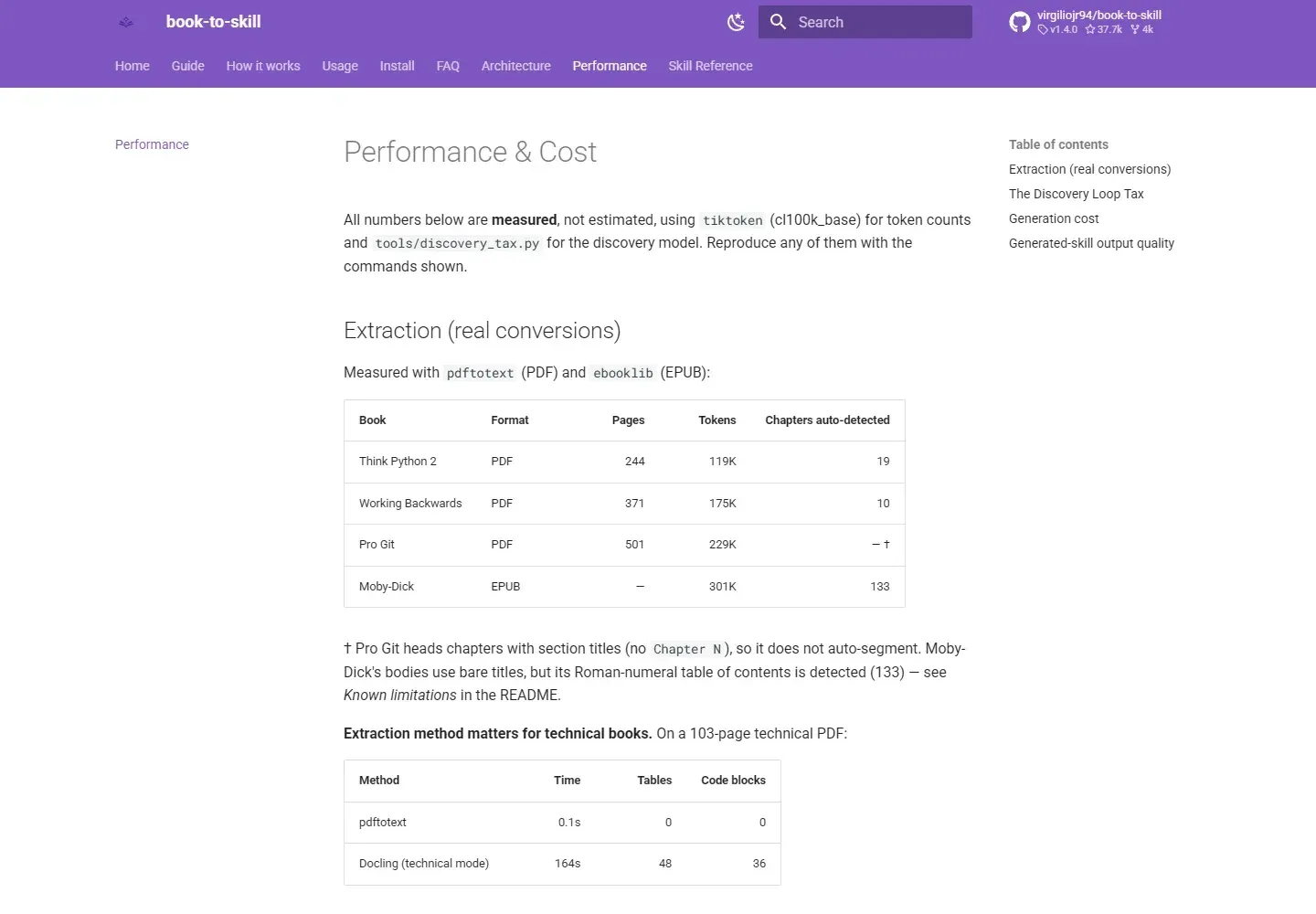
Screenshot of the official performance page with the project-measured extraction tables.
Source: official book-to-skill project page.
Key capabilities
- Supported input formats The usage page lists PDF, EPUB, DOCX, TXT, Markdown, reStructuredText, AsciiDoc, HTML, RTF and MOBI/AZW/AZW3. Plain text, Markdown, reStructuredText and AsciiDoc need no extra dependencies, while MOBI and AZW formats go through Calibre's
ebook-convert, an external application rather than a pip package. Input can be one file, a folder, a glob or a list of paths. - PDF extraction modes Before extraction the skill asks whether a book is technical or text-heavy. Text mode tries
pdftotextfrom poppler, thenpypdf, thenpdfminer.six; technical mode uses Docling, which keeps tables and code blocks as Markdown at roughly 1.5 seconds per page. The documented benchmark on a 103-page technical PDF shows 0.1 seconds with no tables for pdftotext against 164 seconds with 48 tables and 36 code blocks for Docling. - Scanned PDFs and OCR A PDF made of page images has no text layer, so the extractor checks the first pages and stops with an explanation instead of producing an empty skill. The documentation points to running
ocrmypdffirst and converting its output. book-to-skill does not run OCR itself, and text inside diagrams and charts is not extracted from any format. - EPUB, DOCX, HTML and RTF parsers EPUB uses
ebooklibwithbeautifulsoup4, falling back to the standard-libraryzipfilemodule. DOCX usespython-docxwith a ZIP and XML fallback, HTML usesbeautifulsoup4orhtml.parser, and RTF usesstriprtfor a regex fallback. The optional[html]extra adds trafilatura for boilerplate removal and pulls in 17 packages. - Extraction output The extractor writes
full_text.txt, with all sources merged and marked, andmetadata.jsonwith pages, words, tokens, chapters and table of contents, plus an optionalpdf_pages.jsonwith physical-page text evidence. According to the how-it-works page, one unreadable source is skipped with a warning while the rest are processed, and the work directory is cleaned up after the run. - Chapter detection Chapters are detected from explicit headings, Markdown headings, tables of contents and, on the master branch, PDF outlines. The changelog and commit history add heading patterns for Korean, Thai, Persian, Hindi, Vietnamese, Bengali, Russian, Greek, Tamil, Hebrew, Armenian and other languages. The documentation notes that books using only section titles, such as Pro Git, do not auto-segment, and sections then have to be pointed at manually.
- Generated skill files A run produces
SKILL.mdwith core mental models and a chapter index (about 4,000 tokens), one file per chapter underchapters/(about 1,000 tokens each),glossary.mdwith key terms and chapter references,patterns.mdwith techniques and design patterns, andcheatsheet.mdwith decision tables. Chapter files are read only when a question needs them. - Depth and book-type budgets The generator asks for the book type (technical or text) and the purpose (reference or study) and sets chapter summary budgets from the two; chapter summaries are documented at 800 to 1,200 tokens. Technical books add Code Examples and Reference Tables sections. The design principles listed in the docs include front-loading
SKILL.mdand never copying raw text from the source. - Operating modes Besides full conversion, the skill offers an analyze-only mode, generation from a previous analysis, and an update or fold-in mode that merges new material into an existing skill folder. The master branch adds a re-run guard that stops and asks before converting a skill that already exists.
- Where skills are written Generated skills go to the cross-agent root
~/.agents/skills/<slug>/, which Copilot CLI, Amp, Codex, OpenCode and OpenClaw discover. Under Claude Code the converter also attempts a verified symlink at~/.claude/skills/<slug>/, and Hermes Agent installs go under a category folder in its own skills root. Project-local output is an explicit choice that can also be set withBOOK_TO_SKILL_SCOPE=project. - Using a generated skill A skill is called by its slug, for example
/designing-data-intensive-apps replicationto explain a topic orch05to open a chapter. The usage guide notes that GitHub Copilot CLI may need/skills reloadbefore a new skill appears, while Claude Code and Amp pick it up in the next session. - Optional GitHub publishing After a conversion the converter can push the skill to its own GitHub repository using an authenticated
ghCLI. Visibility is asked separately and defaults to private; a public repository is created only when the answer is the bare word public. A published skill installs withnpx skills addon any Agent Skills host. - Install as an agent skill The install guide gives
npx skills add virgiliojr94/book-to-skillfor any host, plusgit clonepaths for~/.claude/skills,~/.copilot/skills,~/.agents/skills, the OpenClaw state directory, OpenCode's managed root and Hermes Agent categories. In Claude Code the skill can also be installed by pasting the rawSKILL.mdURL into a session. - Standalone CLI The extraction engine installs with
pip install "book-to-skill[pdf,epub,docx] @ git+https://github.com/virgiliojr94/book-to-skill.git"and runs asbook-to-skillorpython -m book_to_skill. This path does not register the slash command. Extras arepdf,epub,docx,rtf,html,technical(Docling) andall, and--checkreports which extractors are installed. - Measured token and cost figures The performance page reports, using tiktoken, that answering one question loads about 5,000 tokens against 119,264 to 256,287 tokens for dumping three test books into context, which the project expresses as 24 to 51 times fewer tokens. Estimated one-pass generation cost on Claude Sonnet 4.5 pricing ranges from $0.88 to $1.42 for four sample books.
- Security hardening The 1.3.0 release added an advisory scanner that flags instruction-override phrases, model control tags, invisible Unicode and exfiltration-shaped content in generated skills before they are accepted or published. Extraction strips zero-width and other invisible characters, rejects DOCX parts that declare a DTD or entities, and absolutizes file paths passed to external tools; later commits harden the work directory against symlink attacks.
- Validation and evaluation tools The
tools/folder containsvalidate_skill.py, which checks a generatedSKILL.mdagainst host rules with lenses for Claude, Copilot, Amp, Hermes, OpenClaw and OpenCode, anddiscovery_tax.py, which reproduces the token comparison for a given full-text file. The master branch also adds offline trajectory replay and evaluation tooling.
Where book-to-skill fits
Turning a technical book into a study and reference skill
A user runs /book-to-skill ./my-book.pdf in a supported agent, answers whether the book is technical or text-heavy and whether the goal is reference or study, and confirms the cost estimate shown after extraction. The agent then writes the chapter files, glossary, patterns, cheatsheet and core SKILL.md, and later questions such as /my-book replication load only the matching chapter.
Folding internal documentation into one skill
The README lists architecture decision records, runbooks, onboarding guides, brand and design guidelines, specifications and compliance documents as inputs. Pointing the command at a docs/ folder or a glob merges every supported file into one skill, with source markers kept in the extracted text so chapters and the table of contents can span several files.
Building a research cluster that grows over time
Papers and notes can be combined into one named skill, for example /book-to-skill ~/papers/paper1.pdf ~/notes/export.txt unified-research. When new material arrives, the update mode takes the new file plus the existing skill folder as arguments and folds the content in rather than starting again, as shown on the usage page.
Converting technical books with code and tables
For books where code listings and tables matter, technical mode routes PDFs through Docling so the extracted text keeps them as Markdown, and generated chapters include Code Examples and Reference Tables sections. Scanned books need OCR with a separate tool first, because the extractor stops when it finds no text layer.
Sharing a skill inside a team
A skill can be written to a project-local folder such as .claude/skills/ or .agents/skills/ to travel with a repository, or published to its own GitHub repository, private by default, and installed elsewhere with npx skills add. The README limits sharing to internal documents, the user's own writing and openly licensed material, and asks that skills of third-party copyrighted books stay private.
Checking extraction before generating
Running python3 scripts/extract.py --check or book-to-skill --check lists which extractors are installed for each format and the install command for anything missing. The extraction step writes page, word, token and chapter counts to metadata.json, the usage documentation lists an analyze-only mode, and tools/discovery_tax.py computes the token comparison for an extracted full_text.txt.
Install
npx skills add virgiliojr94/book-to-skillReviews of book-to-skill
Be the first to share your experience with book-to-skill.
Write a review
Loading review form…
Alternatives to book-to-skill
 OpenKBOpenKB is an Apache-2.0 Python CLI from VectifyAI that has an LLM compile PDFs, Office files, web pages and text into a Markdown wiki of summaries, concepts and entities, then answers queries, chats and generates agent skills from it.Ggraphifygraphify maps code, docs and media into a knowledge graph for AI coding assistants, with local code parsing, graph queries and browser exploration.Aanydocanydoc is an open-source Rust converter from Word, Excel, PDF and other formats to Markdown, with a CLI, Node.js, Python and browser bindings.