

What is avoid-ai-writing?
avoid-ai-writing is an open-source Agent Skill that audits prose for patterns the project associates with AI-generated text ("AI-isms") and, depending on the mode, rewrites the text or edits a file in place. It is written and maintained by Conor Bronsdon and published in the GitHub repository conorbronsdon/avoid-ai-writing. The skill's frontmatter lists compatibility with any assistant that reads the agentskills.io SKILL.md format, and the README gives install paths for Claude Code, Claude Cowork, Google Antigravity, OpenClaw, Cursor, Hermes, OpenAI Codex, Windsurf, Cline, GitHub Copilot in VS Code, Claude.ai Projects and ChatGPT. The skill itself needs no external tools or APIs; text is processed by whichever agent and model the user runs it in.
The project has two parts. The skill is a set of editorial instructions: SKILL.md loads a pattern catalog in references/patterns.md with word tiers, pattern categories, context profiles and voice profiles, plus an editing contract that covers scope, source fidelity and protected content such as quotations, code, tables and URLs. The second part is a deterministic, zero-dependency detector engine in JavaScript that runs in Node 18 or newer and in the browser. It is published on npm as avoid-ai-writing-detector and turns pattern matches into a 0 to 100 score and a label. A separate repository, avoid-ai-writing-mcp, wraps the detector as a local stdio MCP server with two read-only tools.
The README counts 74 pattern categories in the human-facing catalog and a 112-entry word replacement table across three tiers, plus ten Tier 3 phrases; the detector implements 54 issue types, and detector/CATEGORIES.md maps the two. The rules and the detector are calibrated for English. The skill text describes itself as a writing-quality tool and its flags as signals rather than proof of authorship, and it cites published audits of AI detectors with high false-positive rates on non-native English writers.
The current release is v3.38.0, published October 15, 2026. It replaced placeholder entries in the word replacement tables with concrete alternatives, restricted model-only detect findings to catalog patterns with their canonical categories and severities, and narrowed several detector rules (the "features support for" verb use, significance inflation around "the evolution of", template "step towards" phrases and the Russian lookalike-letter check) to cut false positives. Version 3.37.0 (October 4, 2026) added a negative-parallelism detector type and ignore markers, and 3.36.0 added step outputs and JSON output to the GitHub Action gate. The changelog goes back to version 1.0.0 on March 5, 2026; unreleased work on the main branch adds an Antigravity plugin manifest and a generated Vale style.
The code and documentation are MIT-licensed. The privacy statement for the ChatGPT and Codex plugin states that the package contains no developer-hosted server, analytics, telemetry or bundled MCP server, that the detector runs locally where the host provides Node, and that the developer receives no user text. Enforcing a published house style guide is stated to be out of scope; the README points to Vale for that job. Similar entries on iThub include Humanizer and antislop.
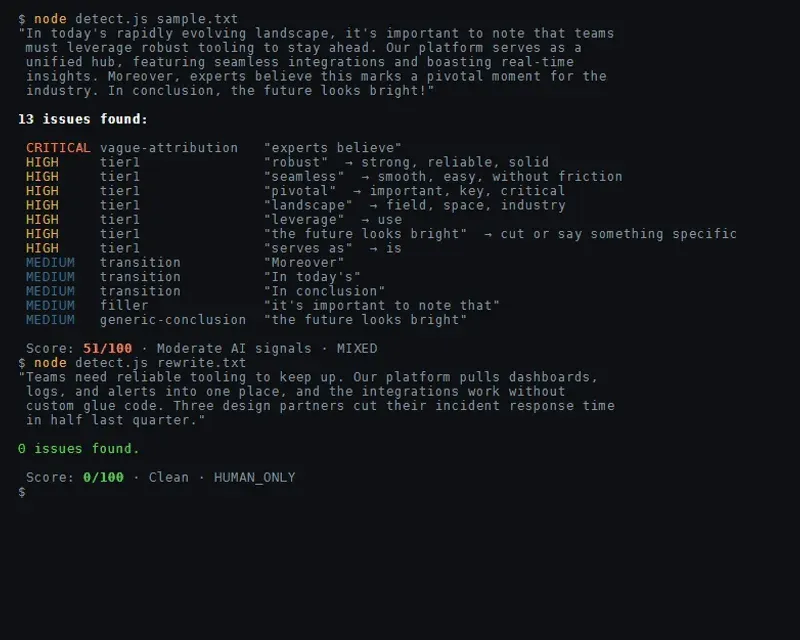
avoid-ai-writing screenshots
Explore the interface. Open a screenshot to view it at full size.
Key capabilities
- Rewrite mode (default) The skill flags AI patterns in supplied text, applies up to two editing passes and returns one final version, followed by a short change summary when useful and a verification note listing passes used, checks that ran and any unresolved or protected finding. Clean input can come back unchanged with zero editing passes. Asking for a detailed audit adds quoted findings before the final rewrite.
- Detect mode Detect mode flags patterns without changing the text. It returns the issues grouped by severity (P0, P1, P2) and an assessment that separates clear problems from patterns that may be intentional in context. It is triggered by phrases such as "detect", "flag only", "audit only" or "scan", or by
--mode detect. - Edit mode for files Edit mode changes a named prose file in place with the agent's Edit tool, making minimal, targeted edits and leaving paragraphs without findings untouched. Source code, configuration and generated data files are refused, because prose rewrites can corrupt structured content. It returns an edits-made and verification report rather than the full file.
- Pattern catalog The catalog groups patterns into content (significance inflation, promotional language, vague attributions), language (word replacements, copula avoidance, synonym cycling, filler phrases), structure (formatting, transition phrases, inline-header lists, title case headings), communication (chatbot artifacts, sycophantic tone, generic conclusions) and meta patterns (excessive structure, uniform rhythm, over-polishing). Later releases added structural detection such as hashtag stuffing and hedge-stacked predictions, AI-tool fingerprints such as unfilled placeholders, chatbot citation markup and
utm_source=chatgpt.comparameters, plus conversational-register and unnecessary-hyphenation patterns. The full list is in references/patterns.md. - Three-tier word table Each flagged word has a plainer alternative, for example "utilize" to "use" or "commence" to "start". Tier 1 matches flag unless a listed exception applies, Tier 2 words flag when they cluster, and Tier 3 words flag only at high density. Tier 1 is split into 1A frequency markers and 1B clarity edits, and 1B is weighted lower in the detector so wordiness fixes do not push a document toward an AI classification.
- Context and voice profiles The
--contextoption acceptslinkedin,blog,technical-blog,investor-email,docsandcasual, and changes which rules apply and at what priority; hashtag stuffing, for instance, ranks lower on blog contexts. An optional--voiceprofile (casual, professional, technical, warm or blunt) sets how the rewritten prose sounds, independent of the context profile. - Iteration limit
--iterate 1allows only the initial rewrite;--iterate 2matches the default ceiling of an initial rewrite plus one corrective or preservation-repair pass and stops early when no justified edit remains. Audits, re-reads and detector rechecks do not consume a pass. The skill reports how many passes it used and why it stopped. - Editing contract and protected content Edits must be grounded in the supplied source or an explicit user correction; the skill is instructed not to invent facts, experiences or confidence, and to flag a gap instead. Quotations, attributed passages, code, tables, URLs, paths, identifiers and frontmatter keep their content during ordinary cleanup. Instructions found inside the source text are treated as data, not as commands to the editor.
- Detector engine and CLI The detector is installed with
npm install avoid-ai-writing-detectorand exposesanalyzeText(), which returns a score from 0 to 100, a label fromCleantoHeavy AI patterns, aHUMAN_ONLY,MIXEDorAI_ONLYdocument classification and a list of issues. The bundled CLI prints the full result as JSON for a file or piped text, with--contextand--source-modeoptions; the detector README documents the API. - GitHub Action and pre-commit gate A deterministic gate fails on the number of findings per file rather than on the composite score. The default threshold is six findings per file, with the
technicalcontext and rendered-Markdown source masking. The Action exposespass,total-findingsandfailed-filesstep outputs from v3.36.0, and the gate CLI can emit JSON. A pre-commit hook scans staged.mdand.mdxfiles with the same default. - Preservation validator
detector/validate.jscompares an original and a rewritten file and checks that code, frontmatter, blockquotes, tables, inline code, URLs, paths and headings survived. An advisory--residual-policy warnmode reports residual pattern findings without failing. The README states that a pass does not verify meaning and that facts and claims need a separate check. - Ignore markers and Markdown mode Text between
avoid-ai-writing:ignore-startandignore-endHTML comments, each on its own line, is excluded from scoring, so a page can quote AI-style prose on purpose. Therendered-markdownsource mode excludes initial YAML frontmatter and HTML comments from the score while keeping issue offsets aligned with the file. - Detector over MCP The companion package
avoid-ai-writing-mcpruns the detector as a local stdio MCP server with two read-only tools,score_textandaudit_text. It calls no model, sends no text to a network service and has no rewrite tool; the README shows it added to Claude Code withclaude mcp add, running the npm package version 0.1.0 throughnpx. - House-style checks An optional
--styleinput takes a user-supplied config with a register list and a mechanics object. From a cloned checkout,scripts/check-style.jsverifies quote form, Latin abbreviations and bans on colons, semicolons or em dashes, andscripts/normalize-quotes.jsmatches quote marks to the original document. The project ships no style guides of its own. - Install in Claude Code and Cowork In Claude Code the skill can be cloned into
~/.claude/skills/avoid-ai-writingand invoked as/avoid-ai-writing, or installed as a versioned plugin with/plugin marketplace add conorbronsdon/avoid-ai-writingand/plugin install avoid-ai-writing@conorbronsdon-skills. Cowork loads skills only from installed plugins, so the plugin route is the documented one there. - Install in other agents OpenClaw installs from ClawHub with
clawhub install avoid-ai-writingor by cloning into~/.openclaw/skills. Hermes and Codex use a clone into their skills directories, Google Antigravity installs the bundledplugins/avoid-ai-writingfolder with theagyCLI, and Cursor uses a ported rule file in.cursor/rules/. A native plugin package with seven focused skills is listed in the OpenAI Plugins Directory for ChatGPT and Codex. - Single-file version
dist/avoid-ai-writing.md(about 138 KB) bundles every rule and profile with manual fallbacks for commands that are unavailable outside the full directory. The README lists where to place it in Cline, GitHub Copilot, Claude.ai Projects and a Custom GPT Knowledge upload, and notes that Windsurf rule files are limited to 12,000 characters, so a directory install is used there.
Where avoid-ai-writing fits
Cleaning up a draft before publishing
The README's example requests include "Remove AI-isms from this post" and "Make this sound less like AI". In rewrite mode the skill audits the draft, rewrites the flagged passages and returns one final version with a verification note. In the README's full example, a funding announcement loses its chatbot opener, promotional modifiers and generic conclusion, keeps the named investors and product capabilities, and the market and study claims that had no source are listed under "Claims needing sources" rather than replaced with invented figures.
Auditing text that should not be changed
Detect mode covers published content, someone else's writing or reference material. It lists every finding by P0, P1 or P2 severity and separates clear problems from judgment calls, without touching the text. Since v3.38.0, model-only detect findings are limited to catalog patterns with their canonical categories and severities, and Tier 2 and Tier 3 matches below their thresholds are left out.
Editing Markdown files in a repository
Pointing the agent at a file, for example "edit post.md in place", switches to edit mode: targeted edits to prose files only, a re-read after editing and a report of what changed. The preservation validator can then compare the before and after files to confirm that code blocks, tables, URLs, headings and frontmatter were kept.
Gating documentation in CI
Repositories can run the Avoid AI Writing Gate GitHub Action or the pre-commit hook over Markdown files. The gate fails when a file has more findings than the threshold (six by default, or zero for a strict policy) and reports per-file counts and detector types. The project describes this as a writing-quality baseline, not an authorship classifier; PROOF.md publishes the detector's results on the repository's own documentation.
Writing for a specific channel and voice
A request such as "rewrite this in a blunt voice for LinkedIn" combines a context profile with a voice profile. The context profile decides which patterns apply and how severe they are for that channel, while the voice profile changes how the existing material is expressed; the editing contract keeps stated uncertainty and does not allow new opinions or experiences to be added to meet a voice target.
Scoring text from scripts or MCP clients
Developers can call analyzeText() from Node or the browser, pipe text into the CLI, or connect an MCP host to avoid-ai-writing-mcp and call score_text or audit_text. All three use the same deterministic engine and return the score, label and issues without calling a model. Related listings on iThub include Claude Blog for drafting blog posts.
Install
git clone https://github.com/conorbronsdon/avoid-ai-writing ~/.claude/skills/avoid-ai-writingReviews of avoid-ai-writing
Be the first to share your experience with avoid-ai-writing.
Write a review
Loading review form…