What is openGym?
openGym is an open-source, self-hosted workout and body-weight tracker for people who want to own their training history. It combines routine planning, guided sessions, exercise media, progress charts and data import in a phone-friendly application. For a developer or homelab operator, the central choice is where that history lives: in a local mobile app, or on a server that synchronizes several devices.
Read the full overview
The standard self-hosted stack has two containers: a Node.js API and an nginx web service serving the React frontend and exercise media. Persistent account and profile data lives in the mounted data directory. The supported Compose workflow does not require a separate PostgreSQL or Redis installation. Prebuilt images are available for amd64 and arm64, and the default web port is 8080.
Browser profiles use passkeys and can synchronize with the server. The Android APK can run entirely locally without an account, or pair with a self-hosted instance. iPhone users can install the web application on the home screen; the documentation discusses building an iOS shell, but that is not the same as a generally available App Store download.
The repository began in July 2026 and the latest release checked was v1.4.1. Current main-branch documentation can describe changes that are not yet in a selected container tag. The self-hosting guide covers setup and recovery; this profile also records the reviewed commit so an operator can compare it with the release actually deployed.
 openGymBusiness Software
Self-hosted workout and body-weight tracking with passkeys and offline logging
Key capabilities
- Routines and guided logging Build a weekly plan or a rotating routine, start a session with previous values available and record sets as you train. The project supports warm-ups, supersets, drop sets, rest-pause, timed work and cardio, together with rest timers and per-exercise notes.
- Exercise media and custom movements Browse an illustrated exercise catalog by muscle and equipment, then add your own movements and media. Exercise animations are included in the distributed web image and Android package. Custom uploads add persistent files that need to be backed up with the training history.
- Progress and body-weight history Review logged activity through charts, records, a year heatmap and body-weight trends. Muscle-volume and fatigue displays are calculations from recorded activity, not measured recovery or a medical diagnosis. Corrected workout entries can change the derived results.
- Passkey profiles The self-hosted service supports per-profile data and WebAuthn sign-in. Passkeys require a secure browser origin, with localhost as the development exception. An instance can optionally enable password sign-in; account policy and invitations are operator choices rather than a required hosted subscription.
- Offline work and synchronization A device keeps a local copy while the server is unreachable and can synchronize later. The project documents field-level merging when more than one device edits state. Test offline edits, conflicting routine changes and reconnect behavior before relying on several devices during the same session.
- Imports and exports Import supported FitNotes, Strong and Hevy histories, plus Apple Health body-weight exports. Export application data as JSON and share routines as files or printable output. Import formats differ, so verify timestamps, units, exercise mapping and duplicate handling with a copy of the source history.
- Android and browser access Use the published signed Android APK for local-only logging or connect it to your server with a pairing code. Browser access works across desktop and mobile devices; a home-screen PWA provides the practical iPhone path. Native desktop applications are not part of the documented distribution.
- Documented API and optional AI The repository supplies an OpenAPI 3.1 HTTP specification and an optional local MCP reader. AI coaching is an opt-in feature with provider configuration and explicit approval of proposed changes. External AI use can send selected training data to that provider and may incur usage costs.
Where openGym fits
A personal training log under your control
Run one private instance for your own routines and weight history, then decide whether phone-only storage or server sync fits your use. Keeping the data yourself removes dependence on a third-party account, but it also makes device loss, server availability and backups your responsibility. Test the JSON export while the installation is still small.
A small shared instance
Passkey profiles and the optional admin dashboard can support several people using the same service. Set the intended registration policy and decide whether invitations are required. Verify that a second profile cannot read the first profile's state, and document account recovery before inviting other users onto a personal server.
Migrating an existing workout history
The import documentation describes the supported source formats. Trial an import with representative sessions before moving the full history. Check dates, kilograms versus pounds, warm-up flags and exercise names, then compare totals with the original app. Keep the untouched export so a failed mapping can be repeated without losing the source.
A phone app connected to a homelab
The Android app pairs with an already authenticated browser session rather than using the browser's passkey directly inside its WebView. The phone can retain offline changes and synchronize them later. Reverse proxies must pass API requests, bearer authorization and CORS preflights correctly; a proxy login page returned with HTTP 200 is not a successful API response.
Read-only analysis and optional assistance
The local MCP server gives a supported client read access to training information. A separate optional coach can draft or review routines through configured providers. Treat both as explicit data-access decisions. Estimates and generated suggestions describe software behavior; they do not establish a safe training prescription or replace a qualified practitioner's assessment.
Positioning and limitations
openGym is a good fit for a technically comfortable user who values data export, self-hosting and a clear distinction between local and synchronized storage. It covers personal workout logging rather than gym-membership billing, access gates or a commercial facility-management system. Its strongest technical feature is the ability to inspect and operate the whole data path.
The self-hosted and mobile-local modes have different account and recovery behavior. The server mode uses profiles and supports device synchronization. The local app has no backend by default, and the phone is the durable home of its state. A browser PWA should not be described as a separately released native desktop or iOS application.
The application is AGPL-licensed; package metadata specifies AGPL-3.0-or-later. Read the license and third-party notices when distributing a modified build or providing a networked version. Exercise media and other bundled material have their own provenance. Review those notices before reusing the catalog outside the application.
The software is free to obtain, and the project states that it has no subscription or advertising requirement. Your server, storage and optional AI provider still have operational costs. Docker is deployment infrastructure and Ollama is an optional compatible AI endpoint; neither is an alternative workout tracker.
View interface preview
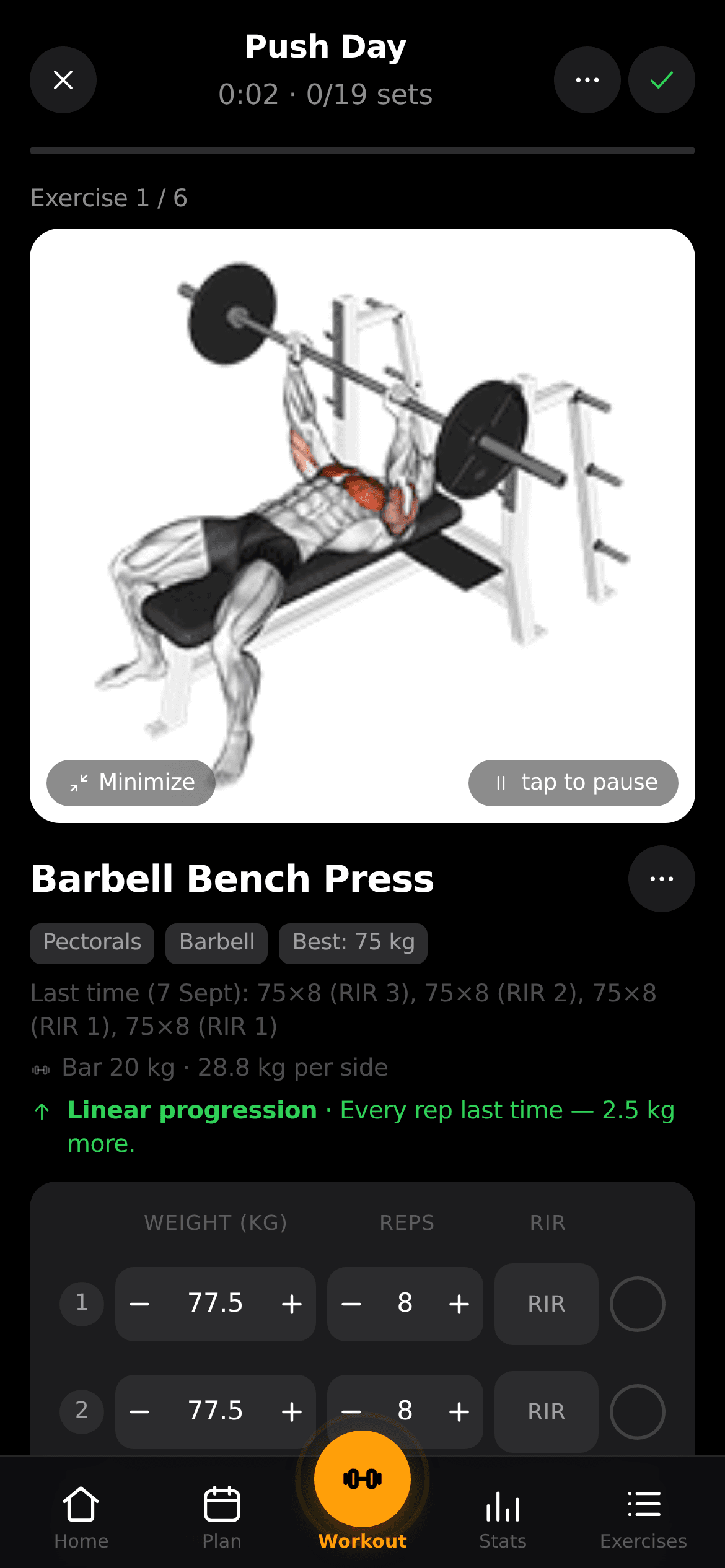
Training history has value because it accumulates over time. A portable JSON export, documented API and readable persistent state make it easier to move that history to a new device or installation. The same design also lets an operator inspect what an optional integration can read instead of accepting an undocumented hosted sync service.
Treat the mounted data directory as part of the application, not a disposable container artifact. The Compose file explicitly includes users, passkeys, per-user state, a session secret and uploaded exercise media. The optional coach credential cache is mounted separately. Follow the backup guide and restore into an isolated test instance before depending on a scheduled archive.
For phone access, configure RP_ID and ORIGIN to match the real HTTPS hostname. Passkeys are tied to that relying-party identity, so changing a domain is an authentication change as well as a reverse-proxy change. Keep proxy limits, registration policy and update ownership explicit. Read the security policy and use a release tag rather than assuming a moving latest image is reproducible.
Evaluate the installation with one complete session, a representative import, an offline edit, a second-device sync and a backup restore. If enabling the coach, inspect the consent screen and selected provider first. Recovery and muscle-map indicators remain software estimates from logged data; this profile reviews the application's documented behavior and makes no medical or performance claims.
“Self-hosted workout and body-weight tracking with passkeys and offline logging”
Technical details
- Access
- Self-hosted
- Source model
- Open source
- License
- AGPL-3.0-or-later
- Founded
- 2026
- Data location
- Operator-controlled self-hosted storage or local Android storage; optional AI data uses the chosen provider
- Pricing model
- Open source
- Pricing details
- Software and service terms ↗
- API
- Available
- API documentation
- Read API documentation ↗
- Version reference
- v1.4.1; main @ e348fc1 ↗
- Source checked
- October 15, 2026
- Website
- opengym.ch ↗
- GitHub
- Source repository ↗
What to verify
Profile audiences: Developers, System Administrators.
- Confirm current features, licensing and support terms.
- Validate deployment, data location and access control.
- Test integrations, exports and recovery workflows.
Reviews of openGym
No published reviews yet.
Loading review form…